

In the publisher workflow, checklists are important to ensure that you don’t miss anything. Imagine how messy or unorganized things can get without checklists in your everyday life, let alone content you are writing for work.
In WordPress, WP Engine’s Newsroom features the Publication Checklist. It is a customizable quality-control tool that ensures all editorial standards are met before a story goes live.
The publication checklist helps you move away from time-consuming administrative content checks. Completely configurable to your requirements, the checklist flags missing items in real-time to editors before publishing, and gives customized suggestions to make sure your content meets everything you need it to.
In this article, I will walk you through how to customize and use these features as well as integrate them with a work management software. In this example, I will use Asana®¹. We will cover these points:
- JSON config customized to your editorial guidelines
- Custom Fields to render the custom guideline
- Create blocking checks that stop publishing
- Visual indicator of progress
Just a Note: If you want a full explanation of all the features and default settings you can choose, please refer to the official documentation. This article will focus on the Publication Checklist feature and customization.
If you prefer a video version of this article, please reference it below:
Table of Contents
- Prerequisites
- Steps for setting up
- The checklist.json File
- Customizing The JSON File
- The fields.json File
- Connecting With Asana
- Asana API And Personal Access Token
- Configure Your Asana Credentials
- The class-asana-client.php File
- The class-asana-integration.php File
- The class-mpc-init.php File
- Conclusion
Prerequisites
To benefit from this article, you should be familiar with the basics of working with the command line (WP-CLI) and WordPress development.
Steps for setting up:
1.Either set up a WordPress install on WP Engine or spin one up locally using Local. For this article, I am using Local.
2.Add a Newsroom license. Once you get a Newsroom license, you will have access to the code and repository.
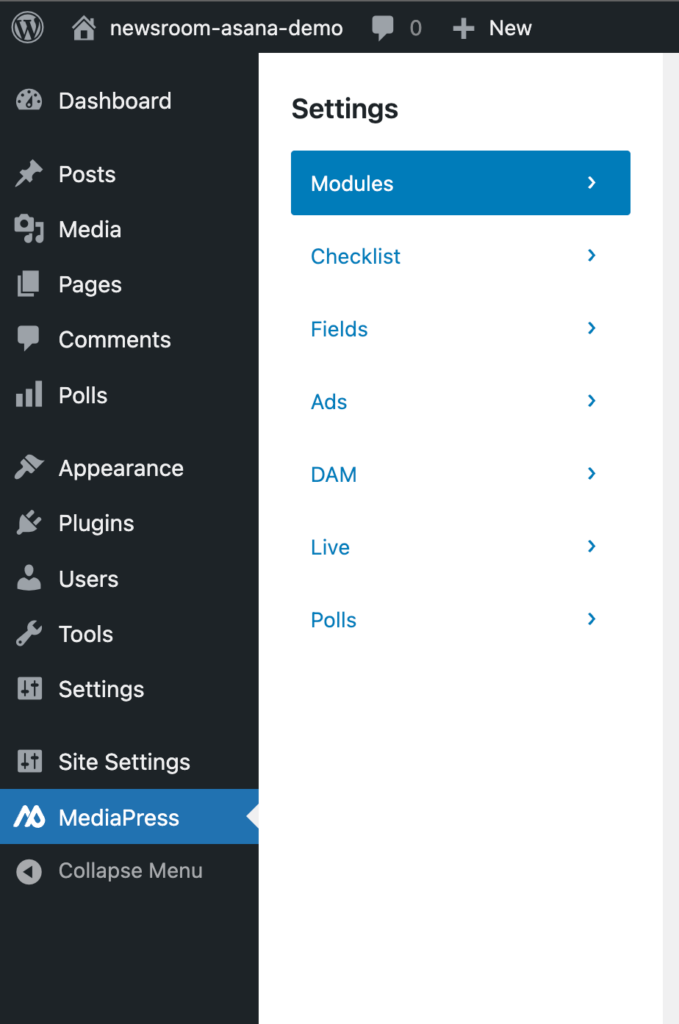
3.Download the latest version of the plugin off the core repository once you have access to it. Upload the plugin into your WordPress install. You should now see a MediaPress option in your WP Admin side menu like this:
4. The next plugin you will need is the simple example extension I created for the Asana connection. We will need to add the plugin extension to our WordPress install. Grab the code here from this repo. Clone the repo directly into your /wp-content/plugins/ directory. It lives in the mediapress-simple folder. Once you have this added to your WP install, You should see the plugin within the dashboard. You can go ahead and activate it.

Now that we have both plugins needed, we need to make sure our settings are properly configured.
If you are accessing this for the first time, you will see the setup wizard allowing you to enable your required features, including the checklist. Once enabled you will have access to toggle the Demo Config option on or off.
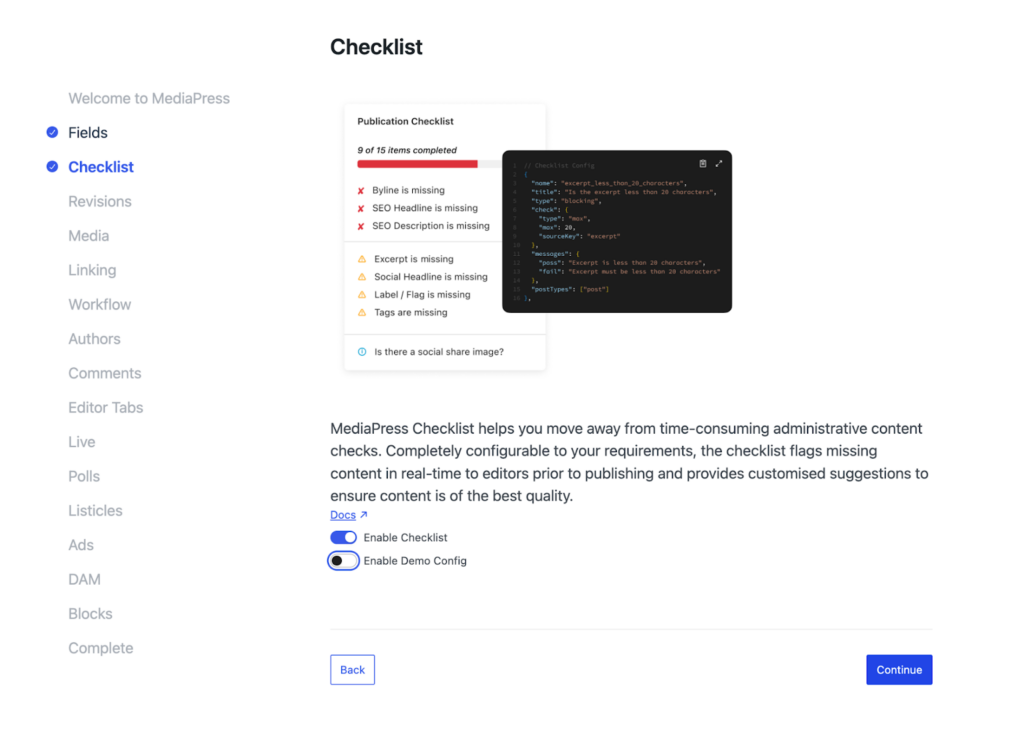
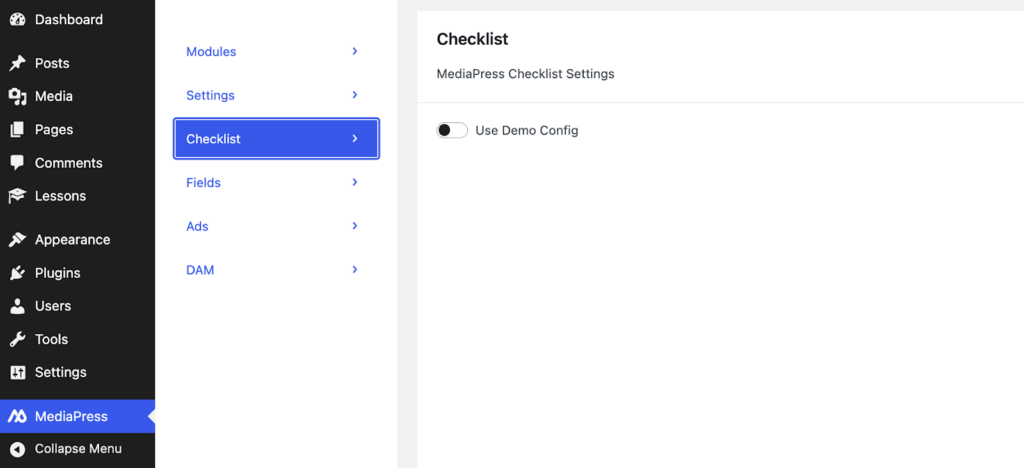
In the WP admin sidebar you will see the MediaPress option. Select Checklist and make sure that the Use Demo Config option is toggled off. This will allow you to use the simple example instead.
We are all set up! Now, let’s dive into the customization.
The checklist.json File
Let’s take a look at the JSON file for the Publication Checklist. Go to mediapress-simple/config/checklist.json in your project. You should see a structure that defines an array of checklist items, where each item is a small rule that MediaPress evaluates against a post. Each item includes:
- A stable name identifier
- A human-readable title
- An item type (blocking, non_blocking, or info)
- An optional check block describing the validation operator (exists/min/max/range)
- Messages shown in the UI for pass/fail/info states
- PostTypes to scope the rule
Refer to the link here for the JSON file in the GitHub repo.
The publication checklist is entirely configuration-driven. This allows customisation based on specific requirements. To define additional checklist items, simply add a new rule in the JSON schema. MediaPress takes care of validation, UI rendering, and blocking behavior. In this example, two new rules have been added: a rule for legal review checks and a featured image check before publishing.
Customizing The JSON Files
The first thing we have to do is add the two rules directly to our checklist.json file. I went ahead and added them:
{
      "name": "has_featured_image",
      "title": "Has featured image",
      "type": "non_blocking",
      "check": {
        "type": "exists",
        "sourceKey": "meta._thumbnail_id"
      },
      "messages": {
        "pass": "Featured image is set",
        "fail": "Featured image is missing"
      },
      "postTypes": ["post"]
    },
    {
      "name": "legal_review_complete",
      "title": "Legal review completed",
      "type": "blocking",
      "check": {
        "type": "exists",
        "sourceKey": "meta.legal_review"
      },
      "messages": {
        "pass": "Legal review completed",
        "fail": "Legal review is required before publishing"
      },
      "postTypes": ["post"]
    }
Code language: JavaScript (javascript)
Here is the breakdown of the rules I added:
1. has_featured_image (Non-blocking)
- Checks: WordPress featured image via meta._thumbnail_id.
- Type: Non-blocking (won’t prevent publishing).
- Validation: “exists” check, passes if the post has a featured image set.
- Asana behavior: Will create a task that marks as complete when the featured image is added.
2. legal_review_complete (Blocking)
- Checks: Custom meta field meta.legal_review.
- Type: Blocking (prevents publishing if incomplete).
- Validation: “exists” check, passes if the legal_review meta field has a value.
- Asana behavior: Will create a task that marks complete when the legal review meta is set.
Both rules follow the correct structure and will integrate with the Asana sync automatically. The featured image check uses WordPress’s native _thumbnail_id meta field, while the legal review uses a custom meta field. Once you add your custom rules, the config is loaded dynamically each time, so changes take effect immediately on the next post save.
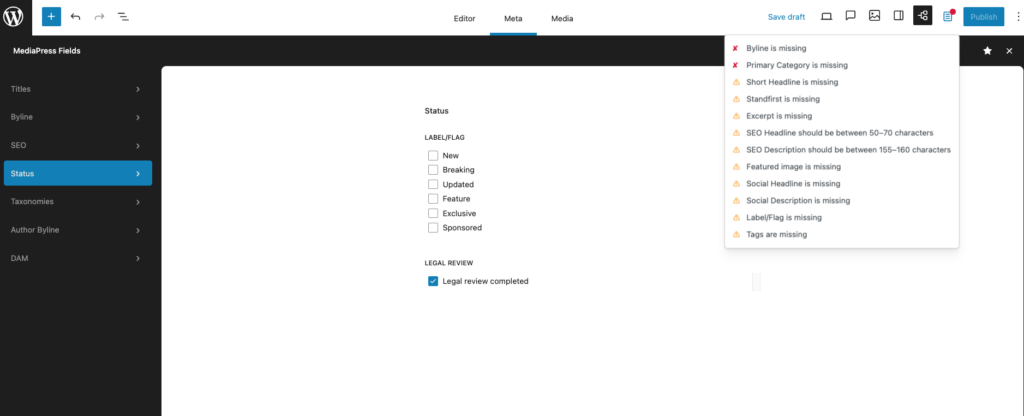
To access the publication checklist, go to a post and click on the checklist icon with the red dot at the top of the page in the nav. The red dot lets you know that there are tasks yet to be done on the list. You should see this:

The fields.json File
While checklist.json defines the rules, fields.json defines the interface and data structure for the custom metadata your editors interact with. In this project, we use this file to register the “Legal Review” checkbox and position it within the MediaPress fields menu under the “status” option.
Go to mediapress-simple/config/fields.json in your project. Here is the configuration for the new field:
{
    "name": "legal_review",
    "type": "checkbox",
    "label": "Legal Review",
    "description": "Legal review status for this post",
    "source": {
      "type": "postMeta",
      "key": "legal_review",
      "registerFor": ["post"]
    },
    "options": [
      {
        "label": "Legal review completed",
        "value": "completed"
      }
    ]
  }
Code language: JSON / JSON with Comments (json)
This configuration handles the underlying data logic for your new check. It includes:
- name: The internal identifier for the field.
- type: Defines the UI component (in this case, a checkbox).
- source: Instructs MediaPress to save this data as
postMetausing the keylegal_review. - registerFor: Limits this field specifically to the
postpost type.
Adding to the Status field group
Defining the field is only the first half of the process. To make it visible to your editorial team, you must assign it to a field group. In the same fields.json file, we update the Status group:
"fields": ["flag", "legal_review"]
Code language: JavaScript (javascript)
By adding legal_review to this array, the checkbox appears in the WordPress Admin post editor sidebar under the Status section.
When you navigate to the status option, you should now see a legal review checkbox. You can test it and it should allow you to check and uncheck it. This will reflect in the checklist as done or not done:
Connecting With Asana
In this article, I will use Asana. I chose it because their API is simple to use and they have a free trial offer for the starter plan. However, please feel free to use whatever project management software your use case calls for.
Asana API and Personal Access Token
The first thing we need to do is grab the API and an access token from your Asana account. Visit the Asana Developer Console to generate a new token. Save that token because we will need it for our connection to WordPress. The Asana API base URL is https://app.asana.com/api/1.0.
To find your project ID, follow these steps:
- Open your Asana project in your web browser.
- Look at the URL, it will look something like: https://app.asana.com/0/1234567890123456/board.
- The Project ID is the long number after the /0/, in this example: 1234567890123456.
Save these credentials. We will need them in the next section.
Configure Your Asana Credentials
Under the hood, this demo reads from WordPress options using get_option(). You can set these using WP-CLI. Make sure you are at the root of your WP install before setting these on your CLI:
wp option update mpc_asana_access_token "YOUR_ASANA_PAT"
wp option update mpc_asana_project_id "YOUR_PROJECT_GID"
Code language: JavaScript (javascript)
Once set, you should be able to confirm the options exist using wp option get.
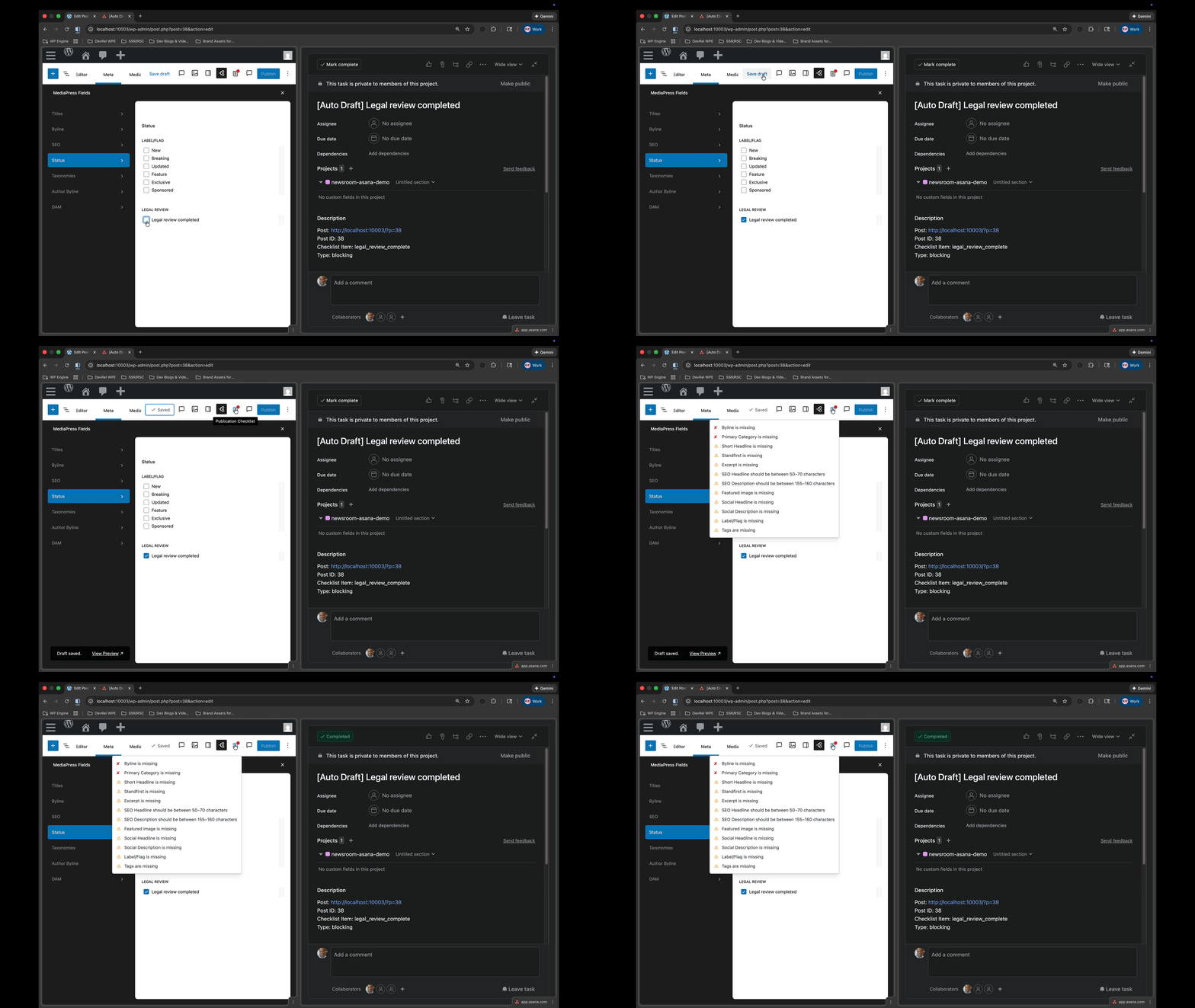
Now test it. Save or update a post, and tasks should appear in your Asana project within a few seconds. The legal review custom checklist item when you check and uncheck should also reflect after you save it in Asana as well.
The class-asana-client.php File
Now, let’s dive into the code to show how this works. The first file we will go over is at mediapress-simple/inc/class-asana-client.php. The file is long so let’s break it down in chunks starting from the top.
<?php
/**
 * Asana API Client
 * Handles communication with Asana API
 */
class MPC_Asana_Client {

	/**
	 * Asana API base URL
	 */
	const API_BASE = 'https://app.asana.com/api/1.0';

	/**
	 * Personal Access Token
	 *
	 * @var string
	 */
	private $access_token;
Code language: HTML, XML (xml)
This opening chunk sets up the client class and establishes two core pieces of state. API_BASE is the fixed root for every Asana REST call, so you only ever append endpoints like /tasks to it. $access_token stores the Personal Access Token you’ll use to authenticate every request via the Authorization: Bearer … header.
/**
	 * Constructor
	 *
	 * @param string $access_token Asana Personal Access Token.
	 */
	public function __construct( $access_token ) {
		$this->access_token = $access_token;
	}
Code language: PHP (php)
The constructor is intentionally minimal: it accepts your Asana token once and keeps it on the instance.
/**
	 * Create a task in Asana
	 */
	public function create_task( $project_id, $name, $notes = '' ) {
		$data = array(
			'data' => array(
				'name'     => $name,
				'notes'    => $notes,
				'projects' => array( $project_id ),
			),
		);

		return $this->request( 'POST', '/tasks', $data );
	}
Code language: PHP (php)
create_task() is our operation for the demo: it builds the payload in the shape Asana expects (data: { … }), assigns the task to a project, and sends it to POST /tasks.
Everything funnels through request().
	/**
	 * Update a task in Asana
	 */
	public function update_task( $task_id, $data ) {
		$payload = array(
			'data' => $data,
		);

		return $this->request( 'PUT', "/tasks/{$task_id}", $payload );
	}
Code language: PHP (php)
update_task() is the generic “change anything” method. You pass an array of fields you want to update (for example completed, notes, due_on, etc.), and it wraps that inside the required data envelope. This becomes the foundation for higher-level helpers like “complete” and “incomplete.”
/**
	 * Mark a task as complete
	 */
	public function complete_task( $task_id ) {
		return $this->update_task( $task_id, array( 'completed' => true ) );
	}

	/**
	 * Mark a task as incomplete
	 */
	public function incomplete_task( $task_id ) {
		return $this->update_task( $task_id, array( 'completed' => false ) );
	}
Code language: PHP (php)
These are methods for completion state that we centralize. This maps to a checklist workflow: a rule passing can “complete” a task, and a rule failing can “re-open” it.
/**
	 * Get a task from Asana
	 */
	public function get_task( $task_id ) {
		return $this->request( 'GET', "/tasks/{$task_id}" );
	}

	/**
	 * Delete a task from Asana
	 */
	public function delete_task( $task_id ) {
		return $this->request( 'DELETE', "/tasks/{$task_id}" );
	}
Code language: PHP (php)
These are wrappers for reading and deleting tasks. We use them for debugging, verification, or cleanup.
/**
	 * Make an API request to Asana
	 */
	private function request( $method, $endpoint, $data = array() ) {
		$url = self::API_BASE . $endpoint;

		$args = array(
			'method'  => $method,
			'headers' => array(
				'Authorization' => 'Bearer ' . $this->access_token,
				'Content-Type'  => 'application/json',
				'Accept'        => 'application/json',
			),
			'timeout' => 30,
		);

		if ( ! empty( $data ) && in_array( $method, array( 'POST', 'PUT' ), true ) ) {
			$args['body'] = wp_json_encode( $data );
		}

		$response = wp_remote_request( $url, $args );

Code language: PHP (php)
This is the HTTP layer. It composes the request URL, attaches the authorization header, declares JSON input/output, and uses WordPress’s HTTP API (wp_remote_request) so it works across hosts and environments.
It also only includes a JSON body when it is actually needed (POST/PUT), which prevents accidental body payloads on GET requests.
if ( is_wp_error( $response ) ) {
			return $response;
		}

		$status_code = wp_remote_retrieve_response_code( $response );
		$body        = wp_remote_retrieve_body( $response );
		$headers     = wp_remote_retrieve_headers( $response );

		// Handle rate limiting (429)
		if ( 429 === $status_code ) {
			$retry_after = isset( $headers['Retry-After'] ) ? (int) $headers['Retry-After'] : 60;
			return new WP_Error(
				'asana_rate_limit',
				sprintf( 'Rate limit exceeded. Retry after %d seconds.', $retry_after ),
				array(
					'status'      => $status_code,
					'retry_after' => $retry_after,
				)
			);
		}
Code language: PHP (php)
We handle our transport failures and Asana®¹ throttling in this file. If WordPress itself cannot make the request, you return the WP_Error as-is. If Asana responds with a 429, you read the Retry-After header (when available) and return a structured error that higher-level code can use to decide whether to retry later.
// Decode JSON response
		$decoded = json_decode( $body, true );

		// Handle non-JSON responses
		if ( null === $decoded && JSON_ERROR_NONE !== json_last_error() ) {
			return new WP_Error(
				'asana_invalid_response',
				'Invalid JSON response from Asana API',
				array(
					'status' => $status_code,
					'body'   => substr( $body, 0, 500 ),
				)
			);
		}
Code language: PHP (php)
This section protects you from unexpected responses. Asana should return JSON, but if anything upstream returns HTML, an empty body, or a proxy injects content, you will fail safely with a clear error. Trimming the body to the first 500 characters gives you enough to debug without dumping huge responses.
// Handle error responses
		if ( $status_code >= 400 ) {
			$error_message = isset( $decoded['errors'][0]['message'] )
				? $decoded['errors'][0]['message']
				: 'Unknown Asana API error';

			return new WP_Error(
				'asana_api_error',
				$error_message,
				array(
					'status' => $status_code,
					'body'   => $decoded,
				)
			);
		}

		return $decoded;
	}
}
Code language: PHP (php)
Finally, you normalize any Asana error (400+) into a WP_Error with the most helpful message available, plus the status code and decoded payload for debugging. If everything succeeds, you return the decoded JSON array, which keeps the rest of your integration code simple: it can just read ['data']['gid'] or other Asana fields directly.
You can view the code in it’s entirety here:
<?php
/**
 * Asana API Client
 * Handles communication with Asana API
 */
class MPC_Asana_Client {

	/**
	 * Asana API base URL
	 */
	const API_BASE = 'https://app.asana.com/api/1.0';

	/**
	 * Personal Access Token
	 *
	 * @var string
	 */
	private $access_token;

	/**
	 * Constructor
	 *
	 * @param string $access_token Asana Personal Access Token.
	 */
	public function __construct( $access_token ) {
		$this->access_token = $access_token;
	}

	/**
	 * Create a task in Asana
	 *
	 * @param string $project_id Asana project ID.
	 * @param string $name Task name.
	 * @param string $notes Task description/notes.
	 * @return array|WP_Error Task data or error.
	 */
	public function create_task( $project_id, $name, $notes = '' ) {
		$data = array(
			'data' => array(
				'name'     => $name,
				'notes'    => $notes,
				'projects' => array( $project_id ),
			),
		);

		return $this->request( 'POST', '/tasks', $data );
	}

	/**
	 * Update a task in Asana
	 *
	 * @param string $task_id Asana task ID.
	 * @param array  $data Task data to update.
	 * @return array|WP_Error Updated task data or error.
	 */
	public function update_task( $task_id, $data ) {
		$payload = array(
			'data' => $data,
		);

		return $this->request( 'PUT', "/tasks/{$task_id}", $payload );
	}

	/**
	 * Mark a task as complete
	 *
	 * @param string $task_id Asana task ID.
	 * @return array|WP_Error Updated task data or error.
	 */
	public function complete_task( $task_id ) {
		return $this->update_task( $task_id, array( 'completed' => true ) );
	}

	/**
	 * Mark a task as incomplete
	 *
	 * @param string $task_id Asana task ID.
	 * @return array|WP_Error Updated task data or error.
	 */
	public function incomplete_task( $task_id ) {
		return $this->update_task( $task_id, array( 'completed' => false ) );
	}

	/**
	 * Get a task from Asana
	 *
	 * @param string $task_id Asana task ID.
	 * @return array|WP_Error Task data or error.
	 */
	public function get_task( $task_id ) {
		return $this->request( 'GET', "/tasks/{$task_id}" );
	}

	/**
	 * Delete a task from Asana
	 *
	 * @param string $task_id Asana task ID.
	 * @return array|WP_Error Response or error.
	 */
	public function delete_task( $task_id ) {
		return $this->request( 'DELETE', "/tasks/{$task_id}" );
	}

	/**
	 * Make an API request to Asana
	 *
	 * @param string $method HTTP method (GET, POST, PUT, DELETE).
	 * @param string $endpoint API endpoint path.
	 * @param array  $data Request data.
	 * @return array|WP_Error Response data or error.
	 */
	private function request( $method, $endpoint, $data = array() ) {
		$url = self::API_BASE . $endpoint;

		$args = array(
			'method'  => $method,
			'headers' => array(
				'Authorization' => 'Bearer ' . $this->access_token,
				'Content-Type'  => 'application/json',
				'Accept'        => 'application/json',
			),
			'timeout' => 30,
		);

		if ( ! empty( $data ) && in_array( $method, array( 'POST', 'PUT' ), true ) ) {
			$args['body'] = wp_json_encode( $data );
		}

		$response = wp_remote_request( $url, $args );

		if ( is_wp_error( $response ) ) {
			return $response;
		}

		$status_code = wp_remote_retrieve_response_code( $response );
		$body        = wp_remote_retrieve_body( $response );
		$headers     = wp_remote_retrieve_headers( $response );

		// Handle rate limiting (429)
		if ( 429 === $status_code ) {
			$retry_after = isset( $headers['Retry-After'] ) ? (int) $headers['Retry-After'] : 60;
			return new WP_Error(
				'asana_rate_limit',
				sprintf( 'Rate limit exceeded. Retry after %d seconds.', $retry_after ),
				array(
					'status'      => $status_code,
					'retry_after' => $retry_after,
				)
			);
		}

		// Decode JSON response
		$decoded = json_decode( $body, true );

		// Handle non-JSON responses
		if ( null === $decoded && JSON_ERROR_NONE !== json_last_error() ) {
			return new WP_Error(
				'asana_invalid_response',
				'Invalid JSON response from Asana API',
				array(
					'status' => $status_code,
					'body'   => substr( $body, 0, 500 ), // First 500 chars for debugging
				)
			);
		}

		// Handle error responses
		if ( $status_code >= 400 ) {
			$error_message = isset( $decoded['errors'][0]['message'] )
				? $decoded['errors'][0]['message']
				: 'Unknown Asana API error';

			return new WP_Error(
				'asana_api_error',
				$error_message,
				array(
					'status' => $status_code,
					'body'   => $decoded,
				)
			);
		}

		return $decoded;
	}
}
Code language: HTML, XML (xml)
The class-asana-integration.php File
The second file that you need to add to your plugin to make this work is at mediapress-simple/inc/class-asana-integration.php.
Breaking the file down starting from the top:
<?php
/**
 * Asana Integration
 * Syncs MediaPress checklist items with Asana tasks (optimized)
 */
class MPC_Asana_Integration {

	/**
	 * Asana API client
	 *
	 * @var MPC_Asana_Client
	 */
	private $client;

	/**
	 * Asana Project ID
	 *
	 * @var string
	 */
	private $project_id;

	/**
	 * Constructor
	 */
	public function __construct() {
		// Get settings
		$access_token     = get_option( 'mpc_asana_access_token', '' );
		$this->project_id = get_option( 'mpc_asana_project_id', '' );

		// Only initialize if credentials are set
		if ( empty( $access_token ) || empty( $this->project_id ) ) {
			return;
		}

		// Initialize Asana client
		$this->client = new MPC_Asana_Client( $access_token );

		// Hook into post save (canonical trigger - handles both block and classic editor)
		add_action( 'save_post', array( $this, 'schedule_sync' ), 20, 2 );

		// Hook for background processing via WP-Cron
		add_action( 'mpc_asana_background_sync', array( $this, 'sync_checklist_to_asana' ), 10, 1 );
	}

Code language: HTML, XML (xml)
At the top of this file, we read the Asana®¹ credentials from WordPress®¹ options, and bail early if they are not set, which keeps the plugin from doing work until it is properly configured.
Once the token and project ID exist, we initialize our MPC_Asana_Client and hook into one canonical WordPress event (save_post) to detect when a post changes. From there, we have a background event (mpc_asana_background_sync) so we are not calling Asana during the editor save request.
/**
	 * Schedule async sync (debounced to prevent duplicates)
	 * Uses WP-Cron for true non-blocking background processing
	 */
	public function schedule_sync( $post_id, $post ) {
		// Skip autosaves and revisions
		if ( defined( 'DOING_AUTOSAVE' ) && DOING_AUTOSAVE ) {
			return;
		}

		if ( wp_is_post_revision( $post_id ) ) {
			return;
		}

		// Only process posts (can be expanded to other post types)
		if ( 'post' !== $post->post_type ) {
			return;
		}

		// Debounce: Check if we already scheduled a sync for this post recently
		$transient_key = 'mpc_asana_sync_scheduled_' . $post_id;
		if ( get_transient( $transient_key ) ) {
			// Already scheduled within last 5 seconds, skip
			return;
		}

		// Set transient to prevent duplicate scheduling (expires in 5 seconds)
		set_transient( $transient_key, true, 5 );

		// Schedule WP-Cron event for background processing (runs in ~5 seconds)
		wp_schedule_single_event( time() + 5, 'mpc_asana_background_sync', array( $post_id ) );
	}

Code language: PHP (php)
This next code block prevents extra sync behavior by ignoring autosaves and revisions, and it scopes the integration to the post post type so you do not accidentally sync everything in the CMS.
The transient acts as a debounce so we do not schedule five sync jobs when the block editor (Gutenberg) triggers multiple saves in quick succession. Finally, it schedules a single WP-Cron event to do the Asana work after the editor request finishes.
/**
	 * Sync checklist items to Asana (runs in background)
	 */
	public function sync_checklist_to_asana( $post_id ) {
		// Acquire sync lock to prevent concurrent syncs
		$lock_key = 'mpc_asana_sync_lock_' . $post_id;
		if ( get_transient( $lock_key ) ) {
			// Another sync is already in progress, skip
			return;
		}

		// Set lock for 30 seconds
		set_transient( $lock_key, true, 30 );

		$post = get_post( $post_id );

		if ( ! $post || 'post' !== $post->post_type ) {
			delete_transient( $lock_key );
			return;
		}

		// Get checklist configuration
		$checklist_items = $this->get_checklist_items( $post->post_type );

		if ( empty( $checklist_items ) ) {
			delete_transient( $lock_key );
			return;
		}

		// Get existing task mappings
		$task_mappings = get_post_meta( $post_id, '_mpc_asana_task_mappings', true );
		if ( ! is_array( $task_mappings ) ) {
			$task_mappings = array();
		}

		// Get previous validation states
		$previous_states = get_post_meta( $post_id, '_mpc_asana_validation_states', true );
		if ( ! is_array( $previous_states ) ) {
			$previous_states = array();
		}

		$updated_states  = array();
		$tasks_to_update = array();

Code language: PHP (php)
This next block starts by making sure we do not run two syncs at the same time for the same post.
The transient lock is the concurrency control and it prevents duplicate task creation under load.
Next, we load the post, load the checklist rules for that post type, and then hydrate two pieces of state from post meta: (1) which checklist items already have Asana task IDs, and (2) what the last known validation result was for each item.
That stored state is what allows you to be efficient and only touch Asana when something actually changed.
// Process each checklist item
		foreach ( $checklist_items as $item ) {
			// Skip info items (items without validation checks)
			if ( ! isset( $item['check'] ) ) {
				continue;
			}

			$item_name = $item['name'];

			// Check if we already have an Asana task for this item
			if ( ! isset( $task_mappings[ $item_name ] ) ) {
				// Create new task
				$task_id = $this->create_asana_task( $post_id, $post, $item );
				if ( $task_id ) {
					$task_mappings[ $item_name ] = $task_id;
					// New task, validate and update
					$is_valid                     = $this->validate_checklist_item( $post_id, $post, $item );
					$updated_states[ $item_name ] = $is_valid;
					$tasks_to_update[]            = array(
						'task_id'  => $task_id,
						'is_valid' => $is_valid,
					);
				}
			} else {
				// Validate current state
				$is_valid                     = $this->validate_checklist_item( $post_id, $post, $item );
				$updated_states[ $item_name ] = $is_valid;

				// Only update if state changed
				$previous_state = isset( $previous_states[ $item_name ] ) ? $previous_states[ $item_name ] : null;
				if ( $previous_state !== $is_valid ) {
					$tasks_to_update[] = array(
						'task_id'  => $task_mappings[ $item_name ],
						'is_valid' => $is_valid,
					);
				}
			}
		}
Code language: PHP (php)
This loop is where the checklist focuses on tasks. We skip purely informational checklist entries (no check), because those are not really pass/fail requirements.
For each rule that can be validated, you either create the task once (if it does not exist yet) or re-check the rule and compare it to the last recorded state. The key optimization is that you only queue an Asana update when the rule flips from pass to fail or fail to pass, so you avoid hammering the API on every save.
// Batch update only changed tasks
		if ( ! empty( $tasks_to_update ) ) {
			foreach ( $tasks_to_update as $task_update ) {
				if ( $task_update['is_valid'] ) {
					$this->client->complete_task( $task_update['task_id'] );
				} else {
					$this->client->incomplete_task( $task_update['task_id'] );
				}
			}
		}

		// Save updated mappings and states
		update_post_meta( $post_id, '_mpc_asana_task_mappings', $task_mappings );
		update_post_meta( $post_id, '_mpc_asana_validation_states', $updated_states );

		// Release lock
		delete_transient( $lock_key );
	}
Code language: PHP (php)
This section of code applies changes to Asana and then persists the new truth back to WordPress. If a rule is valid, the matching task gets completed; if it becomes invalid again, the task is reopened.
After that, you update the post meta mapping and the validation state cache so the next sync can be incremental rather than starting from scratch. Finally, you release the transient lock so future saves can trigger another sync.
	/**
	 * Create an Asana task for a checklist item
	 */
	private function create_asana_task( $post_id, $post, $item ) {
		// Sanitize and truncate post title for Asana (max 1024 chars)
		$post_title = $post->post_title ? wp_strip_all_tags( $post->post_title ) : 'Untitled Post';
		$post_title = mb_substr( $post_title, 0, 100 ); // Limit to 100 chars for task name

		// Sanitize item title
		$item_title = isset( $item['title'] ) ? wp_strip_all_tags( $item['title'] ) : 'Checklist Item';

		$task_name = sprintf(
			'[%s] %s',
			$post_title,
			$item_title
		);

		// Truncate full task name if too long (Asana limit is 1024)
		$task_name = mb_substr( $task_name, 0, 1000 );

		$task_notes = sprintf(
			"Post: %s\nPost ID: %d\nChecklist Item: %s\nType: %s",
			get_permalink( $post_id ),
			$post_id,
			isset( $item['name'] ) ? sanitize_text_field( $item['name'] ) : '',
			isset( $item['type'] ) ? sanitize_text_field( $item['type'] ) : ''
		);

		$result = $this->client->create_task( $this->project_id, $task_name, $task_notes );

		if ( is_wp_error( $result ) ) {
			error_log( 'Asana task creation failed: ' . $result->get_error_message() );
			return false;
		}

		return isset( $result['data']['gid'] ) ? $result['data']['gid'] : false;
	}

Code language: PHP (php)
This helper creates a task that is readable in Asana and safe to generate from WordPress content. We sanitize and truncate the post title so it does not pollute your task list with HTML or overly long names.
The task name format ([Post Title] Checklist Item) makes it obvious what the task belongs to, and the notes include a direct permalink back to the WordPress post so editors can jump back to fix the issue quickly. If Asana rejects the request, you log the error and fail gracefully; otherwise you return the new task GID so it can be stored and reused.
/**
	 * Validate a checklist item against post data
	 *
	 * @param int      $post_id Post ID.
	 * @param WP_Post $post Post object.
	 * @param array    $item Checklist item configuration.
	 * @return bool True if item passes validation, false otherwise.
	 */
	private function validate_checklist_item( $post_id, $post, $item ) {
		// Item must have a check field (caller should verify this)
		if ( ! isset( $item['check'] ) ) {
			return false;
		}

		$check      = $item['check'];
		$check_type = isset( $check['type'] ) ? $check['type'] : '';
		$source_key = isset( $check['sourceKey'] ) ? $check['sourceKey'] : '';

		// Get the value to check
		$value = $this->get_post_value( $post_id, $post, $source_key );

		// Perform validation based on check type
		switch ( $check_type ) {
			case 'exists':

				// Handle checkbox arrays (like legal_review which saves as array)
				if ( is_array( $value ) ) {
					// For legal_review, check if 'completed' is in the array
					if ( 'meta.legal_review' === $source_key ) {
						return in_array( 'completed', $value, true );
					}
					// For other arrays, filter out empty strings and check if array has values
					$value = array_filter( $value );
					return ! empty( $value );
				}
				// For strings, empty string should fail
				if ( is_string( $value ) ) {
					return '' !== trim( $value );
				}
				return ! empty( $value );

			case 'min':
				if ( is_string( $value ) ) {
					$min = isset( $check['min'] ) ? (int) $check['min'] : 0;
					return strlen( $value ) >= $min;
				}
				return false;

			case 'max':
				if ( is_string( $value ) ) {
					$max = isset( $check['max'] ) ? (int) $check['max'] : PHP_INT_MAX;
					return strlen( $value ) <= $max;
				}
				return false;

			case 'range':
				if ( is_string( $value ) ) {
					$min    = isset( $check['min'] ) ? (int) $check['min'] : 0;
					$max    = isset( $check['max'] ) ? (int) $check['max'] : PHP_INT_MAX;
					$length = strlen( $value );
					return $length >= $min && $length <= $max;
				}
				return false;

			default:
				return false;
		}
	}

Code language: PHP (php)
This function takes one checklist item definition and evaluates it against the current post data. The sourceKey tells you what to read (title, excerpt, meta fields, etc.), and check.type tells you how to validate it.
The exists validation is set to handle checkbox arrays. For our legal_review field, it specifically checks if the array contains ‘completed’. This ensures the Publication Checklist accurately reflects the checkbox state in the WordPress dashboard and syncs properly with Asana®¹. For standard strings, it now ensures that a simple empty string or whitespace will fail the validation.
Right now, we support the core operators used in our JSON (exists, min, max, and range), which covers the most common editorial checks like “required field” and “SEO length.” The output is a boolean that drives whether the Asana task should be open or completed.
/**
	 * Get a value from post data using dot notation
	 */
	private function get_post_value( $post_id, $post, $source_key ) {
		if ( empty( $source_key ) ) {
			return null;
		}

		// Handle meta fields
		if ( strpos( $source_key, 'meta.' ) === 0 ) {
			$meta_key = substr( $source_key, 5 );
			return get_post_meta( $post_id, $meta_key, true );
		}

		// Handle post fields
		switch ( $source_key ) {
			case 'title':
				return $post->post_title;

			case 'excerpt':
				return $post->post_excerpt;

			case 'content':
				return $post->post_content;

			case 'categories':
				$categories = get_the_category( $post_id );
				return ! empty( $categories );

			case 'tags':
				$tags = get_the_tags( $post_id );
				return ! empty( $tags );

			case 'authors':
				// Check for co-authors or author taxonomy
				$authors = get_the_terms( $post_id, 'authors' );
				if ( empty( $authors ) ) {
					// Fallback to post author
					return ! empty( $post->post_author );
				}
				return ! empty( $authors );

			default:
				return null;
		}
	}

Code language: PHP (php)
This block is the bridge between the checklist schema and WordPress. It supports dot notation for meta (meta.some_key) and maps source keys like title, excerpt, categories, and authors to the WordPress functions that can answer those questions. The key idea is that the checklist JSON stays declarative, while this function translates it into real WordPress data lookups.
/**
	 * Get checklist items from configuration
	 */
	private function get_checklist_items( $post_type ) {
		// Get config path from filter
		$config_path = apply_filters( 'mediapress_checklist_config_path', '' );

		if ( empty( $config_path ) || ! file_exists( $config_path ) ) {
			return array();
		}

		// Read and parse config
		$config_content = file_get_contents( $config_path );
		$config         = json_decode( $config_content, true );

		if ( ! isset( $config['items'] ) || ! is_array( $config['items'] ) ) {
			return array();
		}

		// Filter items by post type
		$items = array();
		foreach ( $config['items'] as $item ) {
			if ( isset( $item['postTypes'] ) && in_array( $post_type, $item['postTypes'], true ) ) {
				$items[] = $item;
			}
		}

		return $items;
	}
}

Code language: PHP (php)
This final section loads the checklist rules straight from the MediaPress configuration file, using the mediapress_checklist_config_path filter to discover where that JSON lives.
After decoding the file, it filters the items array down to just the rules that apply to the current post type, which keeps your integration flexible if you later want different checklists for different content types. The result is a clean list of rules the sync engine can evaluate and mirror into Asana.
You can view the code in it’s entirety here:
<?php
/**
 * Asana Integration
 * Syncs MediaPress checklist items with Asana tasks (optimized)
 */
class MPC_Asana_Integration {

	/**
	 * Asana API client
	 *
	 * @var MPC_Asana_Client
	 */
	private $client;

	/**
	 * Asana Project ID
	 *
	 * @var string
	 */
	private $project_id;

	/**
	 * Constructor
	 */
	public function __construct() {
		// Get settings
		$access_token     = get_option( 'mpc_asana_access_token', '' );
		$this->project_id = get_option( 'mpc_asana_project_id', '' );

		// Only initialize if credentials are set
		if ( empty( $access_token ) || empty( $this->project_id ) ) {
			return;
		}

		// Initialize Asana client
		$this->client = new MPC_Asana_Client( $access_token );

		// Hook into post save (canonical trigger - handles both block and classic editor)
		add_action( 'save_post', array( $this, 'schedule_sync' ), 20, 2 );

		// Hook for background processing via WP-Cron
		add_action( 'mpc_asana_background_sync', array( $this, 'sync_checklist_to_asana' ), 10, 1 );
	}

	/**
	 * Schedule async sync (debounced to prevent duplicates)
	 * Uses WP-Cron for true non-blocking background processing
	 *
	 * @param int     $post_id Post ID.
	 * @param WP_Post $post Post object.
	 */
	public function schedule_sync( $post_id, $post ) {
		// Skip autosaves and revisions
		if ( defined( 'DOING_AUTOSAVE' ) && DOING_AUTOSAVE ) {
			return;
		}

		if ( wp_is_post_revision( $post_id ) ) {
			return;
		}

		// Only process posts (can be expanded to other post types)
		if ( 'post' !== $post->post_type ) {
			return;
		}

		// Debounce: Check if we already scheduled a sync for this post recently
		$transient_key = 'mpc_asana_sync_scheduled_' . $post_id;
		if ( get_transient( $transient_key ) ) {
			// Already scheduled within last 5 seconds, skip
			return;
		}

		// Set transient to prevent duplicate scheduling (expires in 5 seconds)
		set_transient( $transient_key, true, 5 );

		// Schedule WP-Cron event for background processing (runs in ~5 seconds)
		wp_schedule_single_event( time() + 5, 'mpc_asana_background_sync', array( $post_id ) );
	}

	/**
	 * Sync checklist items to Asana (runs in background)
	 *
	 * @param int $post_id Post ID.
	 */
	public function sync_checklist_to_asana( $post_id ) {
		// Acquire sync lock to prevent concurrent syncs
		$lock_key = 'mpc_asana_sync_lock_' . $post_id;
		if ( get_transient( $lock_key ) ) {
			// Another sync is already in progress, skip
			return;
		}

		// Set lock for 30 seconds
		set_transient( $lock_key, true, 30 );

		$post = get_post( $post_id );

		if ( ! $post || 'post' !== $post->post_type ) {
			delete_transient( $lock_key );
			return;
		}

		// Get checklist configuration
		$checklist_items = $this->get_checklist_items( $post->post_type );

		if ( empty( $checklist_items ) ) {
			delete_transient( $lock_key );
			return;
		}

		// Get existing task mappings
		$task_mappings = get_post_meta( $post_id, '_mpc_asana_task_mappings', true );
		if ( ! is_array( $task_mappings ) ) {
			$task_mappings = array();
		}

		// Get previous validation states
		$previous_states = get_post_meta( $post_id, '_mpc_asana_validation_states', true );
		if ( ! is_array( $previous_states ) ) {
			$previous_states = array();
		}

		$updated_states  = array();
		$tasks_to_update = array();

		// Process each checklist item
		foreach ( $checklist_items as $item ) {
			// Skip info items (items without validation checks)
			if ( ! isset( $item['check'] ) ) {
				continue;
			}

			$item_name = $item['name'];

			// Check if we already have an Asana task for this item
			if ( ! isset( $task_mappings[ $item_name ] ) ) {
				// Create new task
				$task_id = $this->create_asana_task( $post_id, $post, $item );
				if ( $task_id ) {
					$task_mappings[ $item_name ] = $task_id;
					// New task, validate and update
					$is_valid                    = $this->validate_checklist_item( $post_id, $post, $item );
					$updated_states[ $item_name ] = $is_valid;
					$tasks_to_update[]            = array(
						'task_id'  => $task_id,
						'is_valid' => $is_valid,
					);
				}
			} else {
				// Validate current state
				$is_valid                     = $this->validate_checklist_item( $post_id, $post, $item );
				$updated_states[ $item_name ] = $is_valid;

				// Only update if state changed
				$previous_state = isset( $previous_states[ $item_name ] ) ? $previous_states[ $item_name ] : null;
				if ( $previous_state !== $is_valid ) {
					$tasks_to_update[] = array(
						'task_id'  => $task_mappings[ $item_name ],
						'is_valid' => $is_valid,
					);
				}
			}
		}

		// Batch update only changed tasks
		if ( ! empty( $tasks_to_update ) ) {
			foreach ( $tasks_to_update as $task_update ) {
				if ( $task_update['is_valid'] ) {
					$this->client->complete_task( $task_update['task_id'] );
				} else {
					$this->client->incomplete_task( $task_update['task_id'] );
				}
			}
		}

		// Save updated mappings and states
		update_post_meta( $post_id, '_mpc_asana_task_mappings', $task_mappings );
		update_post_meta( $post_id, '_mpc_asana_validation_states', $updated_states );

		// Release lock
		delete_transient( $lock_key );
	}

	/**
	 * Create an Asana task for a checklist item
	 */
	private function create_asana_task( $post_id, $post, $item ) {
		// Sanitize and truncate post title for Asana (max 1024 chars)
		$post_title = $post->post_title ? wp_strip_all_tags( $post->post_title ) : 'Untitled Post';
		$post_title = mb_substr( $post_title, 0, 100 ); // Limit to 100 chars for task name

		// Sanitize item title
		$item_title = isset( $item['title'] ) ? wp_strip_all_tags( $item['title'] ) : 'Checklist Item';

		$task_name = sprintf(
			'[%s] %s',
			$post_title,
			$item_title
		);

		// Truncate full task name if too long (Asana limit is 1024)
		$task_name = mb_substr( $task_name, 0, 1000 );

		$task_notes = sprintf(
			"Post: %s\nPost ID: %d\nChecklist Item: %s\nType: %s",
			get_permalink( $post_id ),
			$post_id,
			isset( $item['name'] ) ? sanitize_text_field( $item['name'] ) : '',
			isset( $item['type'] ) ? sanitize_text_field( $item['type'] ) : ''
		);

		$result = $this->client->create_task( $this->project_id, $task_name, $task_notes );

		if ( is_wp_error( $result ) ) {
			error_log( 'Asana task creation failed: ' . $result->get_error_message() );
			return false;
		}

		return isset( $result['data']['gid'] ) ? $result['data']['gid'] : false;
	}

	/**
	 * Validate a checklist item against post data
	 */
	private function validate_checklist_item( $post_id, $post, $item ) {
		// Item must have a check field (caller should verify this)
		if ( ! isset( $item['check'] ) ) {
			return false;
		}

		$check      = $item['check'];
		$check_type = isset( $check['type'] ) ? $check['type'] : '';
		$source_key = isset( $check['sourceKey'] ) ? $check['sourceKey'] : '';

		// Get the value to check
		$value = $this->get_post_value( $post_id, $post, $source_key );

		// Perform validation based on check type
		switch ( $check_type ) {
			case 'exists':
				return ! empty( $value );

			case 'min':
				if ( is_string( $value ) ) {
					$min = isset( $check['min'] ) ? (int) $check['min'] : 0;
					return strlen( $value ) >= $min;
				}
				return false;

			case 'max':
				if ( is_string( $value ) ) {
					$max = isset( $check['max'] ) ? (int) $check['max'] : PHP_INT_MAX;
					return strlen( $value ) <= $max;
				}
				return false;

			case 'range':
				if ( is_string( $value ) ) {
					$min    = isset( $check['min'] ) ? (int) $check['min'] : 0;
					$max    = isset( $check['max'] ) ? (int) $check['max'] : PHP_INT_MAX;
					$length = strlen( $value );
					return $length >= $min && $length <= $max;
				}
				return false;

			default:
				return false;
		}
	}

	/**
	 * Get a value from post data using dot notation
	 */
	private function get_post_value( $post_id, $post, $source_key ) {
		if ( empty( $source_key ) ) {
			return null;
		}

		// Handle meta fields
		if ( strpos( $source_key, 'meta.' ) === 0 ) {
			$meta_key = substr( $source_key, 5 );
			return get_post_meta( $post_id, $meta_key, true );
		}

		// Handle post fields
		switch ( $source_key ) {
			case 'title':
				return $post->post_title;

			case 'excerpt':
				return $post->post_excerpt;

			case 'content':
				return $post->post_content;

			case 'categories':
				$categories = get_the_category( $post_id );
				return ! empty( $categories );

			case 'tags':
				$tags = get_the_tags( $post_id );
				return ! empty( $tags );

			case 'authors':
				// Check for co-authors or author taxonomy
				$authors = get_the_terms( $post_id, 'authors' );
				if ( empty( $authors ) ) {
					// Fallback to post author
					return ! empty( $post->post_author );
				}
				return ! empty( $authors );

			default:
				return null;
		}
	}

	/**
	 * Get checklist items from configuration
	 */
	private function get_checklist_items( $post_type ) {
		// Get config path from filter
		$config_path = apply_filters( 'mediapress_checklist_config_path', '' );

		if ( empty( $config_path ) || ! file_exists( $config_path ) ) {
			return array();
		}

		// Read and parse config
		$config_content = file_get_contents( $config_path );
		$config         = json_decode( $config_content, true );

		if ( ! isset( $config['items'] ) || ! is_array( $config['items'] ) ) {
			return array();
		}

		// Filter items by post type
		$items = array();
		foreach ( $config['items'] as $item ) {
			if ( isset( $item['postTypes'] ) && in_array( $post_type, $item['postTypes'], true ) ) {
				$items[] = $item;
			}
		}

		return $items;
	}
}

Code language: HTML, XML (xml)
The class-mpc-init.php file
To make our custom fields and checklist rules operational, we need to register them within the WordPress environment. The MPC_Init class handles the core registration and ensures our data remains clean during the save process.
Go to mediapress-simple/inc/class-mpc-init.php.
First, we add two actions to the constructor to connect our custom logic to the WordPress lifecycle:
// Register custom meta fields for REST API
add_action( 'init', [ $this, 'register_meta_fields' ] );
// Handle checkbox save behavior via REST API
add_action( 'rest_after_insert_post', [ $this, 'handle_checkbox_cleanup' ], 10, 3 );
Code language: JavaScript (javascript)
These hooks expose our fields to the REST API and provide a way to clean up checkbox values after a user saves a post.
MediaPress uses React and the REST API for its editor interface. To make our legal_review field readable and writable in the block editor, we must register it:
/**
 * Register custom meta fields for REST API access
 */
public function register_meta_fields() {
    // Register legal_review meta field
    register_post_meta(
        'post',
        'legal_review',
        array(
            'type'         => 'array',
            'single'       => true,
            'show_in_rest' => array(
                'schema' => array(
                    'type'  => 'array',
                    'items' => array(
                        'type' => 'string',
                    ),
                ),
            ),
        )
    );
}
Code language: PHP (php)
By registering this as an array type, we ensure the data format matches exactly what the checkbox component expects when it communicates with the database.
Finally, we add a handler to manage the state of the checkbox. Because a checkbox can sometimes send unexpected data patterns when unchecked, this function ensures we only ever store a clean value:
/**
 * Handle checkbox cleanup after REST API save
 *
 * @param WP_Post         $post Post object.
 * @param WP_REST_Request $request Request object.
 * @param bool            $creating True when creating, false when updating.
 */
public function handle_checkbox_cleanup( $post, $request, $creating ) {
    // Only process if we have meta data in the request
    if ( ! isset( $request['meta'] ) || ! isset( $request['meta']['legal_review'] ) ) {
        return;
    }

    $value = $request['meta']['legal_review'];

    // Check if the value contains 'completed'
    if ( is_array( $value ) && in_array( 'completed', $value, true ) ) {
        // Checkbox is checked - ensure clean array with only 'completed'
        update_post_meta( $post->ID, 'legal_review', array( 'completed' ) );
    } else {
        // Checkbox is unchecked or invalid - delete the meta
        delete_post_meta( $post->ID, 'legal_review' );
    }
}
Code language: PHP (php)
This handler runs after every post save. It verifies if the “completed” value is present in the array. If it is, we save a clean version to the database. If it isn’t, we delete the meta entirely. This precision prevents invalid data states and ensures our Publication Checklist validation always has a reliable value to check against.
You can view the code in it’s entirety here:
<?php

/**
 * Class MPC_Init
 */
class MPC_Init {

    /**
     * Load fields config file for Meta panel & Site settings
     * Load ruleset config file for Publication Checklist
     * Make sure the authors taxonomy is cloned in save without publish
     */
    public function __construct() {
        // Load fields config file for Meta panel & Site settings
        add_filter( 'mediapress_fields_config_path', [ $this, 'fields_config_path' ] );
        // Load ruleset config file for Publication Checklist
        add_filter( 'mediapress_checklist_config_path', [ $this, 'checklist_config_path' ] );
        // Make sure the authors taxonomy is cloned in save without publish
        add_filter( 'mediapress_workflow_taxonomies', [ $this, 'workflow_taxonomies' ] );
        // Register custom meta fields for REST API
        add_action( 'init', [ $this, 'register_meta_fields' ] );
        // Handle checkbox save behavior via REST API
        add_action( 'rest_after_insert_post', [ $this, 'handle_checkbox_cleanup' ], 10, 3 );
    }

    /**
     * Filters the path to the fields config.
     *
     * @param string $path The path to the fields config.
     * @return string
     */
    public function fields_config_path( $path ) {
        $config_path = MPC_PLUGIN_DIR . '/config/fields.json';
        $real_path   = realpath( $config_path );

        // Validate path is within plugin config directory
        if ( false === $real_path || strpos( $real_path, realpath( MPC_PLUGIN_DIR . '/config' ) ) !== 0 ) {
            return '';
        }

        return $real_path;
    }

    /**
     * Filters the path to the checklist config.
     *
     * @param string $path The path to the checklist config.
     * @return string
     */
    public function checklist_config_path( $path ) {
        $config_path = MPC_PLUGIN_DIR . '/config/checklist.json';
        $real_path   = realpath( $config_path );

        // Validate path is within plugin config directory
        if ( false === $real_path || strpos( $real_path, realpath( MPC_PLUGIN_DIR . '/config' ) ) !== 0 ) {
            return '';
        }

        return $real_path;
    }

    /**
     * Filters the workflow taxonomy keys.
     *
     * @param array<string,string> $taxonomies The workflow taxonomy slugs, keyed by REST field key.
     * @return array<string,string>
     */
    public function workflow_taxonomies( $taxonomies ) {
        if ( ! isset( $taxonomies['authors'] ) ) {
            $taxonomies['authors'] = 'authors';
        }

        return $taxonomies;
    }

    /**
     * Register custom meta fields for REST API access
     */
    public function register_meta_fields() {
        // Register legal_review meta field
        register_post_meta(
            'post',
            'legal_review',
            array(
                'type'         => 'array',
                'single'       => true,
                'show_in_rest' => array(
                    'schema' => array(
                        'type'  => 'array',
                        'items' => array(
                            'type' => 'string',
                        ),
                    ),
                ),
            )
        );

        // Register primary_category meta field
        register_post_meta(
            'post',
            'primary_category',
            array(
                'type'         => 'string',
                'single'       => true,
                'show_in_rest' => true,
            )
        );
    }

    /**
     * Handle checkbox cleanup after REST API save
     *
     * @param WP_Post         $post Post object.
     * @param WP_REST_Request $request Request object.
     * @param bool            $creating True when creating, false when updating.
     */
    public function handle_checkbox_cleanup( $post, $request, $creating ) {
        // Only process if we have meta data in the request
        if ( ! isset( $request['meta'] ) || ! isset( $request['meta']['legal_review'] ) ) {
            return;
        }

        $value = $request['meta']['legal_review'];

        // Check if the value contains 'completed'
        if ( is_array( $value ) && in_array( 'completed', $value, true ) ) {
            // Checkbox is checked - ensure clean array with only 'completed'
            update_post_meta( $post->ID, 'legal_review', array( 'completed' ) );
        } else {
            // Checkbox is unchecked or invalid - delete the meta
            delete_post_meta( $post->ID, 'legal_review' );
        }
    }
}

Code language: HTML, XML (xml)
The plugin.php file
The final file we will go over is plugin.php file.
Go to the root of your plugin and open plugin.php. Let’s look at the initialization logic.
Rather than letting the plugin run immediately upon being seen by the server, we wrap the class instantiation in a specific WordPress hook:
// Initialize classes on plugins_loaded hook
add_action( 'plugins_loaded', 'mpc_initialize_plugin' );

function mpc_initialize_plugin() {
    new MPC_Init();
    new MPC_Asana_Integration();
}
Code language: JavaScript (javascript)
By moving the initialization to the plugins_loaded hook, we ensure that WordPress core functions are fully available before our plugin attempts to use them. This is important for functions like register_post_meta().
This approach prevents fatal errors and ensures that the REST API registration happens exactly when it should.
Conclusion
Building your editorial standards directly into the development workflow keeps quality consistent as you produce more content. Customizing the Newsroom Publication Checklist to communicate with the Asana®¹ API connects your editors and project managers through one shared process.
This setup cuts down on manual checks and gives your team a clear view of what tasks remain unfinished inside the WordPress®¹ dashboard.
We’d love to hear what you build with this—drop into the Discord or Community Slack channel and share your projects or feedback. Happy Coding!
[1] WP Engine is a proud member and supporter of the community of WordPress® users. The WordPress® trademark is the intellectual property of the WordPress Foundation. Uses of the WordPress® trademarks in this website are for identification purposes only and do not imply an endorsement by WordPress Foundation. WP Engine is not endorsed or owned by, or affiliated with, the WordPress Foundation.
