Get Started


Key Takeaways
Enterprise publishers need more than a CMS. Editorial workflows, governance, analytics, infrastructure, and integrations all form part of the wider publishing operation.
The main platform options take different approaches to those requirements, from purpose-built publishing operations platforms to managed or self-managed WordPress and proprietary systems.
Platform consolidation can reduce the number of tools, integrations, and vendors involved, helping lower the technical and management overhead of enterprise publishing.
Total cost of ownership should account for licensing and hosting alongside integrations, development, maintenance, vendor management, and internal engineering resources.
WP Engine Newsroom combines WordPress flexibility with purpose-built editorial workflows, governance, content intelligence, and enterprise infrastructure in one platform.
Enterprise organizations publish at a level where choosing a digital publishing platform means considering much more than where content is created and hosted.
Across the content lifecycle, different teams have different requirements.
- Editorial and content teams need to collaborate and keep work moving.
- Reviews, approvals, and publishing standards need to be managed consistently.
- Audience teams need to understand how content performs.
- Tech teams need to maintain the infrastructure, integrations, and tools supporting all of it.
For organizations already invested in WordPress®1, there are several ways to meet those needs — from building and maintaining their own publishing stack to choosing a platform that brings more of those capabilities together.
This article compares the main approaches and what enterprise publishers should consider when choosing an enterprise digital publishing platform.
What makes a digital publishing platform enterprise-ready?
A CMS is just one part of an enterprise publishing operation.
The platform also needs to support how content moves through the organization, how it’s managed and measured, and the infrastructure behind it.
That means looking at the full setup, focusing on everything from editorial workflows and governance to integrations, performance, and ongoing costs.
Editorial workflows and collaboration
Enterprise publishing involves multiple writers, editors, and stakeholders working across different content at the same time. That makes coordination and visibility across the editorial workflow essential.
The right platform should make it easy to see where each piece sits, manage schedules and versions, and move content through review and approval without relying on separate systems.
It should also give editorial teams the tools to manage everyday publishing tasks themselves, without needing developer support every time something changes.
Governance and compliance
Governance becomes more important when content is published across multiple teams and sites. Enterprise buyers need to consider how a platform manages permissions, publication standards, and approval workflows, as well as whether metadata requirements can be applied consistently.
Audit trails are another key consideration, providing visibility into changes throughout the publishing process. The aim is to maintain consistent standards and processes, regardless of which team or site is publishing the content.
Content analytics
Enterprise-ready platforms need to give teams a clear view of how content performs. That includes content analytics covering reader behavior and engagement, alongside attribution that connects publishing activity with wider business outcomes.
Teams should be able to see which content is performing, how audiences interact with it, and what happens next, giving them the information they need to make better-informed content decisions.
Enterprise infrastructure
Performance, security, and uptime become particularly important when publishing volumes and audiences are high. Infrastructure needs to cope with sudden traffic surges without affecting availability or site performance, while providing enough capacity to support future growth.
Multisite publishers also need reliable performance across every property they manage. As the number of sites, users, and publishing activity increases, the infrastructure should be able to accommodate that growth without creating additional management overhead.
Integrations and extensibility
Enterprise publishing platforms need to integrate with the systems organizations already use, whether that’s a DAM, CRM, ecommerce platform, or another part of the wider tech stack.
They also need enough flexibility to accommodate new requirements over time, whether through integrations, extensions, or custom development. This allows organizations to adapt their publishing setup without having to replace the underlying platform every time their needs change.
An enterprise publishing platform needs to be much more than a CMS — it should support how content moves through the organization, as well as how it’s managed and measured, and the infrastructure behind it.
Platform consolidation
How much of the publishing operation a platform can bring together is another important factor. Workflows, governance, analytics, and supporting tools may be built in or require additional plugins, integrations, and vendors.
Each addition means something else to configure, maintain, and manage, often requiring ongoing developer resources.
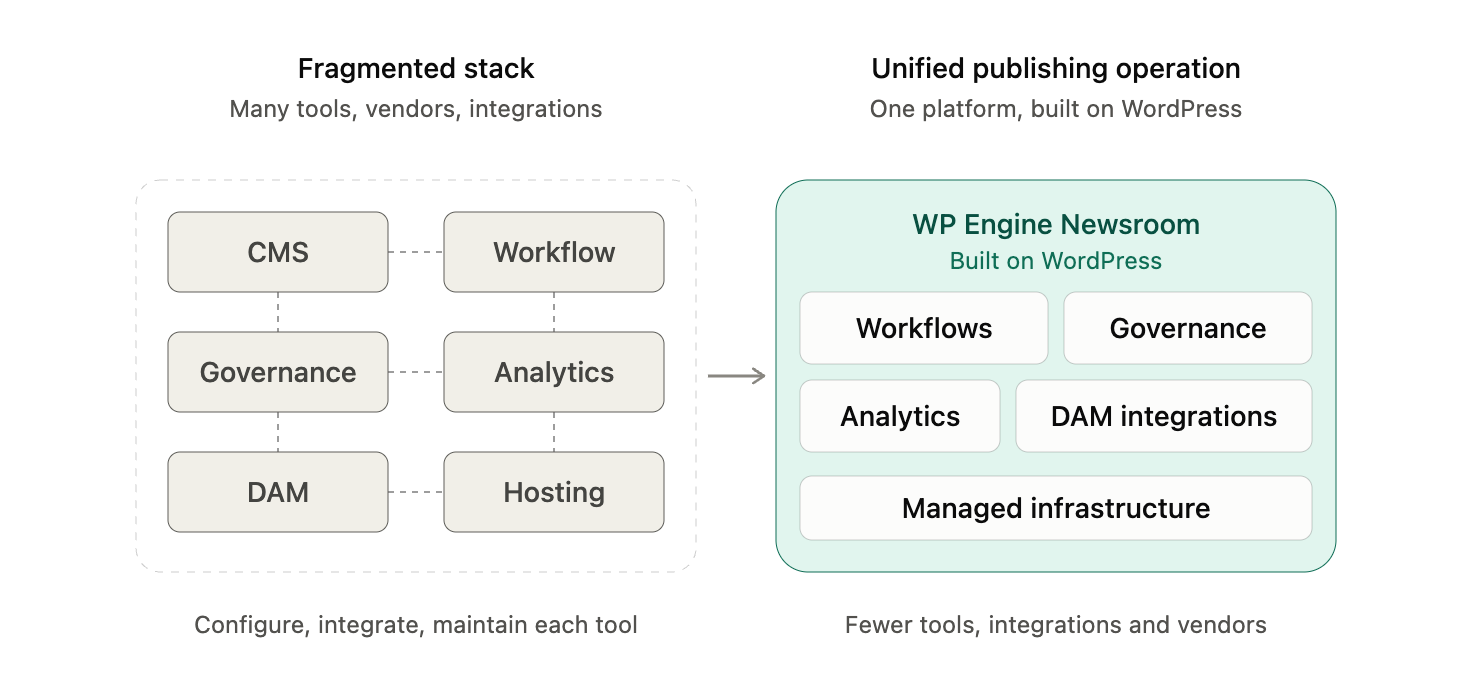
A platform that consolidates more of these capabilities can reduce the number of moving parts, along with the management and integration overhead that comes with them.
Unified publishing capabilities can potentially reduce total cost of ownership (TCO) by 30–60%, through fewer vendors and lower integration and vendor-management overhead.
Total cost of ownership
Enterprise readiness also depends on the resources required to support the publishing operation over time. Total cost of ownership reflects not just licensing or hosting, but the plugins, integrations, and custom development required, alongside ongoing maintenance, vendor management, and internal engineering resources.
A platform that brings more capabilities together can reduce those dependencies, lowering the technical and management overhead associated with maintaining a more fragmented publishing setup.

Bring your publishing operation together
See how WP Engine Newsroom brings editorial workflows, governance, content intelligence, and enterprise infrastructure together in WordPress.
Digital publishing platform options for enterprise teams
The best digital publishing platforms take different approaches to meeting these requirements.
Some bring more publishing functionality into a single platform, while others provide the foundations for organizations to assemble their own combination of tools and integrations.
Different approaches to enterprise publishing software also require different levels of ongoing technical management.
Purpose-built WordPress publishing operations platforms
Best for: Enterprise organizations that want WordPress flexibility alongside integrated publishing operations.
A purpose-built WordPress publishing platform is designed specifically around the needs of large publishing organizations.
It combines the CMS with an additional operational layer for managing the people, processes, and infrastructure involved in producing and publishing content.
Pros:
- Purpose-built editorial workflows can bring collaboration, reviews, approvals, and publishing into a single environment, reducing handoffs between systems.
- Built-in governance can support permissions, publication standards, audit trails, and consistent processes across multiple sites and teams.
- Integrated content analytics can more closely connect publishing activity to audience behavior and performance.
- Managed enterprise infrastructure reduces internal burden related to performance, security, uptime, and traffic surges.
- WordPress ecosystem access retains flexibility around integrations, customization, and future requirements.
- Greater platform consolidation can reduce the number of separate tools, integrations, and vendors to maintain. For example, Newsroom — WP Engine’s purpose-built publishing platform — brings editorial workflows, governance, analytics, and enterprise infrastructure together within WordPress.
- Consolidating capabilities can reduce integration, maintenance, and vendor management costs, thereby reducing overall TCO.
Cons:
- Organizations with relatively basic publishing requirements may not need the full breadth of functionality.
- Adoption may require changes to established editorial workflows and processes.
- Highly specialized requirements may still require integrations or custom development.
Generic managed WordPress platforms
Best for: Organizations primarily looking for managed WordPress hosting, performance, security, and platform management.
A generic managed WordPress platform is a hosting environment where the provider manages the underlying WordPress infrastructure on behalf of the organization.
This typically includes areas such as hosting, performance, security, updates, and technical platform management.
Pros:
- Editorial teams retain the flexibility to choose and configure workflow and collaboration tools around their specific requirements.
- Governance and compliance functionality can be added via the WordPress ecosystem, allowing organizations to select controls that align with their publishing processes.
- Organizations can choose the content analytics tools that best fit their audience and business requirements.
- Managed enterprise infrastructure reduces responsibility for performance, security, uptime, and scaling. A platform such as Pantheon, a WebOps platform supporting managed WordPress, offers automated scaling, integrated CDN, and managed security to reduce the infrastructure burden on internal teams.
- WordPress ecosystem access provides extensive choice around plugins, integrations, and custom development.
- Organizations can decide which publishing capabilities to bring into WordPress and which to manage through specialist platforms.
- Managed infrastructure can reduce internal hosting and DevOps costs compared with operating WordPress entirely in-house.
Cons:
- Advanced editorial workflows, collaboration, and governance may require additional plugins, integrations, or configuration.
- Content analytics may sit in separate platforms rather than being integrated with publishing workflows.
- Adding specialist functionality can increase the number of plugins, integrations, and vendors to maintain.
- TCO needs to account for additional tooling, development, integrations, and maintenance, as well as the managed platform itself.
Self-managed WordPress
Best for: Organizations that prioritize maximum flexibility and control and have the technical resources to build and maintain their own publishing environment.
Self-managed WordPress is a setup where an organization hosts and manages its own WordPress environment rather than relying on a managed platform provider.
The organization is responsible for the infrastructure, security, maintenance, and technical configuration, as well as for selecting and managing its publishing tools.
Pros:
- Editorial workflows and collaboration can be configured or custom-built around highly specific publishing requirements.
- Organizations have complete control over how governance, permissions, and publishing standards are implemented.
- Content analytics tools can be selected based on the organization’s specific audience, reporting, and attribution requirements.
- Organizations retain full control over infrastructure architecture, hosting, and performance decisions.
- Full access to the WordPress ecosystem provides extensive flexibility around plugins, integrations, and custom development.
- Organizations can choose exactly which capabilities to consolidate within WordPress and which specialist systems to retain.
- Avoiding a proprietary platform license can give organizations greater control over where technology spend is allocated.
Cons:
- Advanced editorial workflows, governance, and analytics generally need to be selected, configured, or developed rather than being provided as an integrated publishing layer.
- Performance, security, uptime, scaling, and traffic management remain the organization’s responsibility.
- Greater extensibility can result in more plugins, integrations, and dependencies that need to be maintained.
- TCO includes infrastructure, plugins, integrations, custom development, security, maintenance, and internal engineering resources.
Proprietary enterprise publishing and DXP platforms
Best for: Organizations that need broad enterprise functionality and are comfortable operating outside the WordPress ecosystem.
A proprietary enterprise publishing or digital experience platform (DXP) is a vendor-owned system that combines content management with a broader set of tools for managing digital content and experiences.
Functionality can include publishing workflows, governance, analytics, personalization, and digital asset management.
Pros:
- Enterprise platforms can provide sophisticated editorial workflows and collaboration capabilities for large, distributed teams.
- Permissions, approvals, and governance controls can support complex organizational and compliance requirements.
- Content analytics, personalization, and audience intelligence may be available as part of a broader digital experience suite.
- Enterprise infrastructure and support can accommodate demanding requirements around security, performance, and scale.
- Established platforms can offer extensive integrations with wider enterprise technology stacks.
- Broad suites can consolidate content management and other digital experience capabilities. Adobe Experience Manager, Adobe’s enterprise content management platform, combines CMS and digital asset management capabilities within its wider digital experience offering.
- Consolidation can reduce the need to procure and integrate separate systems for some enterprise requirements.
Cons:
- Editorial and governance processes may need to adapt to the workflows supported by the platform.
- Customization and extensibility operate within a proprietary architecture rather than the open WordPress ecosystem.
- Organizations become more dependent on the vendor’s technology, roadmap, and commercial model, which can make migration more difficult.
- Licensing, implementation, specialist development, integrations, and ongoing support can contribute significantly to TCO.
Industry-specific proprietary publishing platforms
Best for: Organizations with highly specialized publishing requirements that may justify a vertical-specific platform.
An industry-specific proprietary publishing platform is a vendor-owned system developed for the particular needs of a specific publishing sector.
It combines content management with specialist functionality designed around that sector’s established workflows, processes, and publishing requirements.
Pros:
- Specialist functionality can closely match established industry workflows, reducing the amount organizations need to configure or build themselves. Silverchair, a publishing platform built specifically for scholarly and professional publishers, supports specialist requirements spanning content hosting, submission, and peer-review workflows.
- Governance functionality can reflect the particular approval, publishing, and operational requirements of the industry.
- Content and audience capabilities may be tailored to the metrics and commercial models used within that sector.
- Infrastructure designed around specialist publishing use cases can support high publishing volumes, large audiences, and significant traffic peaks.
- Integrations can be purpose-built around commonly used industry systems and workflows.
- Bringing specialist functionality into the core platform can reduce the need to build or integrate separate point solutions.
- Built-in specialist capabilities can reduce custom-development costs for organizations whose requirements closely match the platform.
Cons:
- Highly specialized workflows can become restrictive if an organization’s publishing model or requirements change.
- Integration options may be narrower than those available through a large open ecosystem.
- Organizations depend on the vendor to develop and maintain specialist functionality as industry requirements change.
- TCO can include licensing, implementation, migration, integrations, and specialist support.
Comparison matrix for enterprise publishing platforms
The differences between these approaches are easier to see when the core enterprise publishing capabilities are compared side by side.
The table below shows how each option typically supports infrastructure, editorial workflows, governance, analytics, multisite publishing, and extensibility, alongside the relative management burden and risk of vendor lock-in.
| Capability to evaluate | Purpose-built publishing operations | Generic managed WordPress | Self-managed WordPress | Proprietary enterprise platform |
| Enterprise hosting & performance | ✓ | ✓ | Depends on stack | ✓ |
| Editorial workflows | ✓ Built in | Varies | Requires configuration / tooling | Usually |
| Approval & governance | ✓ Built in | Varies | Requires configuration / tooling | Usually |
| Multi-author collaboration | ✓ | Varies | Requires tooling | Varies |
| Audit trails | ✓ | Varies | Requires tooling | Usually |
| Integrated content analytics | ✓ | Varies | Requires tooling | Varies |
| Multisite governance | ✓ | Varies | Requires configuration | Usually |
| WordPress ecosystem flexibility | ✓ | ✓ | ✓ | ✕ |
| Ongoing integration/maintenance burden | Low | Moderate | High | Varies |
| Vendor lock-in risk | Low | Low-moderate | Low | High |
Take a closer look at your options
Get a practical framework for evaluating platforms against your enterprise publishing requirements.
Common pitfalls when evaluating platforms
Comparing features is a useful exercise when evaluating digital publishing platforms, but it doesn’t always reveal how well a platform will fit around the way an organization publishes.
Before making a decision, enterprise teams should also take care to avoid a few common pitfalls.
Focusing solely on the initial price point
Licensing and hosting are only part of the cost. Integrations, custom development, maintenance, vendor management, and workaround solutions can all add to total cost of ownership over time.
Evaluating features in isolation
A platform may offer the right functionality on paper, but those capabilities need to work together. Editorial workflows, governance features, and analytics tools can create additional overhead if they depend on separate systems and integrations to function effectively.
Overlooking your existing technology stack
Integration capabilities should be assessed against the systems already supporting the publishing operation. Replacing or working around incompatible systems can increase implementation work, ongoing maintenance, technical debt, and dependencies.
Planning only for today’s requirements
Current requirements are crucial, but future scalability needs are also important. Publishing volumes, teams, sites, and systems can all change, so buyers should consider how easily the platform can accommodate growth without continually adding tools or workaround solutions.
Why WP Engine Newsroom brings modern publishing together
WP Engine Newsroom combines enterprise WordPress infrastructure with purpose-built publishing operations, bringing teams, tools, and workflows together in one platform.
It gives publishers the flexibility and extensibility of WordPress alongside the capabilities needed to deliver high-quality content faster, without compromising governance, performance, or editorial standards.
And because every publishing operation works differently, the Newsroom Adoption Guide provides a framework for adapting the platform to existing workflows, editorial practices, and publication setups.
Editorial workflows
Newsroom gives editorial teams greater visibility and control across content production.
Multi-author collaboration, in-platform comments, and @mentions keep contributors working around the content itself, while workflow status and scheduling make it easier to see what’s being worked on and what needs to happen next.
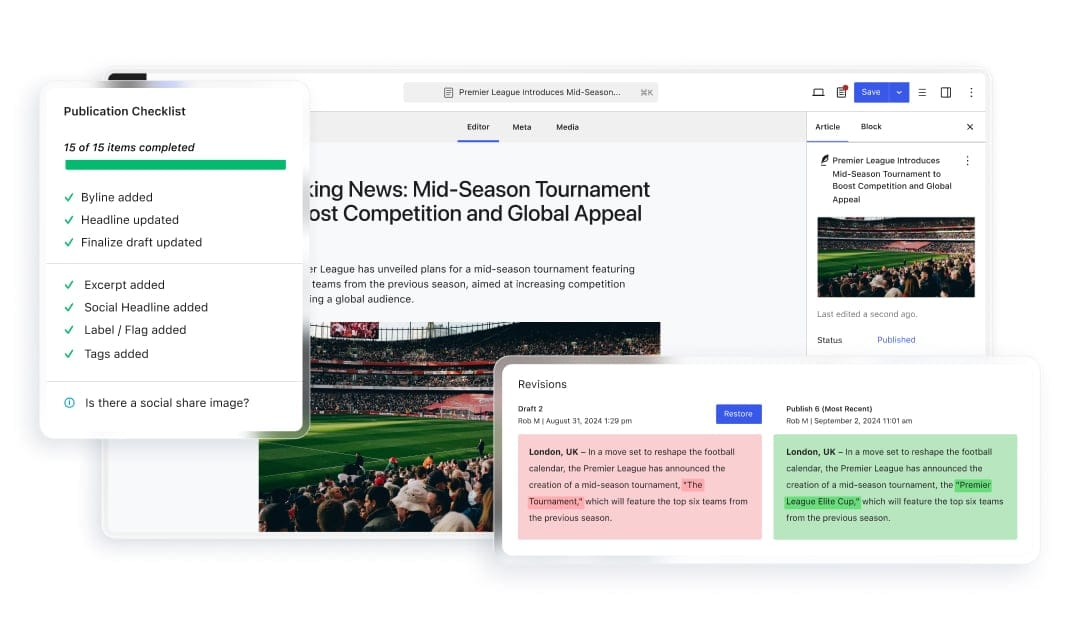
Assignable reviews, approval workflows, and visual revisions then help move content through review and sign-off without relying on separate documents, messages, and systems.
Governance and control
Newsroom builds governance into the publishing process rather than relying on checks at the point of publication.
Publication checklists can embed editorial, accessibility, and compliance requirements into workflows, with role-based permissions controlling who can take specific actions.
Version history and audit trails provide a record of changes, and advanced embargo controls give teams more control over when sensitive or time-critical content is published.
Content intelligence
Integrated analytics within Newsroom connect content performance with audience behavior.
Teams can access real-time dashboards, heatmaps, and scroll tracking, as well as attribution that shows what happens after someone engages with content.
Newsroom’s DAM integration capabilities also keep digital assets closer to the publishing workflow, making them easier to find, manage, and use across content.

Enterprise infrastructure
Behind the publishing operation, Newsroom is supported by WP Engine’s managed enterprise infrastructure. Built around the performance and security demands of high-volume publishing, it’s engineered for 99.99% uptime.
It can also handle major traffic surges without compromising site performance, with multisite capabilities supporting organizations publishing across multiple brands and properties.
Consolidated ROI
Newsroom consolidates the publishing operation within one platform, reducing the need for separate tools, integrations, and vendors.
With fewer dependencies, there’s less development, maintenance, and vendor management, as well as fewer internal resources spent keeping a fragmented publishing stack running.
Taken as a whole, Newsroom offers a different approach to enterprise publishing, extending WordPress to support the operational demands that come with larger teams, higher publishing volumes, and multiple sites.
For enterprise publishers, that creates the potential for a lower total cost of ownership without losing the flexibility of WordPress or limiting what teams can do next.

Find the right fit for your publishing operation
Choosing an enterprise publishing platform means weighing workflows, governance, analytics, infrastructure, flexibility, and long-term costs. See how WP Engine Newsroom brings these capabilities together.
FAQs about choosing an enterprise publishing platform
Does switching enterprise publishing platforms require a full website migration?
Not always. For organizations already using WordPress, some platforms can extend the existing environment rather than requiring a move to a new CMS. The amount of migration work depends on the current setup, the platform being adopted, and whether content, workflows, integrations, or infrastructure need to change.
Can an enterprise publishing platform integrate with an existing technology stack?
Yes. Enterprise publishing platforms can integrate with systems such as DAMs, CRMs, eCommerce platforms, and other tools within the wider technology stack. The available integrations and level of customization vary by platform, so organizations should consider both their existing systems and future requirements.
Can enterprise publishing platforms support headless WordPress?
Yes. Some WordPress-based enterprise publishing platforms support headless architectures, allowing WordPress to manage content while a separate frontend handles presentation. This gives organizations greater flexibility over how and where content is delivered.
How long does it take to implement an enterprise publishing platform?
There’s no standard implementation timeline when implementing new digital publishing software for enterprise teams. It depends on factors including the existing publishing environment, number of sites, integrations, migration requirements, and the amount of workflow or governance configuration involved. A relatively straightforward WordPress implementation may take considerably less time than replacing a proprietary platform or consolidating a complex publishing stack.
- WP Engine is a proud member and supporter of the community of WordPress® users. The WordPress® trademark is the intellectual property of the WordPress Foundation. Uses of the WordPress® trademarks in this website are for identification purposes only and do not imply an endorsement by WordPress Foundation. WP Engine is not endorsed or owned by, or affiliated with, the WordPress Foundation. ↩︎