Get Started
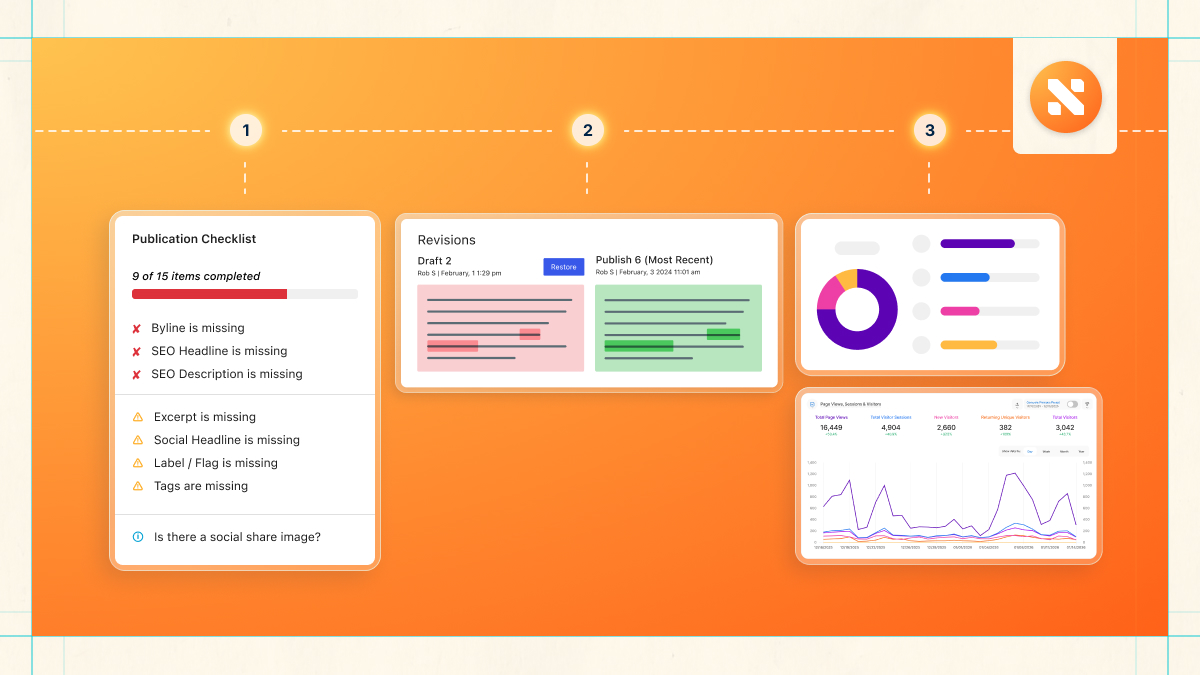

WP Engine Newsroom is a suite of tools and functionality designed to help media organizations create, manage, and deliver impactful, reader-focused stories more efficiently and at scale.
Investing in new technology can often feel like a daunting, highly technical hurdle. However, adopting WP Engine Newsroom is less about a grueling code migration and far more about activating and configuring a streamlined way of working. By replacing fragmented, legacy tools with a highly aligned, functional editorial workflow, you can eliminate operational friction and ease the transition for your entire newsroom.
This guide is designed to help organizations adopting WP Engine Newsroom quickly realize the benefits this platform brings to their specific workflows, editorial practices, and publication setups.
Understanding your WP Engine Newsroom journey
WP Engine Newsroom is engineered to unlock maximum efficiency and editorial velocity at scale. That same philosophy of speed and reduced friction applies directly to your onboarding transition.
The typical disruption associated with complex data migrations is eliminated here.
Moving to Newsroom is less about a complex code migration and far more about an activation and configuration process. It is an intentional shift that empowers your newsroom to replace fragmented legacy tools with streamlined, purpose-built workflows, instantly reducing daily operational toil.
A phased framework for adoption
The flexible nature of Newsroom means you do not have to change everything overnight. Features can be phased in a modular way within your preferred timeline, completely avoiding “day one” workflow shock.
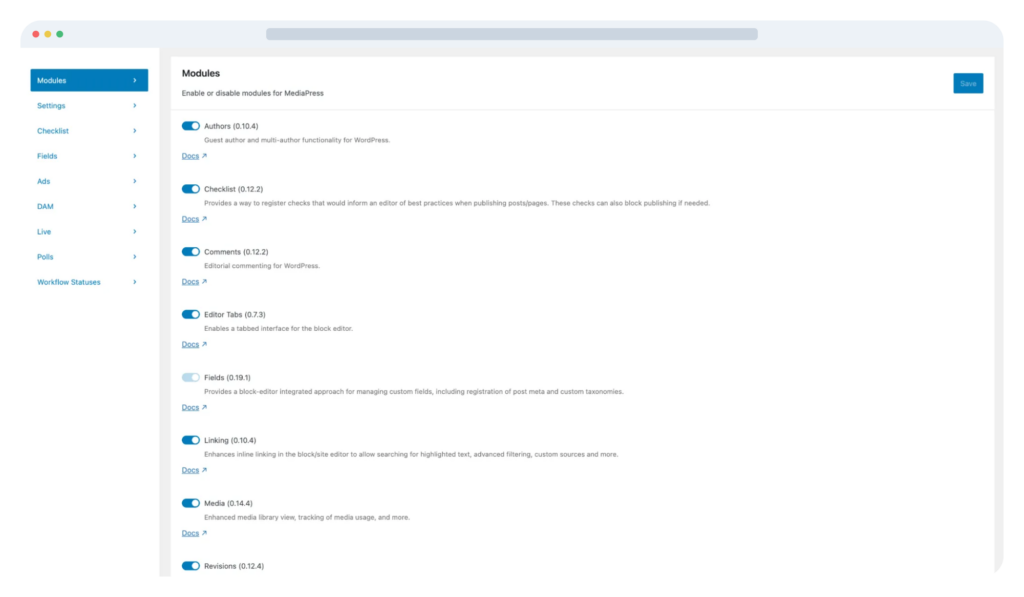
- Eliminate context-switching: Seamlessly replace external email chains, Word docs, and disconnected plugins with native, inline tools.
- Enforce standards: Build quality, SEO, and accessibility guardrails directly into the point of creation without bottlenecking your writers.
Replacing fragmented systems with native Newsroom features
The matrix below demonstrates how Newsroom’s native tools eliminate the common bottlenecks and technical debt caused by legacy systems:
| Legacy tool or workflow | Pain point | The Newsroom core feature solution |
| Multi-stakeholder review | Content reviews are scattered across internal emails, Word docs, and PDFs, triggering version-control nightmares and destroying editorial velocity. | Secure previews and revisions: Secure preview environments enable frictionless reviews from any stakeholder, internal and external. Assignable reviews and visual revisions ensure teams work in parallel safely without version conflicts or editorial lockouts. |
| Reader engagement | Teams are forced to install, configure, and maintain a messy web of separate third-party interactive plugins to drive audience retention. | Dynamic content tools and Smart Search AI: Add interactive elements like charts, polls, and embeds within the native WordPress editor. Smart Search AI leverages AI-powered semantic search and automated recommendations to enhance reader-driven discovery and keep them engaged longer. |
| Multi-user collaboration | Simultaneous edits within standard WordPress fields cause persistent save conflicts, meaning an editor can accidentally overwrite a reporter’s text. Default post locking forces team members to wait in line, preventing SEO leads, photo editors, and journalists from working on metadata, media attachments, and story copy at the same time. | Inline collaboration and draft history: In-platform collaboration tools, including threaded inline comments, user mentions, and a dedicated workspace, keep all editorial discussions centralized inside the WordPress editor. Preserve creative alternatives: Utilizing native Visual Revisions and inline commenting, editors can experiment with alternative copy, compare side-by-side draft iterations, and reference historical feedback. Maintain editorial flow: Storing revision history and inline notes in the CMS preserves creative momentum and alternative phrasing options without cluttering the final layout or resorting to disconnected Word documents and email threads. |
| Governance and standards | An absence of strict pre-publish enforcement leaves compliance, digital accessibility, and SEO quality control entirely dependent on human memory. | Publication checklists: Enforces a unified, compliant publishing workflow at the exact point of creation. The checklists are fully configurable to match your publication’s specific ethical and regulatory demands. |
| Bulky media libraries | Upload directories quickly become a cluttered, unorganized mess of duplicated and unauthorized images, bloating server footprints. | Enterprise media management: Assign specific pre-authorized visuals on a per-post basis. Includes deep, out-of-the-box DAM Integrations with major industry platforms like Cloudinary and Bynder. |
Platform compatibility
The first step in planning your transition is identifying your starting point. For some newsrooms, the path to WP Engine Newsroom is incredibly direct; for others, it requires more strategic preparation.
Whatever your current configuration, each starting point presents a clear opportunity to unlock massive operational and editorial benefits.
Scenario A: Already authoring in the WordPress block editor (Gutenberg)
If your reporters and editors are already using the native WordPress block editor, you are in an ideal position. Your transition will not be a grueling migration. Instead, it is simply an activation and configuration process. You will immediately activate Newsroom’s editorial acceleration tools directly on top of your existing setup.
Good to know: If your team is still utilizing the WordPress Classic Editor, do not worry. We recommend completing your transition to the Block Editor first, then returning to this guide to begin configuring your Newsroom.
Scenario B: Transitioning from a legacy page builder
Newsrooms moving away from heavy page-building plugins will experience a profound, positive shift in daily operations.
- Disabling legacy page builders can occasionally cause historical content to render incorrectly. A highly effective strategy is to keep the legacy page builder active strictly for archiving historical stories, while enforcing a firm rule that all new stories must be authored using Newsroom’s native blocks.
- Editors previously forced to act like web designers, wasting time tweaking margins, padding, and layouts, can shift their energy back to publishing velocity and journalistic consistency. Your newsroom can now utilize pre-approved block patterns to rapidly build rich, dynamic story layouts without risking your site’s core design system.
Scenario C: Moving from decoupled or headless frameworks
If you originally adopted a headless architecture to solve front-end performance issues, you likely inadvertently created a disjointed experience for your editorial team. Headless setups often force editors to publish blindly, stripping away their ability to accurately preview how stories will look before they go live. Shifting to a unified block editor workflow utilizing Gutenberg and Newsroom restores full editorial visibility and control.
Key consideration: Identify the core components of your current custom front end. These can easily be rebuilt natively as robust, reusable block patterns inside Newsroom.
Scenario D: Migrating from a proprietary or custom-Built enterprise CMS
Migrating from a clunky, homegrown legacy system is a complex technical task, but the long-term ROI is unmatched. Custom CMS databases often have unique, non-standard schemas, rigid taxonomy structures, and custom media handling that do not map one-to-one with WordPress out of the box.
While data mapping requires meticulous planning, the benefits of modernizing are substantial:
| Operational benefits | Editorial, governance & workflow benefits |
| Eliminate the continuous expense of hiring specialized developers to maintain a proprietary codebase. WP Engine automatically handles core infrastructure, scaling, and security updates. | Editors gain creative independence and no longer need to submit IT tickets to change a page layout, launch a new section, or build a custom layout block. |
| Onboard faster by eliminating the steep learning curve of clunky, proprietary systems. It is much easier to hire and onboard talent onto a modern, industry-standard WordPress workflow. | Instantly utilize advanced features like automated Publication Checklists, Approval Workflows, and native TWIPLA Analytics. These are tools that are often cost-prohibitive to build from scratch. |
| Plug directly into modern, industry-standard integrations and WP Engine’s secure, enterprise-grade managed hosting. | Bring fact-checking, legal reviews, and asset management in line, via integrated commenting and @mentions. |
Preparing content & assets
A successful transition to WP Engine Newsroom requires a clear framework for handling your existing content catalog and creative assets. By auditing your library ahead of activation, you can prevent broken layouts, eliminate technical debt, and ensure your newsroom hits the ground running.
Managing historical content vs. active, evergreen stories
Mid-market and enterprise media sites often inherit years of back-catalog archives. To protect your site’s historical integrity without bottlenecking your current editorial velocity, follow this dual-path strategy:
- For older, static stories authored in legacy page builders or the Classic Editor, it is often most efficient to leave those legacy plugins active strictly for rendering historical URLs. This ensures your archive remains unbroken without wasting engineering resources on a massive retrospective code rewrite.
- For high-traffic, new, and evergreen stories that are updated frequently, prioritize a manual conversion to native blocks. This unlocks Newsroom’s modern performance advantages, inline commenting tools, and automated Publication Checklists on your most valuable editorial assets.
Safely converting legacy layouts into clean, valid blocks
The core promise of Newsroom is to keep your editorial team in a state of continuous creative flow. Moving away from a “stitched-together” system of shortcodes means migrating content into modern WordPress Gutenberg blocks.
- Utilize Content Modeling (via ACF PRO) to create rigid, predictable data fields for complex story elements before moving data.
- Rather than allowing editors to manually style individual articles and risking breaking your brand’s design system, you can recreate your proprietary layouts as global, reusable block patterns. This allows reporters to build rich multimedia features instantly without developer intervention.
Aligning existing media attachments with Newsroom features
A cluttered, fragmented media library slows down production and introduces severe licensing and compliance risks. Newsroom unifies your asset layer by integrating creative tools directly into the point of creation.
- DAM integrations: Connect your WordPress media interface directly to enterprise Digital Asset Management platforms like Bynder or Cloudinary. This gives your entire distributed newsroom instant, native access to centralized, brand-approved imagery, eliminating off-brand asset use.
- Multi-author attribution: Run a baseline audit of your author taxonomy. By transitioning to Newsroom’s native Author Profiles, you can cleanly attribute multiple writers or external wire services to a single story, manage complex editorial hierarchies, and preserve legal attribution details, all without creating insecure backend dashboard accounts for guest contributors.
Editorial tools & publishing workflows
In a deadline-driven newsroom, editorial velocity is your primary competitive edge. Accelerating your time-to-publish requires eliminating the operational toil of manual tasks and fragmented tools. By replacing disjointed habits with structured, native editorial processes, WP Engine Newsroom returns your focus entirely to what matters most: producing impactful stories at scale.
Here is how Newsroom’s core features directly relieve daily friction for editing and operations leaders:
Enforce quality with publication checklists
Managing internal publishing guidelines across a decentralized newsroom can easily lead to a breakdown in standards. Relying on manual checks slows down your publishing momentum through tedious gatekeeping, yet still risks compliance errors.
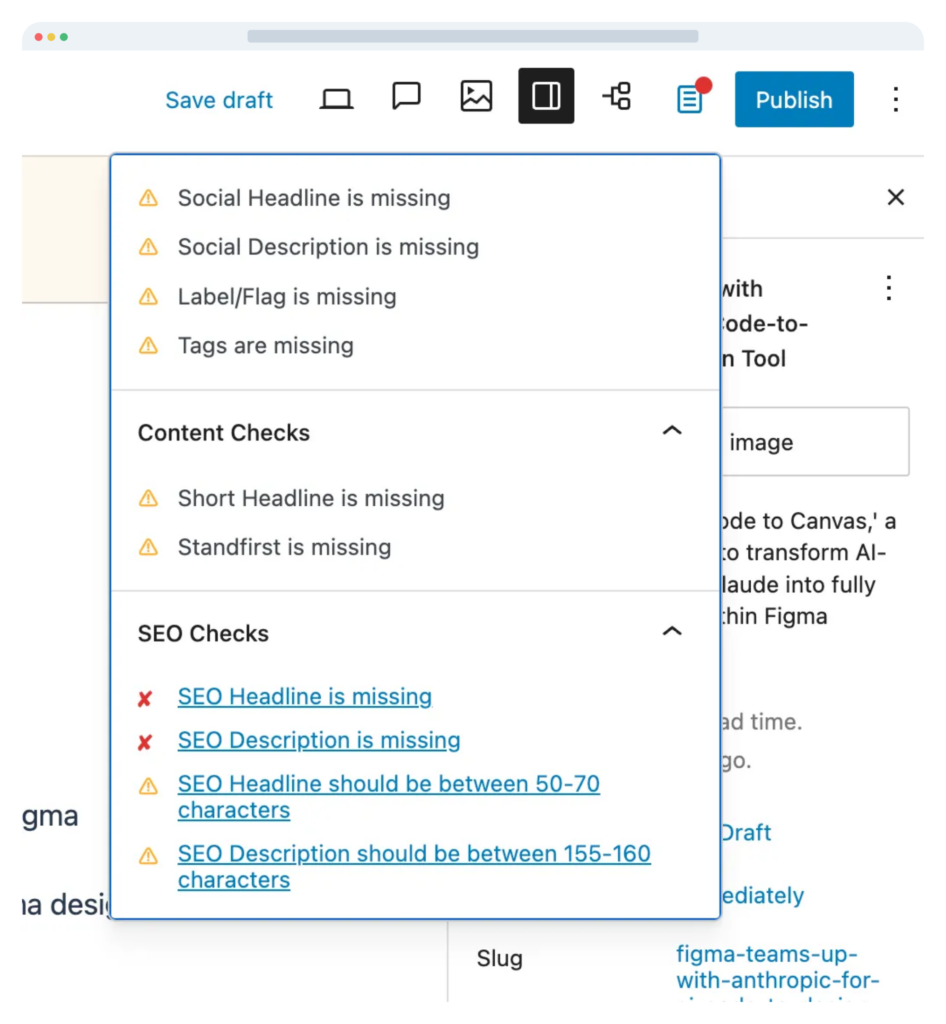
- Publication checklists build quality control directly into the point of creation, rather than as a bolt-on post-publish review.
- Take the guesswork out of the workflow by establishing configurable, mandatory, or advisory checklist items. This ensures every piece of content systematically meets your strict standards for SEO, digital accessibility, and brand compliance before the publish button ever goes live.
Centralize data via metadata management
Ensuring that search configurations, custom fields, and content taxonomies are properly structured should never be an afterthought.
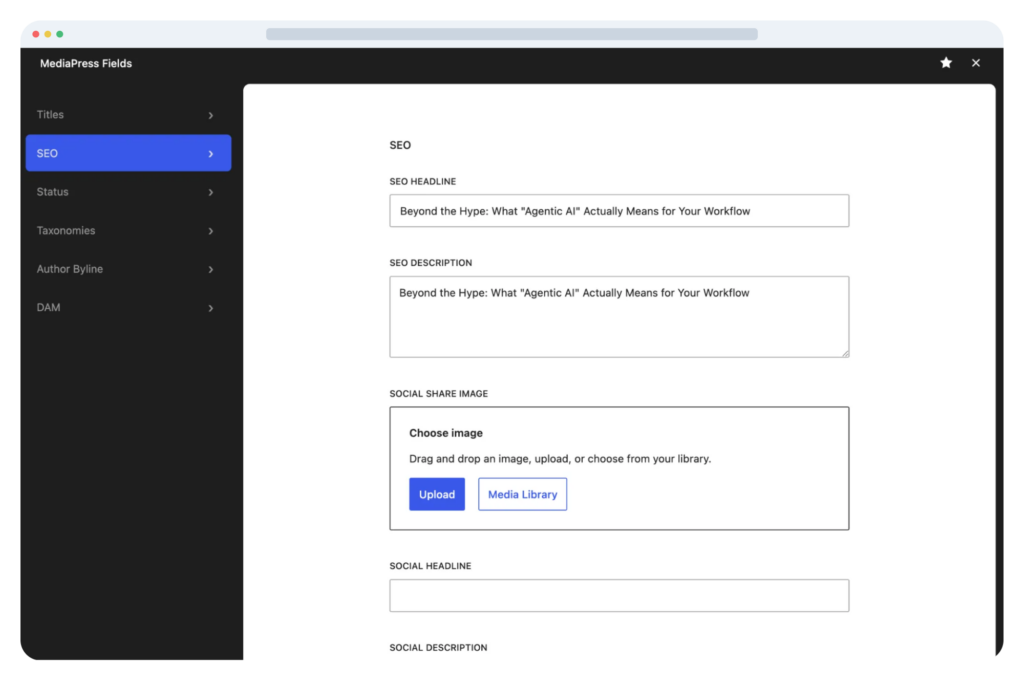
- Metadata management (powered by integrated Content Modeling via ACF PRO) places high-value configuration fields directly at the forefront of the creator workflow.
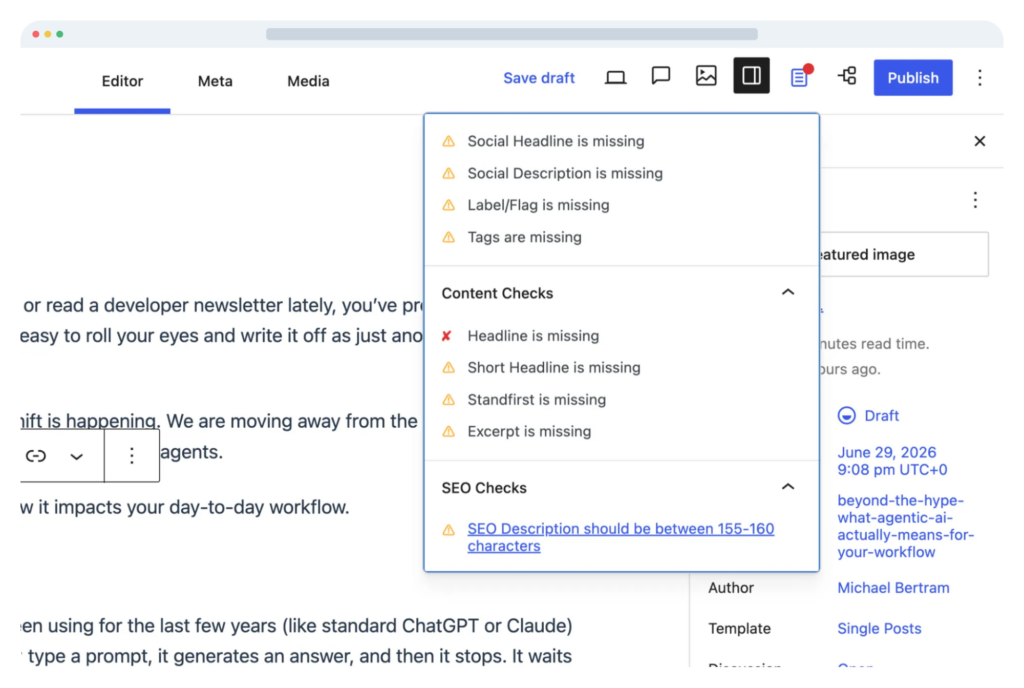
- By prompting reporters to complete metadata before launching a story, you secure structural consistency across your entire portfolio, improve internal linking through Entity Linking, and optimize content discoverability across major search engines.
Cleanly credit contributors with author profiles
Standard WordPress setups force teams to build full, backend user accounts for every freelance writer, wire service, or guest columnist. This fills your admin panel with inactive accounts, creating massive technical debt, cluttered interfaces, and severe security risks.
- Built-in Author Profiles allow you to seamlessly manage complex editorial hierarchies without granting unnecessary backend access.
- This provides flexibility by allowing multiple users or external contributors to be cleanly attributed to a single story, to establish public-facing biography profiles, and to preserve historical attribution even if a user is offboarded from your system.
Technical implementation considerations
The next stage of your Newsroom adoption journey involves addressing specific technical environment factors. Because WP Engine Newsroom is designed to streamline your tech stack and reduce technical debt, the setup is structured to be an activation and configuration process rather than a disruptive engineering overhaul.
System, stack, and database requirements
By building on top of enterprise-grade managed WordPress hosting, Newsroom offloads heavy infrastructure maintenance from your internal IT team.
- Newsroom officially supports the last two point releases of WordPress (e.g., 6.9.x and 7.0.x). To ensure maximum stability and a non-disruptive experience, support for older point releases is phased out gradually rather than dropped immediately when a new point release launches.
- Requires PHP version 8.4 or higher to ensure optimal processing speed, security, and compatibility with modern editorial features.
- There are no custom, proprietary database requirements. Newsroom integrates natively into your standard WordPress database schema, allowing you to maintain full data ownership without complex migrations.
Running legacy tracking systems alongside native newsroom audience intelligence
A common cause of performance degradation on media sites is “tracker bloat”; loading multiple third-party JavaScript snippets (GA4, Chartbeat, etc.) that create context-switching and slow down time-to-market.
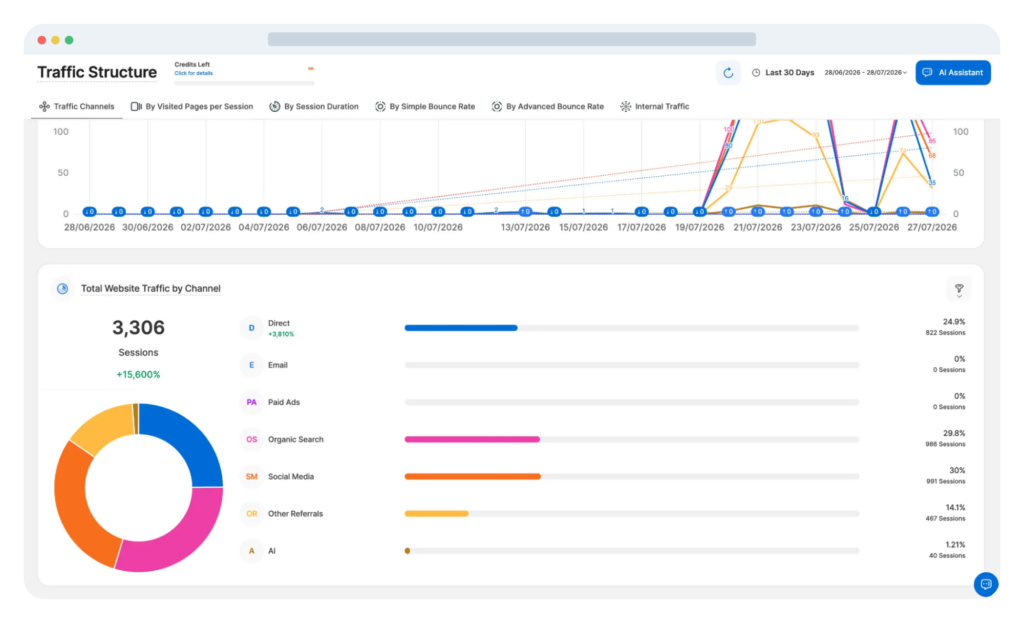
- TWIPLA Analytics comes natively integrated into Newsroom, delivering real-time reader insights, including heatmaps, scroll-tracking, and session recordings. These can all be viewed directly inside the WordPress admin panel with zero manual setup.
- While TWIPLA can run concurrently with existing tools like GA4 or Chartbeat, every additional third-party tracker introduces a front-end performance tradeoff. Because TWIPLA consolidates multiple measurement features into one native solution, newsrooms can evaluate their tracking stack and replace redundant tools to boost site speed.
Maintaining third-party integrations & wire feeds
Connecting external news wire services, syndication feeds, or custom media API pipelines is evaluated and configured based on your newsroom’s specific drafting workflows.
- Using built-in Content Modeling (via ACF PRO) and enterprise API endpoints, incoming wire content maps cleanly into pre-approved block layouts without breaking your site’s design system.
- External wire stories can be routed directly into your editorial queue as drafts. This allows reporters and editors to run automated Publication Checklists, legal reviews, or fact-checking workflows before releasing content live.
Validation, testing & launch
The final phase of your onboarding journey is establishing a secure validation and deployment window. Moving high-stakes publishing operations over to a modern framework requires strict safeguard procedures to guarantee a non-disruptive, zero-error launch.
Pre-launch sandbox testing & workflow validation
Before onboarding your broader content-creation teams, you must thoroughly verify your operational configurations within a secure staging environment.
- Test your customized Publication Checklists under multiple user roles. Ensure that mandatory items successfully lock the publish button as intended.
- Put your custom Approval Workflows through an end-to-end simulation. Validate that content flows seamlessly between approval hierarchies without stalling inside email chains or disconnected tools.
- Have multiple test profiles interact inside the Gutenberg editor simultaneously to ensure that real-time inline comments, @mentions, and workspace tracking perform fluidly without file lockouts.
Managing the transition window & live activation
Transitioning to WP Engine Newsroom is an activation and configuration process rather than a destructive code migration, allowing for a highly coordinated, low-risk launch window.
- Schedule your live configuration during lower-traffic periods.
- Lean heavily on enterprise-grade WP Engine Infrastructure. Push all verified block designs, Content Modeling schemas (ACF PRO), and structural metadata setups directly from your staging environment to production simultaneously. This ensures 100% template alignment on day one.
Deployment guardrails & system continuity plans
In high-stakes publishing environments, you need actionable procedures to address unexpected workflow friction without impacting front-end performance or reader uptime.
Modular workflow controls
Because Newsroom’s tools are modular and highly configurable, your team is never trapped by rigid processes. If an advanced, multi-layer approval workflow creates an unexpected bottleneck during a breaking news cycle or launch day, editorial operations leaders can instantly adjust workflow rules by toggling strict review gates to optional or advisory status. This restores immediate publishing velocity while your technical team refines the routing logic behind the scenes.
Infrastructure-level safety net
Because Newsroom runs directly on WP Engine Enterprise managed infrastructure, your platform automatically captures continuous, enterprise-grade database snapshots before any major configuration changes go live. If an unexpected legacy plugin conflict or broken shortcode threatens site stability during deployment, your technical director can trigger a clean rollback to your pre-launch state with zero data loss, zero content corruption, and no downtime for your readers.
Post-migration optimization & FAQs
Reaching launch day is a major milestone, but true operational success comes from post-migration optimization. By establishing clear workflows and avoiding common implementation traps, your team can maximize publishing velocity, eliminate technical debt, and ensure long-term ROI.
Common onboarding missteps (and how to avoid them)
1. Over-engineering initial checklists
- The misstep: Building long, rigid checklists on day one that stall daily publishing momentum.
- The fix: Start with essential guardrails using Publication Checklists. Set critical requirements (like primary SEO metadata, alt text for WCAG accessibility, or legal disclaimers) as mandatory, while keeping operational guidelines as advisory until your newsroom adapts to the new flow.
2. Re-creating plugin sprawl
- The misstep: Installing third-party plugins for features that Newsroom already handles natively.
- The fix: Audit your active plugins before adding new ones. Newsroom consolidates your stack by natively incorporating Twipla Analytics, Smart Search AI, DAM Integrations (Bynder/Cloudinary), and Inline Commenting directly into the WordPress Gutenberg editor, reducing total cost of ownership and security surface area.
3. Neglecting role-based governance
- The misstep: Assigning uniform administrative access across distributed teams, increasing the risk of accidental early releases or unvetted layout edits.
- The fix: Implement granular access controls early. Use Approval Workflows and Embargo Controls to ensure sensitive material (such as embargoed news exclusives or financial disclosures) remains restricted strictly to authorized reviewers until the designated publish time.
Frequently asked questions about Newsroom adoption
How does Newsroom handle compatibility with our existing WordPress plugins and custom code?
Because Newsroom is built on open WordPress standards rather than a proprietary closed ecosystem, it integrates smoothly with your existing stack. Utilizing content modeling (ACF PRO) and standard REST APIs, Newsroom connects directly with enterprise DAMs, CRMs, and custom data feeds without requiring a destructive platform migration.
What is the typical timeframe for a full newsroom onboarding?
Moving to WP Engine Newsroom is an activation and configuration process rather than a ground-up engineering rebuild. While traditional CMS migrations can take 6–12 months, Newsroom deployments typically take 3–6 months, including pre-launch validation, checklist configuration, and team onboarding.
Are there feature dependencies between Newsroom tools?
No. Newsroom’s suite of tools and functionality is modular. You can activate core capabilities, such as Publication Checklists, Live News, TWIPLA Analytics, or Author Profiles. This can be done either collectively on day one or roll them out in phased stages to match your operational readiness.
Will activating Newsroom’s analytics impact front-end page speed?
No. TWIPLA Analytics is natively integrated and optimized for enterprise hosting performance on WP Engine managed infrastructure. Unlike heavy third-party tracker scripts that cause render-blocking delays, TWIPLA delivers privacy-first insights, including heatmaps and scroll-tracking, with zero impact on Core Web Vitals or reader site speed.
Is a complete front-end/theme rebuild required to use Newsroom?
No, a complete rebuild is not strictly necessary. Newsroom is designed to adapt to your existing site design. If you are already running on a modern WordPress theme, you can seamlessly activate Newsroom’s suite of tools and functionality on top of your current setup. However, if you are moving from a proprietary CMS, headless framework, or a heavily outdated page builder, recreating your core design components as clean Gutenberg block patterns is highly recommended to maximize your team’s editorial velocity.