Get Started


Key Takeaways
WP Engine Newsroom extends WordPress with purpose-built capabilities for enterprise publishing, covering everything from editorial workflows, governance, and specialist publishing tools to analytics and infrastructure.
With Newsroom, reviews, approvals, permissions, publication checklists, and other governance controls are built directly into publishing workflows, reducing the need for separate manual processes.
Newsroom’s integrated audience and content analytics connect publishing with performance, giving teams insight into reader behavior, engagement, conversion, attribution, and business outcomes.
Consolidating publishing capabilities can potentially reduce total cost of ownership by 30–60%, through fewer vendors and lower integration and vendor-management overhead.
Adoption doesn’t always mean a complete rebuild. Organizations already using Gutenberg can add Newsroom around their existing WordPress setup, while legacy, headless, and proprietary CMS environments can take a phased approach.
WP Engine Newsroom is a purpose-built publishing platform with the workflows, governance, analytics, and integrated tools that enterprise content teams need to manage high-volume publishing.
While WordPress®1 provides the CMS and flexibility, Newsroom adds the capabilities to coordinate, control, and improve publishing.
This spans everything from planning and collaboration to approvals, governance, publication, and performance analysis.
Here, we look at how Newsroom brings those capabilities together, helping enterprise teams modernize publishing operations, work more effectively across sites and teams, and get more from WordPress as their publishing requirements grow.
We also explore who Newsroom is designed for, how it differs from a standard WordPress setup, and the different routes organizations can take to adopt it.
What is WP Engine Newsroom?
Built on WordPress, WP Engine Newsroom extends the WordPress environment with tools and functionality designed around the operational demands of large-scale publishing.
As an enterprise WordPress publishing platform, it enables organizations to manage more of the content lifecycle within the same environment, rather than relying on a growing mix of plugins, external platforms, and custom integrations.
Newsroom also combines editorial and publishing capabilities with WP Engine’s managed enterprise infrastructure, giving content and tech teams a more connected publishing foundation.
WP Engine Newsroom at a glance
| Publishing need | What Newsroom adds |
| Faster content production | Multi-author collaboration, scheduling, and workflow visibility that reduce version conflicts, manual handoffs, and delays |
| Clearer reviews and approvals | In-platform feedback, visual revisions, and approval workflows that keep review and sign-off alongside the content |
| Consistent governance | Publication checklists, permissions, metadata controls, and audit trails that build quality, accessibility, and compliance standards into the workflow |
| Better audience insight | Integrated analytics, behavioral insights, and attribution that connect content performance with audience engagement and business outcomes |
| Simpler multi-title management | Centralized templates, branding, and permissions across multiple sites, titles, and teams |
| Reliable performance | WP Engine infrastructure engineered for 99.99% uptime and to handle major traffic surges without compromise |
What does WP Engine Newsroom do?
WP Engine Newsroom brings together a wide range of capabilities that address the key operational challenges faced by enterprise content teams. It supports functions right across the content lifecycle, from creation and collaboration to publication, performance analysis, and optimization.
Some of the biggest challenges it helps address include:
- Fragmented workflows
- Slow reviews and approvals
- Inconsistent governance
- Limited visibility across content production
- Disconnected content and audience data
- The growing cost of maintaining multiple tools and integrations
Coordinate content production from one place
Enterprise content production often spans multiple systems. Planning and ideation, drafting and production, feedback, and coordination are spread across documents, spreadsheets, messaging platforms, and other tools.
As AI becomes part of more content workflows, teams may also be using it across the content lifecycle. This adds another element to coordinate from initial planning through to quality assurance and performance optimization.
The more places that work happens, the more handoffs teams have to manage. In turn, it then becomes harder to see what’s being worked on, who owns each task, where content sits in the WordPress editorial workflow, and what needs to happen next.
WP Engine Newsroom brings that activity into WordPress, giving teams greater visibility and keeping the content production process in one place.
Work together in WordPress
Newsroom’s multi-author collaboration features allow several contributors to work on content at the same time, without creating version conflicts.
Writers and editors can add feedback and discussion alongside content via in-platform comments and @mentions, removing the need to move between WordPress and separate communication tools.
Keep track of content
Newsroom’s work and status visibility features provide a central view of content activity, helping teams monitor progress, identify content owners, and see outstanding tasks without chasing updates across different systems.
Its content scheduling functionality also allows teams to plan upcoming publications and set content to go live at a specified time.
Manage changes before publication
Teams can use Newsroom’s visual revisions feature to easily review and compare content changes at a glance.
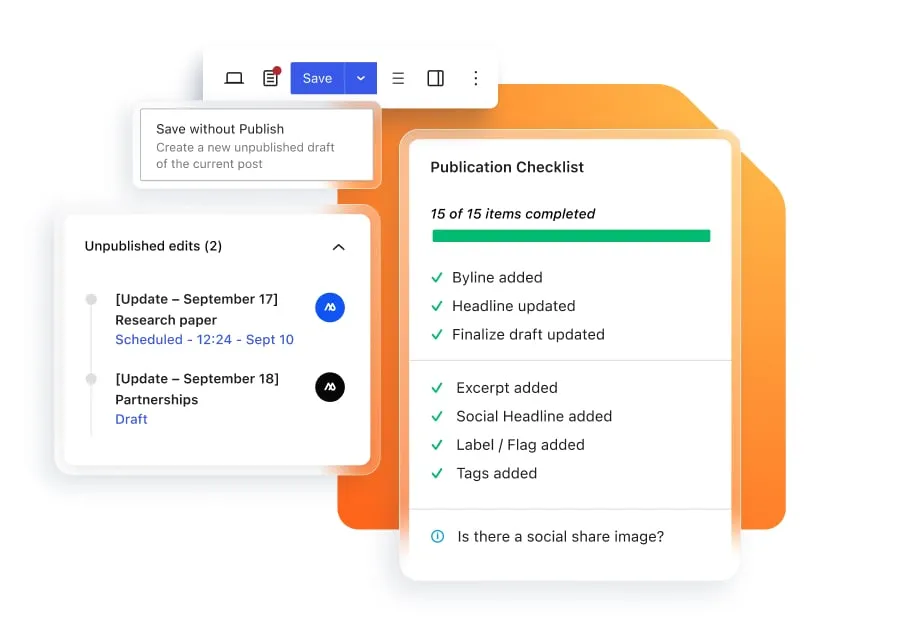
The platform’s Unpublished Edits feature allows them to safely update live content without actually publishing changes before they’re approved.
Keep reviews and approvals moving
Editorial reviews are much more difficult to coordinate when drafts, feedback, and sign-off are split across email, documents, messaging platforms, and WordPress.
Assign and track reviews
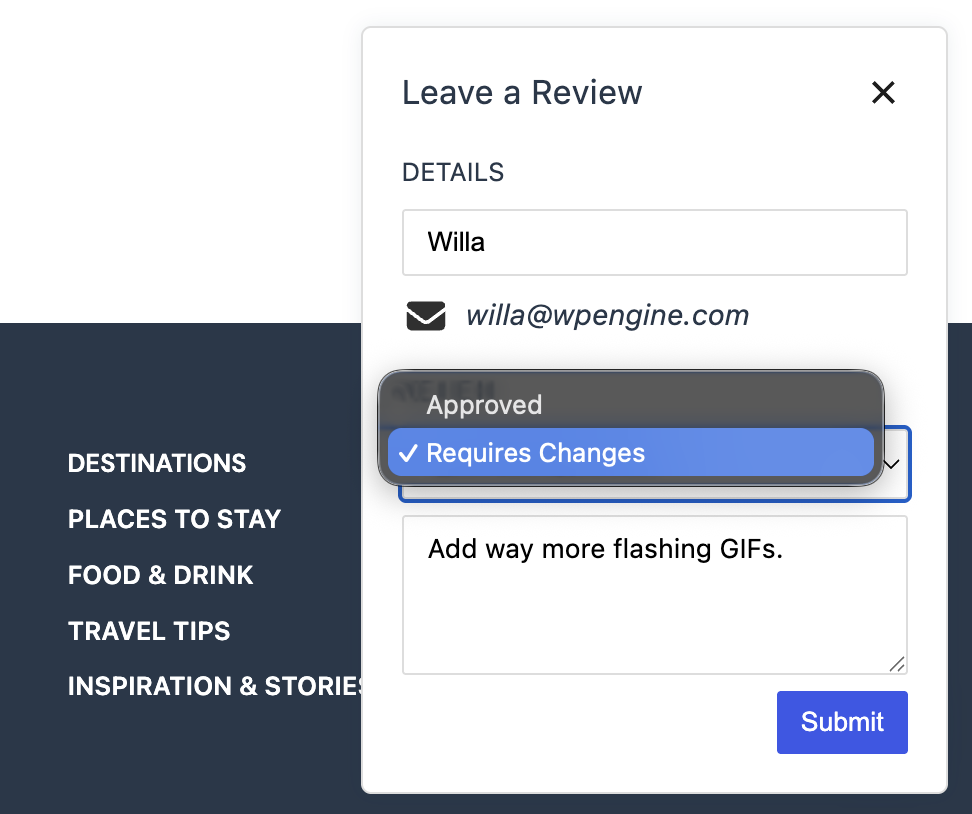
Newsroom brings the review and approval process entirely into WordPress. Reviews can be assigned to specific team members or subject matter experts (SMEs), who can mark content as approved or requiring changes, with comments added directly alongside the review.
Teams can also see who’s reviewed a post and the status of their latest review.
Manage approval workflows
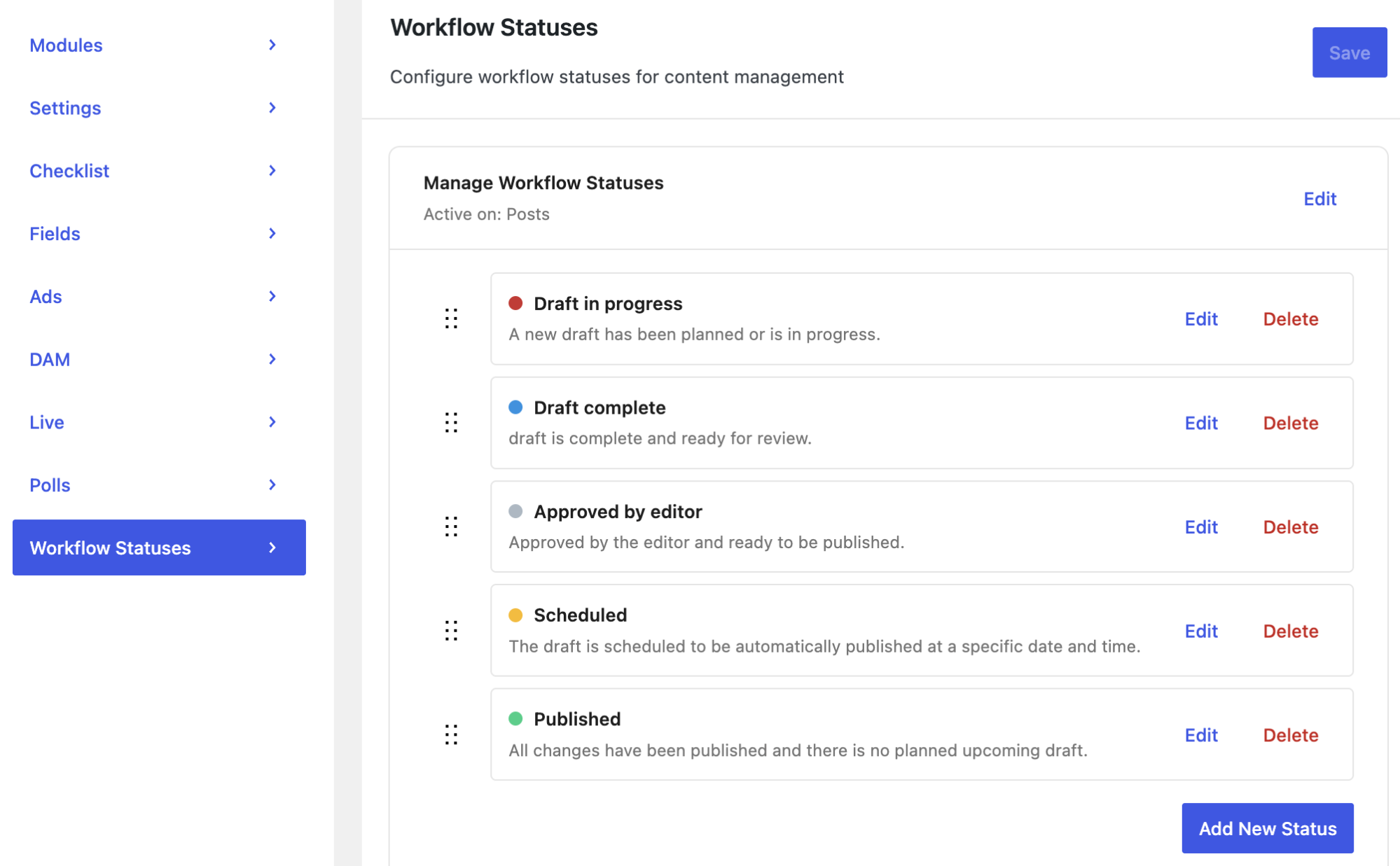
Custom workflow statuses can be used to reflect each stage of the approval process, while in-platform comments allow feedback to be added to an entire post or directly alongside specific content.
Bring external reviewers in
For stakeholders outside WordPress, secure previews provide access to draft content via a dedicated link, with invited reviewers able to submit comments and indicate whether changes are required or the content is approved.
Build governance into publishing workflows
For large content teams, governance covers much more than final approval. Brand and style guidelines, accessibility, SEO, legal, and other publishing standards may need to be applied consistently and signed off on across contributors, teams, and sites.
WP Engine Newsroom builds those requirements into day-to-day publishing through:
- Publication checklists that make sure each title’s standards are met before content goes live
- Approval workflows that enable teams to build review and sign-off into the publishing process
- Configurable role-based permissions that control who can access, edit, review, and publish content
- Metadata management to support consistent content classification and record keeping
- Audit trails and version history that give a transparent record of changes and publishing activity
- Embargo controls to restrict access to sensitive content ahead of publication
These features help distributed teams and organizations — particularly those with stricter governance requirements — maintain quality, brand, accessibility, and compliance standards without relying on separate manual reviews.
They also provide a framework for AI content governance, allowing teams to build human-in-the-loop review gates, subject matter checkpoints, and other quality assurance controls into the same documented workflow.

WP Engine Newsroom in action
Dutch news publisher NRC used Newsroom to bring its editorial workflows directly into WordPress, including publication checklists and mandatory metadata requirements.
Give teams purpose-built publishing tools
Some publishing requirements need more specialist functionality than standard content creation and workflow tools.
Newsroom provides purpose-built features and integrations for different content formats, publishing models, and audience requirements.
Publish fast-moving stories with Live News
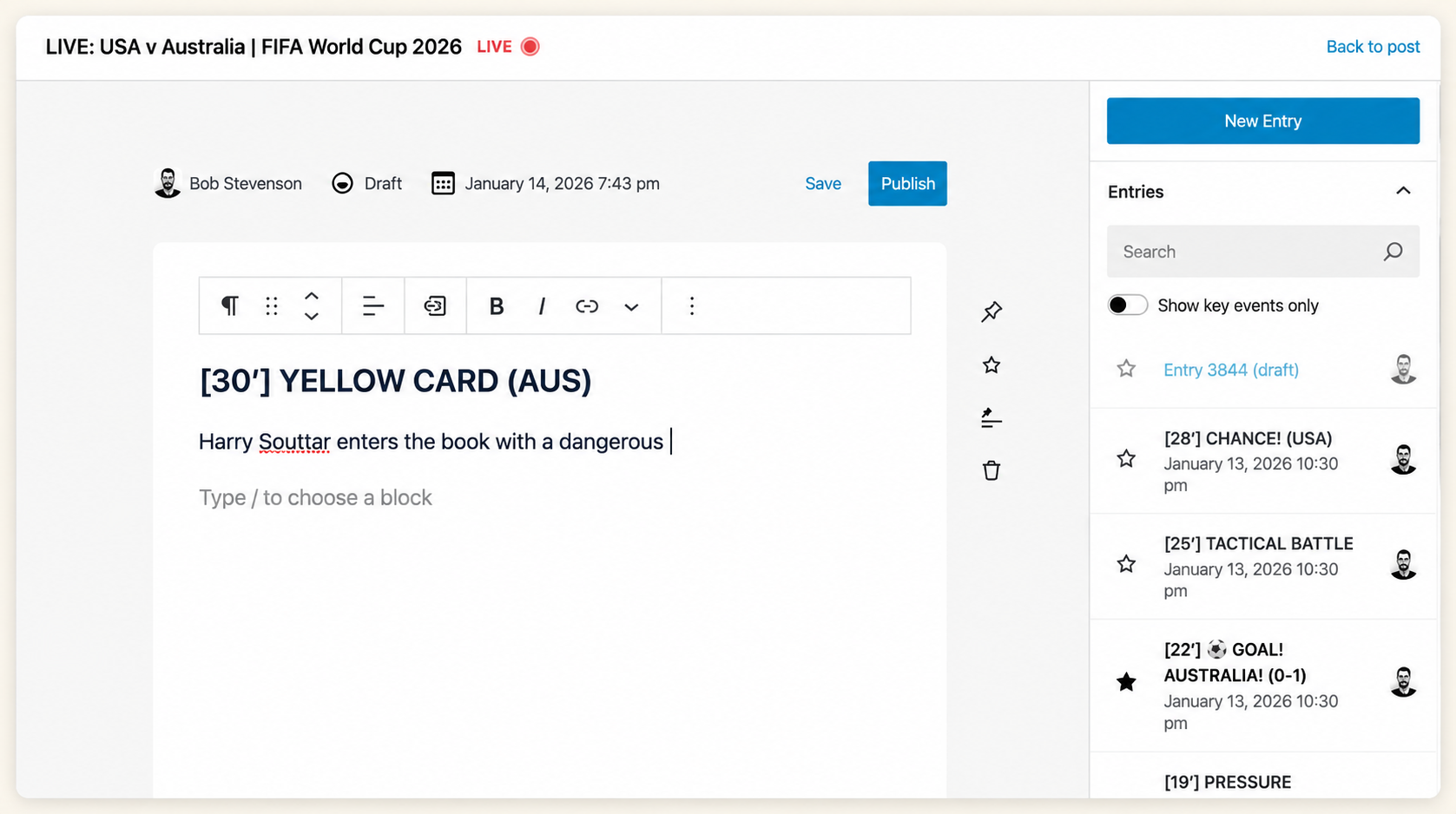
Newsroom’s Live News feature gives editors a dedicated interface for publishing short, chronological updates to developing stories, with new entries pushed to readers in real time.
Build consistent content with ACF PRO
Newsroom includes the ACF PRO plugin, which lets publishers create predefined fields and templates for different types of content, keeping articles consistent across teams. This structured approach also supports a more machine-readable content architecture, making content easier to reuse across different formats, channels, and digital experiences.
Improve content discovery with Smart Search AI
Smart Search AI helps readers find relevant content faster, using AI-powered search and recommendations to connect them with more of the content they’re interested in.
Access approved assets with DAM integrations
Newsroom integrates with DAM platforms, including Bynder and Cloudinary, allowing teams to access approved media assets from a central asset repository directly within WordPress.
Build monetization into content
Built-in ad integrations allow publishers to incorporate advertising into their content, supporting monetization without requiring a separate publishing workflow.
Turn published content into newsletters
The platform’s newsletter builder lets teams create and send newsletters using published posts directly within WordPress, removing the need to move content between systems.
Create richer content formats
Newsroom’s block-based publishing tools let teams create richer story formats using reusable layouts and interactive elements, including charts, polls, maps, video, and audio.
Connect content with audience insights
Newsroom connects publishing with content-specific performance data through WP Engine Analytics powered by TWIPLA. This helps teams understand what happens after publication, and use those insights to inform editorial and audience strategy, feeding analytics and optimization back into future content planning.
What are readers doing?
Heatmaps and scroll tracking show how readers interact with individual pages and where their attention drops off, with session recordings providing a closer look at individual visits.
Combined with traffic and audience analysis, this gives teams a clearer picture of who is reading, where they come from, how they navigate the site, and what their behavior can reveal about audience intent.
What’s driving results?
Conversion funnels show how readers progress toward actions such as registrations or subscriptions, supported by event tracking that captures specific interactions along the way. UTM tracking then connects those outcomes with individual campaigns and traffic sources, giving teams a clearer view of what’s contributing to results.
How is content performing across the organization?
Real-time dashboards bring content performance data into one view, helping teams see what’s attracting attention and how audiences are responding. Cross-site attribution extends that visibility across different sites and content areas, providing a broader picture of how content contributes to engagement and business outcomes across the organization.

Bring publishing tools and systems together
Enterprise publishing stacks often include separate systems for collaboration, analytics, DAM, search, newsletters, advertising, workflow management, and other functions.
As that stack grows, so does the work involved in managing it, as well as the cost. Each additional platform can mean another integration to maintain, another vendor relationship to manage, and another potential point of disconnect within the wider publishing workflow.
Newsroom brings more of these capabilities within WordPress through built-in functionality and integrations, giving editorial and tech teams a more connected environment and reducing the reliance on separate systems.
Unified publishing capabilities can potentially reduce total cost of ownership (TCO) by 30–60%, through fewer vendors and lower integration and vendor-management overhead.
Scale publishing across sites and teams
Newsroom provides the infrastructure and controls needed for high-volume publishing across multiple sites and teams.
For organizations managing multiple publications, brands, markets, or languages, multisite support makes it possible to centralize elements such as templates, branding, permissions, and governance rather than building and managing a separate publishing setup for each one. This allows controls to be applied across the organizational structure while still allowing individual sites and publications to meet their own requirements.
That centralized approach also makes it easier to scale content operations as publishing requirements grow, with WP Engine’s managed infrastructure supporting high traffic volumes and significant spikes in demand.
WP Engine Headless Platform support adds flexibility over content delivery, allowing organizations to use WordPress as the publishing environment while delivering content to different front ends.
| Scaling requirement | How Newsroom supports it |
| More sites, brands, and publications | Multisite support centralizes templates, branding, and publishing controls across multiple properties |
| More contributors and teams | Centralized permissions and governance help maintain consistent access and publishing controls |
| Higher publishing volumes | WP Engine managed infrastructure supports the demands of high-volume content production and delivery |
| Bigger traffic peaks | 99.99% uptime and traffic-surge handling support availability and performance during periods of high demand |
| More varied content delivery | Headless capabilities provide flexibility over how and where content is delivered |
WP Engine Newsroom in action
With Newsroom, the UAE-based news platform Lana now publishes 150+ original articles every day in both English and Arabic, demonstrating how the platform can support high-volume, multilingual publishing from a single WordPress environment.
Who is WP Engine Newsroom for?
Newsroom is designed for enterprise organizations managing complex publishing operations. It’s particularly suited to:
- News and media: Supporting fast-moving and breaking news while maintaining editorial quality and control.
- Higher education: Coordinating publishing across departments, teams, and sites while maintaining institutional standards, governance, and accessibility.
- Public companies: Managing market-sensitive corporate and investor communications with stronger governance, approval, and embargo controls.
- High-volume publishing teams: Managing large volumes of content and contributor networks across multiple teams, sites, brands, publications, or sectors.
Within these organizations, Newsroom supports the different functions involved in enterprise publishing.
Editorial teams
For editorial teams, Newsroom makes it easier to keep writers, editors, and reviewers coordinated from assignment through to approval. Teams can see what’s being worked on, what’s ready to edit, and what’s waiting for approval without chasing updates across documents, spreadsheets, messaging platforms, and inboxes.
Built-in workflows and governance controls also help teams maintain consistent publishing standards as content volumes grow, while reducing the manual coordination involved in moving content from draft to publication.
Marketing and audience teams
With Newsroom, marketing and audience teams can see which headlines, formats, and topics engage readers, and which content contributes to subscriptions and other conversions. Reader behavior, engagement, conversion, attribution, and campaign data provide a clearer picture of how audiences interact with published content.
Teams can then feed those insights back into content strategy, helping inform what gets commissioned, optimized, and published next based on real audience behavior and organizational goals.
IT and systems teams
For IT and systems teams, Newsroom gives editorial teams more control over day-to-day publishing and site changes without relying on developers for routine requests. This frees up resources for higher-value priorities while IT retains the governance and technical controls the organization needs.
Newsroom also consolidates more publishing capabilities within one managed platform, reducing the plugins, integrations, and vendor relationships IT teams need to maintain as publishing operations grow.
WP Engine Newsroom in action
ITP Media uses Newsroom to support publishing across 75+ brands. By bringing more of its publishing operations into one platform, the team has reclaimed nearly 30% of editorial support time, while improving Core Web Vitals by 40%.
How is Newsroom different from a standard WordPress setup?
WordPress is fully capable of supporting enterprise publishing.
The difference with Newsroom is that it adds purpose-built publishing workflows, governance, analytics, and other specialist capabilities within the WordPress environment, reducing how much organizations need to assemble and maintain themselves.
| Standard WordPress setup | WP Engine Newsroom | |
| Editorial workflows | Configured through plugins, custom development, and external processes | Purpose-built workflows integrated into the publishing environment |
| Collaboration and approvals | Often managed across WordPress and separate collaboration or communication tools | Multi-author collaboration, comments, reviews, and approvals within the publishing environment |
| Governance and compliance | Controls depend on the organization’s chosen plugins, processes, and customizations | Publication checklists, permissions, metadata controls, audit trails, and other governance capabilities built into publishing workflows |
| Analytics and audience insights | Typically provided through separate analytics platforms and integrations | Integrated content and audience analytics, including real-time performance dashboards and behavioral insights |
| Content and media management | Custom fields, content modeling, and DAM capabilities added and configured separately | ACF PRO plus integrated DAM connections with Bynder and Cloudinary |
| Search and discovery | Search and recommendation functionality selected and implemented separately | Smart Search AI, including AI-powered search and recommendations, integrated with the publishing environment |
| Specialist publishing tools | Added individually through plugins, integrations, or custom development | Purpose-built capabilities, including Live News, advertising, and richer content formats |
| Multisite operations | Available, with governance, permissions, and implementation dependent on the setup | Multisite publishing with centralized controls for managing sites, teams, and publishing standards |
| Infrastructure and performance | Dependent on the organization’s chosen hosting and infrastructure | WP Engine managed enterprise infrastructure, including 99.99% uptime and support for major traffic surges |
| Ongoing management | Organization maintains its chosen plugins, integrations, vendors, and custom development | More publishing capabilities consolidated within a managed environment, reducing the number of separate systems and integrations to maintain |
Different starting points, different paths
The route to Newsroom depends on an organization’s existing publishing setup, with adoption ranging from straightforward activation to a more structured migration.
Already using Gutenberg
For teams already working in the WordPress block editor, adopting Newsroom is primarily an activation and configuration process.
Existing WordPress publishing can remain in place, with Newsroom’s editorial, workflow, and governance capabilities added to the current setup.
Moving from a legacy page builder
Organizations moving from a legacy page builder can take a phased approach, retaining it where needed to preserve historical content.
New, high-traffic, and frequently updated content can then move to native WordPress blocks and Newsroom workflows over time.
Running a headless or decoupled setup
For headless or decoupled setups, adoption can bring more of the editorial experience into Gutenberg and Newsroom.
Existing front-end components can be recreated as reusable block patterns, giving editors greater visibility and control over how content will appear when published.
Migrating from a proprietary or custom CMS
Moving from a proprietary or custom CMS requires more planning, particularly around existing data structures, taxonomies, and media.
Migration also provides an opportunity to replace custom-built publishing functionality with Newsroom’s integrated editorial, governance, analytics, and infrastructure capabilities.

Plan your move to WP Engine Newsroom
See how to assess your current publishing setup, identify the right starting point, and plan a phased adoption of WP Engine Newsroom.
Is WP Engine Newsroom right for your organization?
As publishing operations grow more complex, organizations may need more purpose-built workflows, governance, analytics, and publishing tools. The following checklist can help you assess whether your requirements have reached that point and whether Newsroom could be a good fit.
For a more detailed evaluation framework, the Buyer’s Guide to Evaluating Modern Editorial Platforms explores the capabilities enterprise teams should consider.
Newsroom suitability checklist
Newsroom may be a good fit if one or more of the following apply to your organization:
- Your organization publishes a high volume of content
- Publishing involves many authors, editors, reviewers, and other stakeholders
- Your organization manages multiple sites, brands, publications, markets, or languages
- You need consistent governance, compliance, or publishing standards
- Editorial work is spread across WordPress and several external tools
- You rely on manual handoffs, reviews, or approvals
- Developers are needed to support routine publishing requirements
- You’re adding more plugins, integrations, or custom development as publishing requirements grow
- It’s difficult to connect content performance with audience behavior and business outcomes
- You expect publishing volumes, sites, or contributor numbers to grow
In short, Newsroom is most relevant where the challenge has expanded from managing a website to managing a publishing operation. At that point, teams don’t just need a CMS; they need custom workflows, configurable controls, and purpose-built tools to manage everything around it.
Newsroom brings those capabilities into one connected environment, while retaining the flexibility of WordPress. That gives large content teams a publishing setup that can grow with them, supporting more content, contributors, sites, and new requirements as their publishing operation expands.

Modernize your publishing operations
Bring workflows, governance, analytics, and purpose-built publishing capabilities together in WordPress, with the infrastructure to support enterprise publishing requirements.
FAQs about WP Engine Newsroom
Do we need to rebuild our site or migrate databases to use Newsroom?
Not necessarily. Newsroom can be added to an existing WordPress setup, and WP Engine says its Starter Theme is optional rather than required. The route to adoption depends on your current setup, with options ranging from configuring Newsroom around an existing Gutenberg site to a more structured migration from a legacy or proprietary CMS.
Does Newsroom work with custom post types and custom fields?
Yes. Newsroom includes ACF PRO for content modeling, allowing teams to create structured fields and content types around different publishing requirements. This can support existing WordPress content structures as well as new formats developed as publishing requirements change.
Can external freelancers or legal partners use Newsroom without full admin access?
Yes. Secure Previews allow drafts to be shared with people who aren’t WordPress users via dedicated links. Invited reviewers can view content, add comments, and mark it as approved or requiring changes, allowing external contributors or legal teams to participate in reviews without being given full WordPress access.
Do teams have to roll out every feature at once, or can Newsroom be adopted in phases?
WP Engine Newsroom can be introduced gradually, with the approach depending on the organization’s existing publishing environment. Teams can configure the capabilities they need around current workflows and take a phased approach to areas such as moving from legacy page builders, restructuring content, or consolidating existing publishing tools.
How does Newsroom actually reduce technical debt for engineering teams?
Newsroom provides configurable publishing capabilities that might otherwise require custom development, plugins, integrations, or separate tools. This can reduce the amount of bespoke functionality engineering teams need to build and maintain, while making it easier to introduce new workflows, governance requirements, and publishing capabilities without another cycle of custom development.
- WP Engine is a proud member and supporter of the community of WordPress® users. The WordPress® trademark is the intellectual property of the WordPress Foundation. Uses of the WordPress® trademarks in this website are for identification purposes only and do not imply an endorsement by WordPress Foundation. WP Engine is not endorsed or owned by, or affiliated with, the WordPress Foundation. ↩︎