Get Started


Key Takeaways
WP Engine Newsroom is a WordPress-based publishing platform for organizations with more demanding editorial operations. Its strongest differentiator is the extended WordPress publishing functionality.
That includes customizable workflow statuses, reviews, publication checklists, commenting, revisions, secure previews, DAM connectivity, and integrated analytics.
Newsroom is most relevant when publishing complexity or volume is high. Large contributor groups, frequent publishing, formal review requirements, multiple publications, and more complex technology stacks strengthen the case for it.
It works alongside specialist systems in a publishing stack. Tools can remain where they serve a distinct purpose.
Pricing is tailored to each organization. Buyers need to consider implementation and the cost of their wider publishing environment, as well as the Newsroom price itself.
Enterprise publishing gets complicated around the CMS as much as inside it.
High-volume content teams describe publishing “40–50 articles a day” without visibility into where stories are, authors working across “four platforms” that don’t communicate, and workflows living across multiple locations, like Google Docs, email, and Slack.
WP Engine Newsroom takes a different approach to publishing: keep WordPress®1 as the publishing foundation, but extend the functionality required by larger publishing teams
This review looks at what that adds in practice, how it fits into the wider publishing stack, and which publishers are likely to benefit from it.
What is WP Engine Newsroom, and how does it work?
WP Engine Newsroom is an enterprise publishing platform built for WordPress to address the challenges that media and content teams face every day. WordPress remains at the heart of the CMS, while Newsroom extends the publishing tools and WP Engine services around it.
The Newsroom package includes:
- MediaPress, which provides editorial functionality, including metadata, workflow statuses, comments, reviews, publication checklists, revisions, secure previews, media management, and publishing-specific content features.
- ACF PRO for extending content models and creating editable custom fields.
- Smart Plugin Manager for automated plugin and theme updates, including rollback when certain visual problems are detected.
- Smart Search AI + Recommendations for site search and related or trending content recommendations.
- WP Engine Analytics powered by TWIPLA for traffic, content, and visitor analytics.
MediaPress also includes publishing-specific features such as live articles, advertising blocks, author management, advanced featured images, charts, polls, listicles, and other content blocks.
Newsroom is designed to help you harness the power of your publishing operation without replacing all of the specialist systems. WordPress remains the underlying CMS, and existing technologies can remain part of the stack where they serve a specialized purpose through powerful integrations.
For example, MediaPress can connect with Cloudinary and Bynder for digital asset management. That allows those systems to remain responsible for asset management while selected assets are synchronized into the WordPress publishing experience.
The relevant comparison is therefore not Newsroom versus WordPress. It is a standard WordPress environment versus WordPress with features built to solve the problems that editorial and content teams face every day, provided as part of the Newsroom package.

Bring modern publishing together
WP Engine Newsroom connects editorial workflows, governance, and insights inside WordPress, while supporting the specialist systems your teams rely on.
WP Engine Newsroom review: Pros and considerations
Newsroom’s main advantage is the combination of WordPress flexibility with publishing functionality designed for larger editorial operations.
Instead of seeing workflow, governance, analytics, search, and other publishing requirements as separate layers in addition to the core CMS, Newsroom provides these capabilities as part of an extension of the WordPress publishing environment.
That matters most as the number of contributors, publishing requirements, and systems starts to grow.
| Pros | What it means |
| Built for WordPress | Publishers retain WordPress as the underlying CMS and development ecosystem. |
| Publishing-specific workflow tools | Custom statuses, reviews, comments, revisions, and checklists are available within the WordPress publishing experience. |
| Publication controls | Checklist items can act as hard blockers that prevent publication until requirements are met. |
| Integrated analytics | Content and visitor analytics are available alongside the publishing environment. |
| DAM connectivity | MediaPress currently documents connections with Cloudinary and Bynder. |
| Publishing-specific content tools | Live articles, advertising blocks, polls, listicles, advanced images, and other formats are included. |
The benefit is less focused on any one feature on this list, and more about how they complement each other.
Editorial feedback can sit alongside the article being reviewed, publication checklists can be enforced before content goes live, analytics can inform the teams responsible for the content, and specialist systems such as DAMs can remain connected rather than sitting entirely outside the publishing workflow.
At the same time, the breadth of the platform means fit depends on the publishing operation.
A team evaluating Newsroom should look at its existing WordPress environment, the processes it wants to support, and the specialist technology it intends to keep.
Those factors shape both implementation and how much of the Newsroom feature set an organization will use.
| Considerations | What it means |
| Designed for advanced publishing operations | Newsroom’s broader feature set is most relevant to teams with more structured or demanding publishing requirements. |
| Implementation depends on the starting point | Existing themes, content architecture, integrations, and custom functionality shape the adoption process. |
| Full Site Editing compatibility matters | WP Engine states that a compatible theme is required to fully use MediaPress. |
| Works alongside specialist systems | DAMs and other specialist publishing technology can remain part of the stack where appropriate. |
| WordPress extensibility remains available | Newsroom adds built-in functionality while publishers can continue developing organization-specific integrations and experiences. |
| Pricing is tailored | Buyers need to contact WP Engine for pricing based on their requirements. |
The most important consideration is scope.
Newsroom packages a substantial amount of publishing functionality together. Its value is clearest when those capabilities map to the requirements of the publishing operation.
If you’re comparing Newsroom with other approaches, the Buyer’s Guide to Evaluating Modern Editorial Platforms provides a broader framework for assessing workflows, governance, technology, and long-term platform requirements.
Where does Newsroom fit into a WordPress publishing stack?
WordPress already provides the core CMS: content creation, publishing, users, extensibility, APIs, plugins, themes, and multisite capabilities.
Newsroom extends that foundation for content creators.
MediaPress adds publishing-specific workflow and content functionality. Smart Plugin Manager handles plugin and theme updates. Smart Search AI adds search and recommendations. WP Engine Analytics adds integrated analytics.
Specialist systems can still sit outside that layer. A publisher might continue using a DAM, CRM/CDP, subscription platform, email system, advertising technology, or another specialized product.
So Newsroom’s role is not to turn WordPress into something fundamentally different. It packages more of the functionality needed to operate a publishing organization around WordPress.
Where Newsroom has an advantage
The clearest advantage is the combination of WordPress and purpose-built publishing operations.
Publishers don’t give up the WordPress ecosystem to gain more structured editorial workflows. They can continue using its content models, APIs, plugins, integrations, and development ecosystem while adding another layer for managing how content moves through the organization.
That becomes more relevant as the content operation gets larger.
A writer and editor can coordinate a simple workflow with standard WordPress features and a handful of external tools. With dozens of contributors, multiple approval stages, several publications, and a high daily publishing volume, the coordination itself becomes a larger part of the job.
Newsroom addresses that coordination directly.
- Editorial workflows provide defined stages for content to move through
- Status visibility shows teams where work stands
- Governance capabilities bring approvals and publishing requirements into those workflows
The practical benefit is less about any single feature and more about having those functions operate as parts of the same publishing process.
Content analytics are another notable part of that model. Most publishers already have access to web analytics, so the question isn’t whether Newsroom can provide another dashboard.
The more relevant distinction is whether performance information is useful within the editorial workflow. Newsroom is designed to put content-level insights closer to the teams deciding what to commission, update, optimize, or publish next.
The same applies to multi-site publishing and infrastructure.
Organizations operating several publications or brands have to manage more than the content on each individual site. They also have to consider shared technology, governance, integrations, permissions, and operational consistency.
Newsroom brings those requirements into a centralized platform while retaining core WordPress functionality.
What does Newsroom change for editorial teams?
The clearest change is that more of the editorial workflow can happen inside WordPress.
MediaPress supports custom workflow statuses, so teams can define states that reflect how content moves through their organization. A simple workflow might distinguish between a draft in progress, a completed draft, editorial approval, scheduled content, and published content.

Those statuses are configurable rather than fixed.
Collaboration also happens around the article itself. Comments can apply to the entire post or appear inline, and comments can be resolved and restored as teams work through feedback.
Reviews provide another layer. A reviewer can mark a post as Requires Changes or Approved, with required comments when changes are requested. The editor retains a record of reviews submitted by different team members.
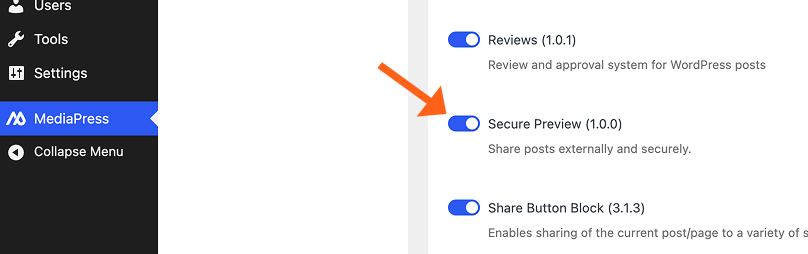
For external stakeholders, Secure Previews can provide access to a draft without giving the reviewer a WordPress dashboard account. Invited reviewers can comment on the draft and indicate whether it requires changes or is approved.
MediaPress also expands WordPress revisions with visual comparisons for blocks and metadata. That is particularly useful when teams need to compare not only article text but changes to elements such as SEO fields and featured images.
For already published content, the Workflow feature supports unpublished edits. Teams can prepare changes to a live article separately and schedule the revised version for publication later.
Taken together, these features make Newsroom’s editorial proposition concrete: statuses, feedback, reviews, revisions, and updates can be managed closer to the content they apply to.
Newsroom provides the structure for those processes while leaving teams in control of how their editorial workflow is defined.
How does Newsroom handle editorial governance?
The publication checklist is one of Newsroom’s clearest examples of governance in practice.
MediaPress checklists define requirements that should be satisfied before an article is published. Checklist items can be configured as warnings or hard blockers; hard blockers disable the Publish button until the requirement is met.
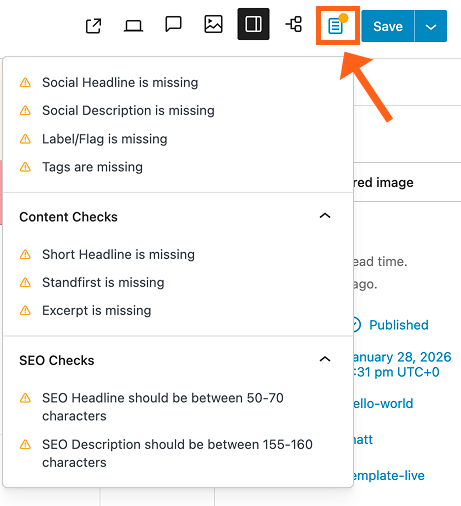
This provides a practical way to encode publishing requirements rather than relying entirely on documentation or individual memory.
- Reviews complement the checklist by recording whether team members consider a post approved or in need of further changes.
- Secure Previews extend that review process to invited people outside the WordPress dashboard.
- Revisions provide another useful record by allowing teams to compare previous versions of both content and metadata.
Together, configurable statuses, reviews, checklists, revisions, and secure external review provide a set of tools for building publishing controls into the editorial process. Organizations with specialized compliance or authorization requirements can map those requirements to the appropriate Newsroom workflows and controls during implementation.
As with any governance system, the configuration matters. Checklists and review stages are most useful when they reflect genuine publishing requirements and the way the organization actually works.
Can Newsroom reduce publishing-tool fragmentation?
Potentially. How much depends on the existing stack.
Newsroom includes functionality that publishers might otherwise source separately: editorial collaboration, workflow statuses, reviews, publication controls, search and recommendations, analytics, plugin management, and several publishing-specific content tools.
That creates opportunities to consolidate overlapping functionality.
But consolidation and integration aren’t the same thing.
A specialist system can remain useful after Newsroom is adopted. The DAM integration is a good example: MediaPress connects WordPress with Cloudinary and Bynder rather than attempting to make a dedicated DAM unnecessary.
The same principle applies to the wider publishing stack.
The useful comparison is which existing capabilities Newsroom can provide directly, which specialist systems should remain, and how those systems connect to the publishing environment.
The amount of consolidation will naturally vary by existing architecture. Publishers with mature specialist systems can focus on integration, while organizations with overlapping publishing tools or custom publishing functions can evaluate which capabilities Newsroom can bring into the core publishing environment.
For organizations managing that complexity across multiple properties, How to Scale Content Operations Across Multiple Brands and Markets looks at how workflows, governance, and publishing technology can scale together.
Previously, you might have edits happening in Google Docs, comments in Slack, tasks in Trello, and requests coming in from multiple directions. Now all of that collaboration can happen within a single editorial workflow.
Charlotte Cijffers, Chief Digital Officer, ITP Media Group
Content analytics: What does Newsroom measure?
Newsroom includes WP Engine Analytics powered by TWIPLA, with analytics embedded into the publishing platform.
Its capabilities extend beyond basic pageview reporting. Newsroom’s current analytics offering includes real-time visitor and content performance data, heatmaps, scroll tracking, session recordings, funnels, traffic-source analysis, UTM reporting, and conversion and attribution data.

For editorial teams, the useful distinction is how that information is organized.
Traditional web analytics often starts with the site or visitor journey. Content analytics starts with individual stories and asks how readers interact with them. That can help teams compare content, understand engagement, identify where readers drop off, and examine which content contributes to conversions or other outcomes.
The practical value comes from how editorial and audience teams use those insights when updating, promoting, optimizing, or planning content.
What does Newsroom mean for technology teams?
For technology teams, the relevant question is what Newsroom provides out of the box and where WordPress’s extensibility remains useful.
The package includes Smart Plugin Manager for automated plugin and theme updates, Smart Search AI + Recommendations, analytics, and MediaPress’s publishing functionality.
That can reduce the need to source or build equivalent capabilities individually.
At the same time, Newsroom retains WordPress’s extensibility.
MediaPress itself exposes developer customization options. Publication checklists, for example, can be customized by developers, and publishers can still build their own themes, integrations, blocks, content models, and other WordPress functionality.
Full Site Editing compatibility is also relevant to implementation planning.
WP Engine states that a site’s WordPress theme needs to be compatible with Full Site Editing to fully utilize MediaPress, so existing implementations should include theme compatibility in their technical assessment.
Who is WP Engine Newsroom best suited for?
Newsroom is primarily designed for organizations where publishing and editorial workflows can be made more efficient. The strongest fit is where content volume, contributors, sites, or governance requirements make coordination a significant part of publishing.
High-volume news and media publishers
News and media organizations are the most obvious fit. They publish frequently, often with many stories moving through production at the same time. Those stories may pass between reporters, editors, reviewers, audience teams, and other stakeholders before publication.
Speed matters, but so does visibility. Editors need to know what is being worked on, what is ready to edit, what is waiting for approval, and what can go live. For publishers covering breaking or time-sensitive stories, the underlying infrastructure also needs to accommodate periods of significantly higher traffic.
Newsroom is most relevant here when publishing volume makes coordination itself a substantial part of the editorial workload.
Multi-brand and multi-site publishers
Organizations operating several publications face a different problem: how much should be shared, and how much should remain specific to each publication?
Sites may share infrastructure, technology, governance standards, or integrations while maintaining separate editorial teams and workflows. A centralized publishing platform can provide more consistency across the group without requiring every publication to operate in exactly the same way.
That makes Newsroom relevant to publishers trying to manage shared operations across multiple WordPress properties while preserving differences between their editorial teams. See how the Netherlands-based newsroom NRC achieved this in our case study.
Enterprise organizations with newsroom-style publishing operations
The same requirements aren’t limited to traditional news companies.
Universities, public companies, and other large organizations can operate newsroom-style publishing teams with frequent content, multiple contributors, several stakeholders, and formal review requirements. Publishing may involve communications teams, subject-matter experts, legal or compliance stakeholders, marketers, and editors rather than reporters and a traditional news desk.
What matters is the operating model. If publishing is business-critical and content regularly moves between multiple people before it goes live, many of the same workflow and governance requirements apply.
For these organizations, Newsroom is more relevant when publishing resembles a coordinated production process rather than occasional website content management.
Who may not need Newsroom?
A small publication with a few contributors and a straightforward draft → review → publish workflow may already have everything it needs with WordPress and a carefully selected set of tools.
The same is true for organizations with limited governance requirements, a single site, or little need for dedicated editorial analytics.
The additional operational layer becomes harder to justify if there isn’t much operational complexity to manage in the first place.
Newsroom also assumes that WordPress will remain the publishing foundation. Organizations specifically looking to move away from WordPress are making a different architectural decision and should evaluate platforms in that context.
The dividing line isn’t simply company size. Publishing complexity is the more useful measure.
Content volume, number of contributors, workflow stages, governance requirements, sites, integrations, and the amount of coordination required between them all affect whether Newsroom’s additional publishing layer is likely to be relevant.
Adoption: What should publishers expect?
Implementation depends on the existing WordPress environment.
For a compatible WordPress implementation, adoption can focus more heavily on configuration: deciding which MediaPress modules to use, defining workflow statuses, configuring publication checklists, connecting analytics and DAM systems where relevant, and preparing teams to use the new process.
Configure before rolling out
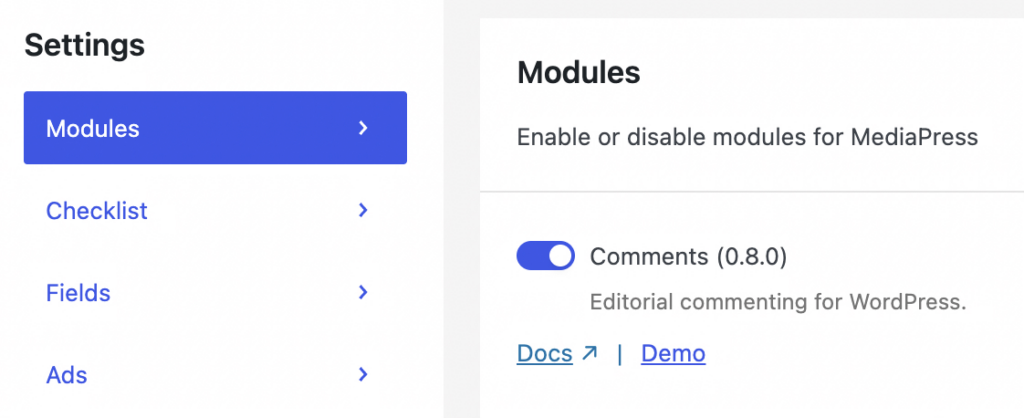
Newsroom’s modules can be enabled or disabled individually, giving teams full control over which functionality they introduce rather than requiring every feature to be used from day one.
Workflow configuration also involves decisions about how Newsroom should reflect the publishing process. Custom statuses can mirror the way work moves through the organization, while publication checklists can focus on requirements that genuinely need to be enforced.
Before a wider rollout, publishers should test those configurations with the people who will actually use them.
The practical point is simple: Newsroom adoption combines technical implementation with the opportunity to configure the platform around the organization’s publishing process.
To learn more about introducing Newsroom into an existing publishing operation, see the WP Engine Newsroom Adoption Guide.
WP Engine Newsroom pricing and total cost of ownership
WP Engine doesn’t present Newsroom as a standard self-service purchase with a single public price. Buyers need to contact WP Engine for pricing based on their requirements.
For an enterprise implementation, the platform price is also only part of the calculation. Publishers can compare the cost of the existing environment with the expected environment after adoption.
That can include:
- platform and hosting
- workflow and collaboration tools
- analytics
- plugins
- custom development
- integrations
- maintenance
- developer time
- vendor management
- specialist systems that will remain
- implementation and training
The important distinction is between the capabilities Newsroom can consolidate and the systems or costs that remain part of the publishing environment.
If an existing DAM remains in place, for example, its cost remains part of the future stack. If Newsroom provides functionality currently handled by a workflow tool or custom implementation, those costs can be included in the comparison.
A useful TCO assessment, therefore, compares the complete operating environment before and after adoption, including the tools Newsroom can consolidate and the specialist systems the organization plans to retain.

Evaluating your publishing platform?
Discover the key capabilities, integration requirements, and considerations to assess when choosing an enterprise publishing platform.
Support and partnership
WP Engine provides 24/7 support around its platform and WordPress environment, with available support channels depending on the customer’s plan.
Its documented support scope covers WP Engine platform functionality and areas such as caching, SSL, server maintenance and security, performance, CDN, backups, onboarding, and migration.
For a Newsroom buyer, the wider publishing environment may also combine WP Engine functionality with custom WordPress development and third-party systems. Establishing ownership across those components during implementation helps teams understand where different types of requests should be directed after launch.
Buyers can also confirm the support channels, escalation paths, SLA, and other commitments that apply to their specific Newsroom agreement during procurement.
WP Engine Newsroom review: What to consider before choosing it
Newsroom is worth evaluating when WordPress is the intended publishing foundation and the organization needs more publishing-specific functionality around it.
The strongest reasons to consider it are concrete:
- editorial reviews and collaboration extend beyond the CMS;
- publication requirements need to be applied consistently;
- publishers want richer content and visitor analytics;
- specialized publishing formats are important;
- or the surrounding WordPress stack includes a growing number of tools and custom publishing functions.
For organizations with an established WordPress environment, the evaluation becomes which of those capabilities Newsroom can provide directly, which existing systems should remain, and how the resulting publishing environment compares with the current setup.
That is ultimately the useful test.
WordPress provides the publishing foundation. Newsroom adds a package of editorial, analytics, search, development, and platform capabilities around it. Its value comes from how those capabilities map to the requirements of the publishing operation—and what it would otherwise take to provide and maintain them.

See WP Engine Newsroom in action
Contact Sales to discuss your current content operations and explore Newsroom’s full capabilities across your publishing lifecycle.
Frequently asked questions about WP Engine Newsroom
Does Newsroom replace WordPress?
No. Newsroom is built around WordPress. WordPress remains the underlying CMS, while Newsroom adds MediaPress and other WP Engine tools and services around it.
Which products are included with WP Engine Newsroom?
WP Engine’s technical documentation lists MediaPress, ACF PRO, Smart Plugin Manager, Smart Search AI + Recommendations, and WP Engine Analytics powered by TWIPLA as part of the Newsroom package.
Can external reviewers review an article without a WordPress account?
Yes. MediaPress Secure Previews can provide invited reviewers with individual preview links. Invited reviewers can comment on the draft and mark their review as requiring changes or approved.
Can Newsroom prevent an article from being published if requirements aren’t met?
Yes. MediaPress publication checklists can contain hard-blocker items. When a hard blocker hasn’t been satisfied, the Publish button is disabled until the requirement is addressed.
Which DAM platforms does Newsroom integrate with?
The current MediaPress technical documentation specifically documents connections with Cloudinary and Bynder. Assets can be synchronized using DAM tags and made available within the MediaPress media interface.
Can editors prepare changes to a published article without immediately changing the live version?
Yes. MediaPress Workflow allows editors to save changes to a published post as an unpublished edit and schedule that version to replace the current post later.
Does Newsroom require a specific WordPress theme setup?
WP Engine states that the site’s theme must be compatible with Full Site Editing to fully utilize MediaPress. Theme compatibility should therefore be included in implementation planning.
How much does WP Engine Newsroom cost?
WP Engine doesn’t publish a single standard self-service price for Newsroom. Organizations need to contact WP Engine for pricing based on their requirements.
- WP Engine is a proud member and supporter of the community of WordPress® users. The WordPress® trademark is the intellectual property of the WordPress Foundation. Uses of the WordPress® trademarks in this website are for identification purposes only and do not imply an endorsement by WordPress Foundation. WP Engine is not endorsed or owned by, or affiliated with, the WordPress Foundation. ↩︎