Get Started


Key Takeaways
Multi-stage content approval workflows replace informal review habits with structured quality checks to prevent brand erosion, publishing delays, and costly post-launch errors.
Editorial pipelines break down when teams confuse gathering input with final decision-making authority. Enforcing a Single Approver Rule for each stage eliminates committee-style delays while clearly separating reviewer recommendations from binding go/no-go decisions.
Building a functional pipeline requires mapping five distinct operational roles and establishing mandatory entry and exit criteria for every production stage. Drafts must move forward based on explicit quality gates rather than arbitrary due dates to eliminate repetitive revision loops.
Integrating approval workflows directly inside your content management system with a platform like WP Engine Newsroom eliminates double-handling while enabling automated escalation rules for delayed reviews. Built-in role permissions, pre-publish checklists, and embargo controls ensure only fully authorized assets reach the live site.
Teams should audit their current content handoffs, centralize reviewer feedback into a single source of truth, and standardize quality checklists to streamline publishing operations.
In print publishing, if you don’t have a defined, multi-stage review process, things go off the rails fast and expensively. When skipping a single step might mean tens of thousands of dollars in ruined stock sitting on a pallet, you just don’t skip steps.
I learned that the hard way.
Print publishing teaches you very early on that rigorous quality control is the structural backbone that keeps a project from collapsing under its own weight.
Modern digital publishing eliminates the physical printing press, but it hasn’t eliminated those same failure modes.
Because digital allows us to “just fix it live,” it’s very tempting for teams to skip the discipline of staged reviews—copyediting, design verification, staging previews, and final sign-off.
The result looks like agility at first.
However, that agility comes with continuous firefighting, broken user experiences, brand erosion, and errors rushed out under the illusion of speed.
Real publishing velocity and distribution rely on unshakeable review discipline.
In this guide, I’ll break down how to map your stages, establish strict entry and exit criteria, assign distinct roles, and automate the governance process directly inside WordPress®1.
What is a content approval workflow?
In brief, a content approval workflow is a formal, repeatable sequence of quality checks and sign-offs required before any piece of content goes live. Positioned directly between creation and publication, it acts as the control layer of your publishing lifecycle.
The content approval process defines the path an asset follows from a completed draft to authorized release, establishing clear boundaries for who checks the work and who authorizes publication.
Beyond basic quality control, its core business purpose is to establish brand consistency, enforce decision clarity, and create a predictable publishing cadence. Instead of relying on ad-hoc sign-offs, a structured workflow removes ambiguity around when an asset is truly ready for distribution.
Corporate publishing pipelines often break down when teams blur the line between two distinct functions:
- Content review (gathering input): Evaluating the asset, line-editing for style, checking technical accuracy, and offering constructive feedback. Reviewers evaluate quality and recommend changes.
- Content approval (making decisions): Exercising final authority to issue a binding go/no-go publishing decision. Approvers hold business accountability for what goes live.
Maintain strict decision discipline by separating feedback gathering from final sign-off. Avoid committee-style sign-offs. One accountable approver per asset is the single most effective rule to prevent output delays.
At each checkpoint, the approver records a definitive decision: move forward, request specific revisions, or reject.
Back in my magazine days, I summed this up by saying “no publication can survive the mistakes of more than one person.”
Reviewers give input. Approvers make decisions.
Depending on your editorial process and content approval flows, the same person may serve as both a reviewer and an approver, but they are very different functions.
For example, the managing editor might wear a copy editing hat at one stage of the process, and a final approver hat in another. The copy editing stage is a technical exercise. The approval stage is about who holds responsibility for what gets published and when.
Did I mention I learned the hard way?
Long story short, very early in my career, an advertorial was written by our team, copy edited, and sent to the client for subject matter expert review and more copy editing by their comms department. It landed back on my desk with just two days left before the deadline. I gave it a final editorial review and sent it for layout.
This mistake happens constantly in modern content operations when teams send an executive a loose Google Doc or Slack link asking for a “quick look.” Without explicit stage guardrails and contextual framing, leadership wastes valuable time line-editing already-approved copy instead of providing a simple go/no-go decision.
Defining the exact scope of review at every step prevents leadership bottlenecks and keeps your pipeline moving.
The 5 essential roles in an editorial workflow
Every functional editorial pipeline relies on five distinct roles and responsibilities to move an asset safely from a blank page to a published URL:
- Creator
- Subject matter expert (SME)
- Internal reviewer or copy editor
- Final approver
- Publishing admin
In case you find yourself filling more than one role, do your best to look at each piece with fresh eyes, and make sure you’re reviewing for the right things. Don’t simply combine your duties.
| Role | Description and key responsibilities | Core focus |
| Creator | Drafts original content according to the brief and entry criteria. | Content generation and revisions |
| Subject matter expert (SME) | Verifies technical accuracy, claims, and regulatory compliance. | Accuracy and risk mitigation |
| Internal reviewer or copy editor | Checks tone, readability, structural flow, and brand voice. | Editorial quality and style |
| Final approver | Holds ultimate sign-off authority (enforce the “Single Approver Rule” to avoid committee paralysis). | Binding go/no-go decision |
| Publishing admin | Schedules, formats, and deploys the fully approved asset to the live CMS. | Technical deployment |
Optimize content reviews
Discover how WP Engine Newsroom unifies multi-author collaboration, custom publication checklists, and automated approval workflows directly inside WordPress.
Why content approval workflows break down (and how to fix them)
Informal editorial habits rarely scale as content volume and team size grow. Most approval bottlenecks stem from five structural failure modes:
| Approval challenge | Root cause | Practical solution |
| Unclear ownership | Broad stakeholder access leads to committee sign-offs where everyone gives input but nobody is accountable. | Enforce the Single Approver Rule per stage. Reviewers recommend revisions; one approver makes the final go/no-go decision. |
| Scattered feedback | Comments arrive across Slack, email threads, Google Docs, and verbal notes, creating parallel records. | Centralize all comments and visual markups into a Single Source of Truth directly within your CMS or asset manager. |
| Infinite revision loops | Subjective, vague requests (e.g., “make it punchier”) force guessing games and repetitive rework. | Require Structured Feedback that is specific, directive, prioritized, and anchored to a clear brand style guide. |
| Approval deadlocks | Reviewers miss deadlines with no backup plan, leaving assets stranded indefinitely in inbox queues. | Set explicit Turnaround Deadlines paired with automated escalation paths and secondary backup approvers. |
| Adoption resistance | Teams accustomed to informal processes view structured workflows as unnecessary bureaucratic red tape. | Publish a 1-page workflow guide, run short onboarding walkthroughs, and demonstrate how process protects author time. |
Step-by-step: How to build a multi-stage editorial approval workflow
Building a reliable workflow requires getting rid of bad habits and workarounds and replacing them with structured guardrails. Here’s how to construct a multi-stage workflow from the ground up:
Step 1: Map your current process and identify bottlenecks
You’re not going to get very far without a full understanding of the current process. Your writers probably didn’t develop workarounds just to drive you crazy. They’re solving a problem. Getting them to adapt to the new process means it has to solve those same problems, but in a more effective way.
Before building a new system, map the system you already have and figure out where the process breaks down:
- Audit the handoffs: Trace every point where a draft changes hands, from initial website and SEO content request forms to final layout, evaluating your content and workspace sharing setups to see where the asset sits idle waiting for action.
- Identify review process steps: Any content asset should move from one step to the next, without going backward. If the step isn’t completed, it doesn’t move forward.
- Track version sprawl: Count how many places a single asset lives during production. The ideal number is one. Tracking how draft status corresponds to your editorial calendar keeps everyone aligned on target publishing dates.
- Pinpoint manual triggers: Highlight every step that relies on someone manually emailing or pinging a colleague to nudge a draft forward.
A scattered feedback loop is a common issue. Centralize all comments, asset versions, and sign-offs in a single system. Feedback scattered across Slack, emails, and separate doc links creates parallel records, making final approval status difficult to verify and causing version confusion.
Scattered feedback only has two possible outcomes:
- You’ve had a disaster, and you’re dealing with the fallout.
- You haven’t had a disaster yet.
Don’t feel left out if you’re in scenario 2. If your review “process” is an undocumented tangle of Slack messages, emails, and in-line comments, then it’s only a matter of time.
Step 2: Establish entry and exit criteria for every stage
A draft should never move to the next phase based on due dates. Define explicit gates for every stage:
- Entry criteria: Prerequisites required before a stage begins. For example, completing specialized templates for content briefs is required before writing starts, or a complete draft is required before reviewing starts. Make sure to define what “complete” means for each stage.
- Exit criteria: Mandatory conditions that must be met before moving to the next stage. For example, it’s not enough for a reviewer to read a document and leave some comments. They need to formally sign off before it goes to the next stage.
Step 3: Standardize feedback across teams
Vague feedback is the enemy of fast and accurate publishing. Establish explicit quality standards before writing begins, referencing your content style guide and a standardized quality checklist rather than subjective opinions. Train your team to follow four essential feedback rules:
- Specific: Pinpoint the exact line, visual element, or section requiring revision.
- Directive: Clearly state what needs to change rather than just pointing out what is wrong.
- Prioritized: Mark edits as mandatory (must-fix) versus optional polish.
- Contextual: Explain why the edit is needed, aligning requests with business goals or brand standards.
- In-context and consolidated: Keep feedback anchored directly alongside the asset. Designate a single content owner to de-duplicate and resolve conflicting comments before routing actionable revisions back to the creator.
I once spent a Friday night completely rewriting the lead section of a feature because an exec left a sticky note on the manuscript that simply read: “Needs more punch.”
I stripped out technical nuances, added dramatic adjectives, and restructured the narrative arc.
When we reviewed the draft on Monday morning, it turned out “punch” just meant he wanted a few more subheads to break up a dense block of body text.
The takeaway? Three hours of unnecessary guesswork and author frustration could have been saved with three words: “Add more subheads.”
Step 4: Implement automated notifications and escalation rules
Human memory is no substitute for a formal project management system.
Set strict review windows and establish explicit turnaround expectations. Pair these with automated triggers to remind reviewers of upcoming deadlines across the content calendar. If a reviewer misses the window, automated escalation rules should notify a backup approver, reassign the task, or at least flag the creator or an editor.
When a draft languishes in someone’s inbox past its window, your system needs a predetermined rule to break the deadlock. Choose the escalation rule that best fits your team’s structure and risk tolerance:
- The secondary approver failover: Automatically reassign the draft or alert a designated backup as soon as the review window expires. This ensures an out-of-office response doesn’t stall an entire launch.
- The conditional auto-advance: For low-risk stages (like secondary copy edits or stylistic polishes), configure the workflow to automatically pass the asset forward with a “skipped” tag if the window closes, while keeping strict, impassable gates on legal and SME stages.
- The management pull-up: Re-route overdue drafts directly to a managing editor’s queue with an escalated priority flag. This gives leadership immediate visibility to step in, make the executive call, or reallocate resources during daily review meetings.
Step 5: Measure key approval metrics and audit quarterly
Building a workflow isn’t a one-time event. Measure performance metrics regularly to keep your process lean.
Make sure to look at:
- total approval cycle time
- review rounds per asset
- first-pass sign-off rates
- and where content sits idle longest.
Conduct quarterly audits to refine review windows, update guidelines, and clear emerging bottlenecks as team sizes and content volumes evolve.
Bonus tip: Overcoming adoption friction and process resistance
Workflow failures are often human challenges rather than technical flaws.
When moving away from ad-hoc collaboration, reduce adoption friction by walking teams through the workflow before enforcement begins. Focus onboarding on how structured gates, automated escalation, and explicit exit criteria eliminate chaotic weekend rewrites and endless feedback loops.
Streamlining content approvals directly in WordPress
Moving your approval workflow out of external docs, chat apps, and email chains and moving the approval system directly into your content management system (CMS) with WP Engine Newsroom eliminates double-handling and publishing friction.
Governance that lives within the publishing environment starts to feel less like a roadblock and more like putting on your seat belt. It might take some getting used to, but once you do, you’ll only notice it when it saves you from catastrophe.
Role-based permissions restrict access without restricting flow
Integrating native website feedback tools directly into the CMS helps maintain these boundaries without sending reviewers to external platforms. Leveraging native WordPress roles alongside custom workflow permissions restricts access so unapproved drafts cannot accidentally go live.
For sensitive corporate communications, built-in embargo controls ensure market-critical content stays staged securely within the CMS until every single sign-off is cleared.
Real-time collaboration and integrated assets
In traditional WordPress setups, two people trying to work on the same draft triggers a post-locking warning. WP Engine Newsroom uses dedicated Editor Tabs for Editor, Media, and Meta functions. Isolating these functions allows different team members to work on SEO, media updates, and post content at the same time without locking each other out.
Enforcing quality with Checklists and Workflow features
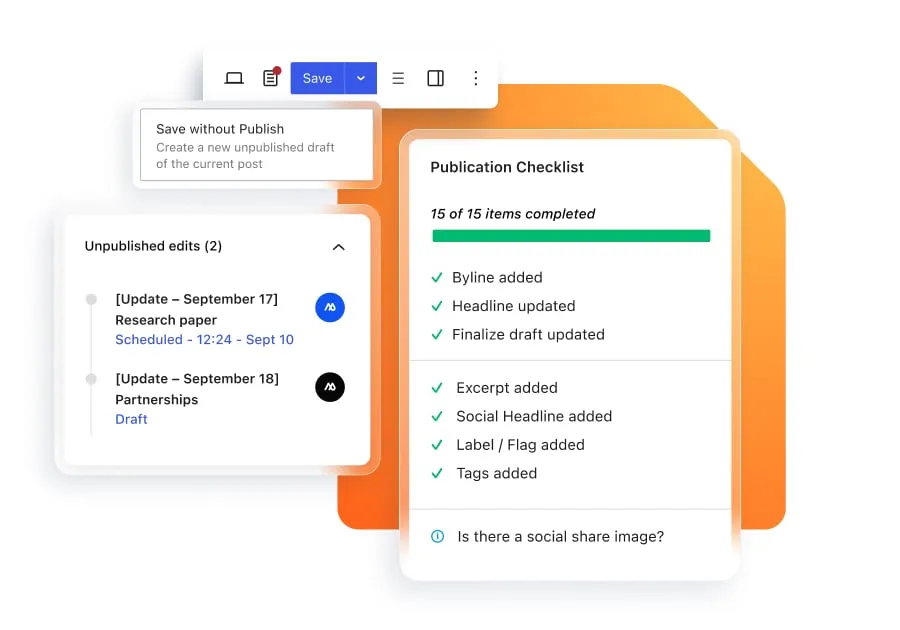
Speaking of lockouts, there are times when that’s exactly what you want. That’s why Newsroom’s Checklist feature disables the “Publish” button until your key parameters are met.
Just how rigidly you apply those parameters is up to you. Customization allows you to decide which elements are mandatory and which are only suggested.
Vanilla WordPress lets you save drafts without publishing them. The Workflow feature of Newsroom gives you the ability to do the same thing with live posts. Save your work as an unpublished draft, take it through every quality gate and review, and schedule it for publication without once leaving your CMS.
Staging embargoed site updates without the last-minute scramble
Newsroom has tons of features, but there’s plenty you can do with just the ones I’ve mentioned here.
It’s very common to run into a situation where you need to make changes across numerous posts, but the changes can’t be live before a certain time. The usual “solution” is to get the updates ready in separate docs, and then roll them all out in a mad rush when the embargo lifts.
This came up recently at WP Engine, when we improved Global Edge Security (GES) with even more powerful bot mitigation capabilities. This meant updates to at least a dozen content pieces that mentioned GES, bots, or both, and none of the updates could go live before the official product launch.
Newsroom let us skip the mad rush.
After vetting all of the updates with our product and security experts, we saved them as unpublished edits and scheduled them to go live at the same time as the official announcement.
Scale your content workflows with WP Engine Newsroom
Newsroom brings governance, real-time multi-author collaboration, customizable pre-publish checklists, and embargo controls natively into WordPress.
Instead of wrestling with fragmented tools and scattered email chains, Newsroom gives enterprise editorial teams the connected foundation needed to publish faster without sacrificing quality or brand security.
- Ready to streamline your publishing operations? Explore how WP Engine Newsroom can transform your team’s editorial workflow today.
- Evaluating your CMS architecture? Download the Buyer’s Guide to Evaluating Modern Editorial Platforms to review the workflows, governance models, and security standards required for modern publishing operations.
FAQs about editorial approval workflows
How do you prevent content approval bottlenecks?
Focus on setting clear entry/exit criteria, enforcing the single approver per stage rule, and using automated notification triggers.
What is the difference between a project management tool and a content approval tool?
Project management tools track task status and deadlines; content approval tools govern the actual asset text, versioning, inline feedback, and publishing permissions.
How many reviewers should be involved in a content approval stage?
Keep review teams as small as possible. This both delineates responsibilities and prevents wasted or duplicated effort.
- WP Engine is a proud member and supporter of the community of WordPress® users. The WordPress® trademark is the intellectual property of the WordPress Foundation. Uses of the WordPress® trademarks in this website are for identification purposes only and do not imply an endorsement by WordPress Foundation. WP Engine is not endorsed or owned by, or affiliated with, the WordPress Foundation. ↩︎