Get Started


Key Takeaways
A publishing tech stack should support the full content lifecycle, connecting planning and creation with review, governance, publication, distribution, measurement, and optimization.
An integrated publishing stack doesn’t need every capability in one platform. Specialist tools can remain where they add value, as long as information moves reliably between systems without unnecessary manual work.
WordPress provides a flexible foundation for enterprise publishing, with specialist tools and integrations extending the stack as requirements change.
Building a more connected stack starts with understanding how content moves, where key data is managed, and where workflow gaps exist.
WP Engine Newsroom brings core publishing workflows, governance, analytics, and infrastructure closer to WordPress, while supporting integrations with the specialist systems enterprise teams still need.
For enterprise teams publishing on WordPress®1, the open source CMS provides the ideal foundation for creating, managing, and publishing content. But it’s rarely the only system involved.
Behind the scenes, planning might happen in one platform, drafting in another, with separate systems for managing digital assets, coordinating approvals, checking analytics, and handling distribution.
As publishing operations grow, new tools and integrations are often added to meet specific requirements. That can leave teams with a tech stack that works on paper, but results in more manual handoffs, duplicated work, technical debt, and publishing bottlenecks.
Reducing everything to a single platform may seem like the answer to overcoming those issues. However, specialist tools still have an important role to play. Instead, publishers need to think about how each part of their tech stack fits into the wider content lifecycle and, most importantly, how information moves between them.
Here, we look at how publishers can create a more integrated publishing operation, building a connected WordPress tech stack that retains the flexibility of the CMS without creating more work for the teams using and maintaining it.
What is a publishing technology stack?
Large-scale publishing operations rely on multiple layers of tech working across the entire content lifecycle.
Combined, these platforms, integrations, and infrastructure form the digital publishing technology stack, supporting everything from planning and creation through review, publication, and distribution to measurement and optimization.
WordPress can provide the core environment for creating, managing, and publishing content, while editorial workflows, digital asset management, governance, audience data, analytics, and distribution may involve additional systems.
Underneath them sits the infrastructure responsible for keeping publishing environments secure, performant, and available as traffic and content volumes change.
At the enterprise level, what matters isn’t which tools make up the publishing technology stack. It’s how well their roles are defined, how effectively they exchange information, and whether they support a connected publishing operation from start to finish.
What should an enterprise publishing tech stack include?
The exact combination of platforms and systems will vary between organizations, depending on their publishing requirements, existing infrastructure, and wider tech ecosystem.
What remains consistent are the core capabilities enterprise publishing technology needs to support, from editorial workflows and content creation to governance, distribution, analytics, and infrastructure.
Most enterprise publishing stacks need to cover seven core areas:
| Capability | What it needs to support |
| Content planning and editorial workflows | Assignments, editorial calendars, collaboration, status visibility, handoffs, and production management |
| Content creation and CMS | Structured content, editing, publishing, extensibility, and multi-site requirements |
| Review, governance, and approvals | Permissions, approval workflows, publishing standards, audit trails, and compliance |
| Digital asset management | Images, video, documents, metadata, rights management, and DAM integrations |
| Distribution and audience experiences | Websites, apps, newsletters, syndication, social channels, APIs, and other destinations |
| Content analytics and optimization | Content performance, audience behavior, attribution, conversions, and insights that can inform future editorial decisions |
| Infrastructure, performance, and security | Hosting, scalability, uptime, caching, security, and developer tooling |
The value of these capabilities depends on how well they work across the wider publishing operation. Editorial workflows need to connect with governance, assets need to move into the publishing environment, and performance data needs to feed back into editorial decisions.

Bring all modern publishing capabilities into one place
WP Engine Newsroom connects editorial workflows, governance, and insights around WordPress, while supporting the specialist systems your teams rely on.
Why do publishing tech stacks become fragmented?
Instead of stemming from a single major event or decision, fragmentation is usually the cumulative effect of smaller changes made across the publishing operation over time. Some of the most common factors include:
- New requirements: Teams add tools or plugins to support new publishing needs without necessarily revisiting the wider architecture.
- Gaps between systems: Spreadsheets, documents, and communication tools are introduced to bridge processes that existing platforms don’t support.
- Specialist capabilities: Dedicated platforms for areas such as analytics or digital asset management add value, but also create more connections across the stack.
- Custom integrations: New integrations keep content and data moving between systems, but each one adds another dependency to maintain.
- Organizational growth: As publishing volumes increase and more teams, sites, or brands become involved, a stack that once worked well can become harder to coordinate.
As these changes mount, teams can end up entering the same information in several places, manually updating statuses, or moving content and assets between systems. IT and systems teams also have more integrations to maintain, troubleshoot, and update.
This is where the connections between systems become critical. The stack needs to work as a publishing operation, rather than a loose collection of tools performing separate functions.
What makes a publishing tech stack connected?
Performant integrations are about much more than just linking up platforms through APIs. Connections need to support the way content, assets, and data move through the publishing operation, without creating additional work for the teams using the systems.
An integrated publishing tech stack should provide:
- Shared visibility that enables teams to see where content sits within the production process and what needs to happen next.
- Clear ownership of content, assets, workflow information, and data, with defined systems of record to avoid conflicting versions across platforms.
- Fewer manual handoffs by allowing content and data to move reliably between systems without repeated entry, copying, or manual status updates.
- Consistent governance through permissions, approvals, and publishing controls that apply across the operation rather than being managed separately within individual tools.
- Connected insights that feed content performance and audience data back into editorial planning, production, and optimization.
- Extensible architecture that allows specialist systems to be added or changed without every new requirement becoming another custom integration project.
For IT and systems teams, every integration also needs to remain manageable, reducing operational friction without creating an expanding maintenance burden as the publishing stack changes.
The stack needs to work as a publishing operation, rather than a loose collection of tools performing separate functions.
How to build a connected publishing stack on WordPress
Building an integrated publishing stack starts with focusing on the content operation.
Instead of looking at individual tools in isolation, build a detailed understanding of how content moves through the organization, where each system fits, and where unnecessary friction has developed.
1. Map your existing content lifecycle
Start by plotting what happens to content from the initial idea through to publication and optimization.
Follow the content
Track where briefs and assignments are created, where content is drafted, how reviews and approvals are handled, where assets are stored, how content reaches different channels, and how performance is measured afterward.
This provides a full picture of what the publishing stack needs to support before deciding which tech belongs where.
Look for friction
Focus on the process rather than the software. Look for manual handoffs, activity occurring outside official systems, and points where information must be transferred between platforms.
2. Identify systems of record
Next, establish where the content and data moving through the publishing lifecycle should live.
Establish ownership
Identify which system holds the definitive version of each type of information. Where does a piece of content live? Which system owns digital assets, workflow information, or audience data?
If the same information appears across multiple platforms, defining a source of truth helps prevent conflicting versions and duplication.
Plan how data moves
Once ownership is established, IT and systems teams can determine how data needs to move between platforms, when that exchange should happen, and which other systems need access to it.
This doesn’t mean forcing everything into WordPress. Content and data can live in the systems best suited to managing them, while remaining accessible to the wider publishing stack.
3. Find workflow gaps and duplicate tooling
With the content lifecycle and systems of record established, look for areas where the current stack is creating unnecessary work.
Identify workflow gaps
Look for repeated data entry, manual status updates, assets being transferred between platforms or teams relying on spreadsheets, documents, and messaging tools to keep processes moving.
These workarounds can indicate that existing systems aren’t properly supporting the publishing workflow or that the connections between them need attention.
Review overlapping tools
Different teams may use separate platforms to solve similar problems, resulting in overlapping capabilities across the stack.
Not every duplicate tool needs to disappear, but you should consider whether each provides a specialist capability worth retaining or is just compensating for a gap that could be addressed elsewhere.
4. Decide what belongs close to WordPress
Not every capability needs to sit inside WordPress. The focus should be on which activities benefit from being closer to the core publishing environment and which are better handled by outside systems.
Prioritize everyday publishing
Consider the activities editorial teams perform most often and those directly connected to content creation. Content planning and production, reviews, approvals, permissions, and publishing controls may be easier to manage closer to WordPress, reducing the need to move between separate interfaces.
Weigh the operational overhead
For IT and systems teams, consolidating core publishing capabilities can mean fewer integrations, dependencies, and points of failure to manage.
Ask whether keeping a capability separate provides enough value to justify the additional operational overhead.
5. Integrate specialist systems intentionally
Specialist systems can remain part of the stack where they provide capabilities the core publishing platform doesn’t need to replicate. A dedicated DAM, CRM, or audience platform, for example, may continue to provide functionality that’s better handled outside WordPress.
Define the connection
For each specialist system, establish what needs to move between platforms, when that exchange should happen, and which teams need access to it.
An API connection alone doesn’t make a workflow integrated if teams still need to copy information, switch between systems, or manage additional steps manually.
Keep specialist value
Retain specialist tech where it provides capabilities the publishing operation genuinely needs. The priority is making sure those systems fit into the wider workflow without becoming another isolated part of the stack.
An API connection alone doesn’t make a workflow integrated if teams still need to copy information, switch between systems, or manage additional steps manually.
6. Build governance into the architecture
Governance works best when it’s part of the publishing workflow, with controls applied as content moves from creation through review and publication.
Define permissions and approvals
Establish who can create, edit, approve, and publish content, with defined approval workflows to make sure the right reviews happen before anything goes live.
Publishing standards, audit trails, and compliance requirements can also be built into the process, helping maintain consistency across teams, sites, and publications.
Make governance scalable
As publishing operations grow, governance is often much harder to oversee. Manual checks and separate documents increase the risk of steps being missed, particularly across multiple teams or sites.
Building controls into the publishing architecture allows governance requirements to be applied consistently without creating a separate layer of work around the publishing process.
7. Connect analytics back to production
Analytics should feed back into the publishing process, helping marketing and audience teams decide what to plan, create, and optimize next.
Bring insights into editorial decisions
Connect content performance and audience behavior with the editorial workflow so teams can identify topics worth revisiting, content that needs updating, opportunities for further distribution, or formats and channels that are performing particularly well.
Create a continuous feedback loop
Giving editorial and audience teams access to the same performance insights helps connect measurement with future content decisions.
This creates a continuous feedback loop, where performance data informs the next round of planning and production instead of remaining isolated within an analytics platform.
8. Evaluate the ongoing cost of integration
The expense of adding a tool to the publishing stack includes more than its license fee and initial implementation. Integrations, maintenance, and management all contribute to the total cost of ownership.
Account for ongoing maintenance
Custom integrations need attention as platforms and APIs change, while plugins require updates and troubleshooting. Multiple vendors also mean more contracts and dependencies to manage, with changes to one system potentially affecting others across the stack.
Factor in developer time
IT and systems teams may also spend time maintaining connections, resolving compatibility issues, and supporting workarounds between platforms.
Considering these ongoing requirements alongside the cost of the tech can help determine where specialist tools justify the additional overhead and where consolidating capabilities could reduce the maintenance burden.
Evaluating your publishing platform?
Discover the key capabilities, integration requirements, and considerations to assess when choosing an enterprise publishing platform.
Where WP Engine Newsroom fits in the publishing tech stack
For organizations already invested in WordPress, WP Engine Newsroom provides an operational layer around the CMS, bringing more of the publishing process into WordPress without requiring every specialist system to be replaced.
This gives teams a way to consolidate core publishing capabilities while retaining DAM, CRM, and other enterprise systems where dedicated functionality still makes sense.
Coordinate editorial production
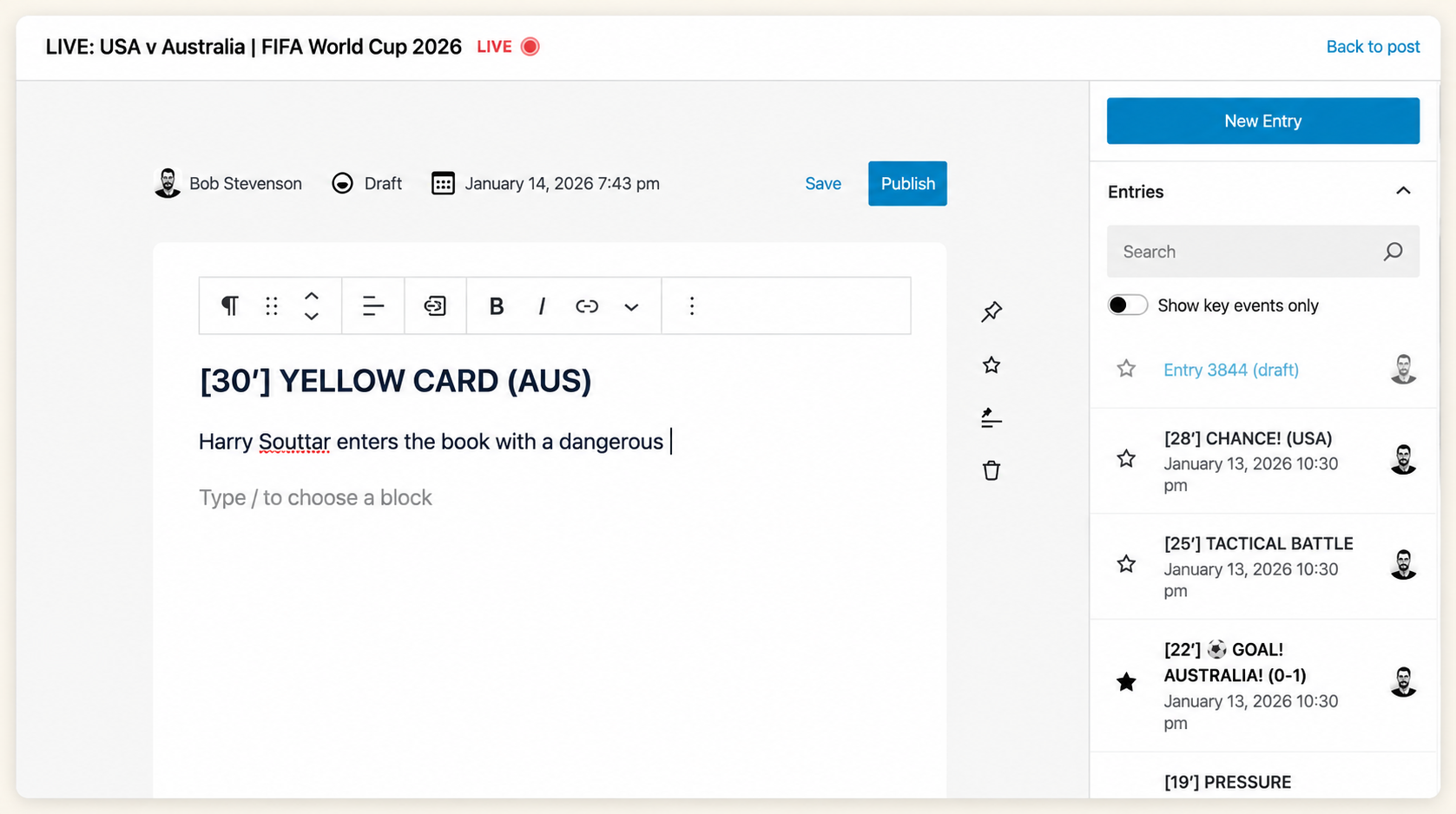
Newsroom brings more of the planning, production, and collaboration involved in publishing into WordPress. Multi-author collaboration allows team members to work on content without version conflicts or lockouts, while comments keep discussions closer to the content itself.
Content scheduling supports planned publication, while the Live News feature enables teams to publish and update live coverage as events unfold, without moving production into separate tools.
Manage reviews and governance
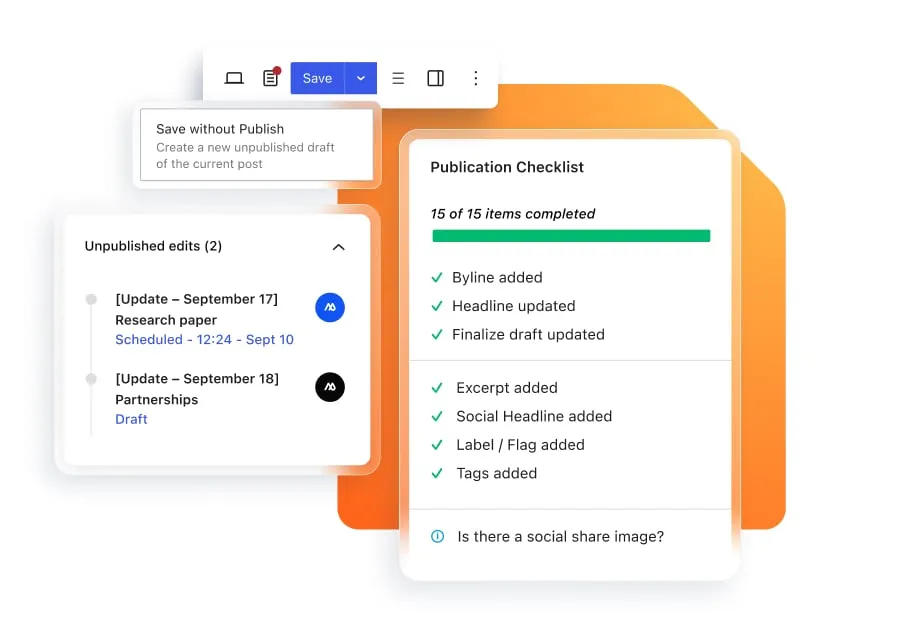
Approval workflows, visual revisions, and unpublished edits give teams more control over how content moves through review, while permissions determine who can create, edit, approve, and publish.
Publication checklists bring quality, accessibility, SEO, and brand standards into the workflow before content goes live, with audit trails supporting greater accountability across the publishing process.
Connect specialist systems
Newsroom supports integrations with specialist systems that remain outside WordPress. DAM integrations, for example, allow approved assets from third-party platforms to be accessed within the publishing workflow, so teams can work with the assets they need without managing a separate manual handoff.
Feed insights into publishing
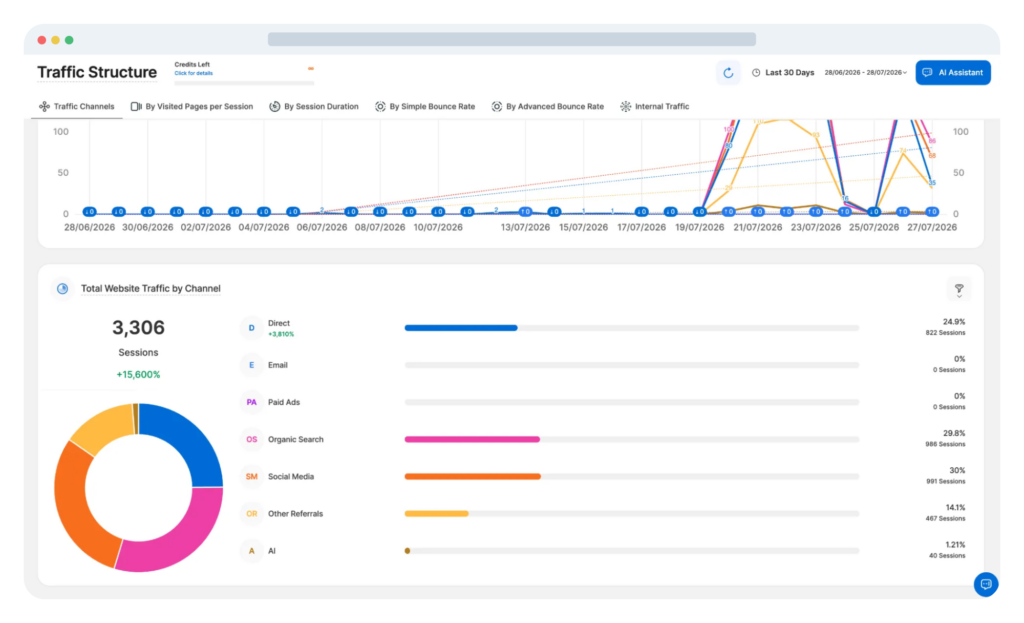
WP Engine Newsroom analytics, powered by TWIPLA, gives teams access to content performance and audience behavior data alongside the publishing operation. This helps connect measurement with editorial decisions, so performance insights can inform what teams create, update, and optimize next.
Support multisite publishing
For organizations publishing across multiple sites or properties, multisite support provides centralized control over areas including templates, branding, and permissions.
This helps teams maintain consistent publishing standards while allowing individual sites and teams to operate within the wider WordPress environment.
Run on enterprise WordPress infrastructure
Newsroom sits on WP Engine’s enterprise WordPress infrastructure, connecting publishing operations with the hosting, security, performance, and scalability needed to support them.
For IT and systems teams, this means fewer independently managed components around the core publishing environment, while maintaining the extensibility needed to connect specialist enterprise systems.
To learn more about introducing Newsroom into an existing publishing operation, see the WP Engine Newsroom Adoption Guide.
Questions to ask before adding another tool to your publishing stack
Every new tool should have a clearly defined role within the wider publishing operation. Before adding another platform, plugin, or integration, consider:
- What specific problem does it solve? Is there a clear requirement that isn’t being met today?
- Does an existing platform already provide this capability? Adding another tool may create unnecessary overlap.
- Where will its data live? Establish which system will act as the source of truth and how information will move between platforms.
- How does it integrate with WordPress? Consider how well the integration supports the actual publishing workflow, not simply whether an API exists.
- Does it introduce another manual handoff? Look at whether teams will need to transfer content, assets, or information themselves.
- Will editorial teams need to work in another interface? Consider whether the tool adds another place for teams to manage content, workflows, or status updates as part of their day-to-day work.
- Who will maintain the integration? Account for ownership, troubleshooting, upgrades, and future changes.
- How does it affect permissions and governance? Adding another system shouldn’t create gaps in existing controls.
- What happens when the tool or API changes? Think about how dependent the publishing operation will become on that connection.
- What is its total cost? Include implementation, maintenance, and developer time alongside license costs.
- Does it make the publishing operation easier to manage? Consider its impact on the stack as a whole and the teams using it.
Build around the publishing operation, not individual tools
A connected publishing tech stack starts with how content moves through the organization. Once that’s clear, publishers can make more deliberate decisions about which capabilities belong close to the core publishing environment and where specialist systems continue to provide value.
WordPress provides an extensible foundation for that architecture. Its flexibility makes it possible to support different publishing models, integrate specialist tech, and adapt as needs change. The key is making sure those additions work as part of a coherent publishing operation instead of becoming isolated tools and processes.
For enterprise publishers, that means using WordPress’s extensibility deliberately — consolidating core publishing workflows, governance, and visibility where it makes sense, while maintaining connections with the specialist systems teams still need.
With WP Engine Newsroom, publishers can put that approach into practice, creating a more connected publishing operation around WordPress without giving up the flexibility that made WordPress the right foundation in the first place.

Where modern publishing comes together
WP Engine Newsroom connects editorial workflows, governance, and insights around WordPress, while supporting the specialist systems your teams rely on.
FAQs about building a connected publishing tech stack on WordPress
Existing plugins and custom integrations don’t necessarily need to be removed. As more core publishing capabilities are connected around WordPress, some third-party plugins may become redundant, while others will continue to support specialist requirements. Consolidating overlapping capabilities can reduce plugin clutter, technical debt, and developer time spent resolving update breakages. However, it is essential to review existing dependencies before making changes so critical data flows aren’t disrupted.
Not necessarily. Project management platforms may still be useful for high-level roadmaps or cross-departmental work that extends beyond the publishing process. The key question is whether editorial teams also need to manage day-to-day assignments, reviews, approvals, and status updates there, or whether moving those activities closer to the publishing environment reduces context switching and manual handoffs.
In a headless or decoupled architecture, WordPress can continue to manage structured content, editorial reviews, and publishing workflows while content is delivered through a separate front end. Keeping governance, permissions, and quality checks within the CMS allows those controls to remain part of the publishing process, while integrations and APIs enable content and related metadata to move between WordPress and downstream delivery systems.
Permissions can be used to control who can create, edit, approve, and publish content across different sites, brands, and teams. For organizations managing multiple properties, centrally managed permissions support consistent governance and brand standards across the architecture while allowing individual teams to retain the specific access they need for their own publishing responsibilities.
Look at operational measures alongside software costs. Useful indicators include developer time spent maintaining integrations and troubleshooting API breaks, the number of manual handoffs and instances of duplicate data entry, approval times, and publishing velocity — the time it takes content to move from initial idea to publication.
- WP Engine is a proud member and supporter of the community of WordPress® users. The WordPress® trademark is the intellectual property of the WordPress Foundation. Uses of the WordPress® trademarks in this website are for identification purposes only and do not imply an endorsement by WordPress Foundation. WP Engine is not endorsed or owned by, or affiliated with, the WordPress Foundation. ↩︎